Do E-Signatures Hold Up in Court?
Do e-signatures hold up in court? For US small business owners and freelancers, the short answer is yes, most of the time. The ESIGN Act of 2000 and UETA, now adopted by 49 states, give electronic signatures the same legal weight as wet ink. But "most of the time" is doing a lot of work there. A signature is only as enforceable as the evidence behind it. If you can't show who signed, when they signed, and that they meant to sign, a judge can and will toss the document. The honest answer is that e-signatures fail in court when the process around them fails, not when the law does. LoreSign and similar platforms exist to close that gap, with audit trails, signer verification, and tamper-evident records. This guide covers the legal framework, the real court cases, the state-level exceptions, and a practical checklist to make sure your signed documents actually hold up.
| At a glance | Details |
|---|---|
| Legal status | Yes, generally enforceable in the US |
| Key law | ESIGN Act and UETA |
| Main risk | Proving signer identity and intent |
| Best practice | Use audit trails and authentication |
| Court precedent | Upheld in many cases |
| Digital vs e-sign | Digital is a secure subset |
In This Guide
- The Short Answer: Yes, E-Signatures Hold Up in Court
- Electronic Signatures vs. Digital Signatures: What’s the Difference?
- Electronic Signatures vs. Digital Signatures: Why the Difference Matters
- Do E Signatures Hold Up In Court: A Step-by-Step Guide
- The Legal Framework: ESIGN, UETA, and What They Actually Require
- What Makes an E-Signature Legally Binding?
- Real Court Cases Where E-Signatures Were Upheld or Challenged
- When E-Signatures Don't Hold Up in Court
- State-by-State: Where E-Signature Laws Get Complicated
- How to Make Sure Your E-Signatures Hold Up in Court
- Will DocuSign and Other E-Signature Platforms Hold Up in Court?
- Common Mistakes to Avoid When Using E-Signatures
The Short Answer: Yes, E-Signatures Hold Up in Court
Yes, e-signatures hold up in court in the US. The ESIGN Act (2000) and UETA give electronic signatures the same legal weight as wet-ink signatures, as long as the signer intended to sign and consented to doing business electronically.
That "as long as" does real work. Courts don't reject e-signatures because they're electronic. They reject them because someone skipped a step: no consent, no attribution, no retained record. Get those right and an e-signed contract is as enforceable as one signed with a pen.
What the ESIGN Act says
The ESIGN Act is a federal law passed in 2000. Its core rule: a signature, contract, or record can't be denied legal effect just because it's in electronic form. That applies in all 50 states.
But ESIGN only applies to interstate commerce. If a transaction stays entirely within one state, that state's version of UETA governs instead. In practice, the two laws work together and the requirements are nearly identical.
What UETA says
UETA is the state-level counterpart. Forty-nine states have adopted it. The holdout is New York, which passed its own law (the Electronic Signatures and Records Act) that mirrors UETA's substance.
UETA's rule is the same as ESIGN's: an electronic signature satisfies the law if the parties agreed to conduct the transaction electronically. The signature itself can be a typed name, a clicked button, a drawn signature, or even a voice recording.
The one-sentence legal principle
An e-signature is valid when it can be attributed to the person who signed it and that person intended to sign. Everything else, audit trails, identity verification, timestamps, is evidence that helps you prove those two things if a dispute lands in court.
Electronic signatures are legally valid under the ESIGN Act and UETA, but courts may reject them if you cannot prove the signer’s identity or intent. Digital signatures, which use encryption, provide stronger evidence but are not always required.
Electronic Signatures vs. Digital Signatures: What’s the Difference?
| Factor | Electronic Signature | Digital Signature |
|---|---|---|
| Definition | Any mark or process indicating intent to sign | A specific type using encryption and certificates |
| Technology | Typed name, scanned image, click-to-sign | Public key infrastructure (PKI) |
| Security | Varies by method | High—tamper-evident and identity-verified |
| Legal basis | ESIGN Act and UETA | Often meets higher evidentiary standards |
| Common use | Everyday contracts and approvals | High-stakes or regulated documents |
Electronic Signatures vs. Digital Signatures: Why the Difference Matters
People use these terms interchangeably. They aren't the same thing, and the confusion causes real problems when someone asks for a "digital signature" but actually needs a basic e-signature, or vice versa.
What is an electronic signature?
An electronic signature is a legal concept, not a technology. It's any electronic sound, symbol, or process attached to a record that shows intent to sign. A typed name at the bottom of an email. A clicked "I agree" button. A finger-drawn squiggle on a tablet. All of these are electronic signatures.
The law cares about intent and attribution, not the format. Under ESIGN and UETA, an electronic signature is valid if the signer meant to sign and the signature can be linked to them. That's it.
What is a digital signature?
A digital signature is a specific technology. It uses public key infrastructure (PKI) to create a cryptographic seal on a document. When you digitally sign something, the software generates a unique hash of the document and encrypts it with your private key. Anyone with your public key can verify two things: the document hasn't changed since you signed it, and the signature belongs to you.
Here's the practical difference. An electronic signature says "I agree to this." A digital signature says "I agree to this, and this exact document hasn't been altered since I signed it." The digital signature embeds tamper evidence directly into the file.
Which one do you actually need?
For most contracts, agreements, and business documents, an electronic signature is enough. Courts don't require cryptographic seals to enforce a signed contract. They require proof of intent and attribution, which an audit trail provides.
Digital signatures matter when document integrity is the point: government filings, regulatory submissions, some healthcare and financial documents, and certain international transactions. If someone specifically asks for a digital signature, they usually mean the cryptographic kind, and a basic e-signature won't satisfy them.
The honest answer: if you're sending a service agreement or a freelance contract, don't overthink it. An electronic signature with a solid audit trail is what holds up in court.
For high-stakes contracts, use a platform that offers digital signature capabilities (like PKI-based signatures) and always enable audit trails. This gives you a clear chain of custody that courts find persuasive.
Do E Signatures Hold Up In Court: A Step-by-Step Guide
- Choose a reputable e-signature platform that provides audit trails and authentication.
- Verify the signer’s identity using email verification, knowledge-based questions, or multi-factor authentication.
- Clearly state in the document that signing is intentional and that the signer agrees to the terms.
- Use a platform that records the date, time, and IP address of each signature.
- Save the final signed PDF along with the audit trail and certificate of completion.
- Retain all related communications and drafts to show the context of the agreement.
- If the document is high-value or complex, consult an attorney to ensure compliance with state laws.
The Legal Framework: ESIGN, UETA, and What They Actually Require
Two laws govern e-signatures in the US. You don't need to memorize them. You do need to know what they require, because when a judge looks at your signed contract, these are the standards they apply.
The ESIGN Act explained
The Electronic Signatures in Global and National Commerce Act passed in 2000. It's a federal law, which means it applies in every state. Its core rule is simple: a signature can't be denied legal effect just because it's electronic. If a law says something must be in writing or signed, an electronic record or signature satisfies that requirement, as long as the parties agreed to do business electronically.
ESIGN also has a preemption clause. If a state law conflicts with ESIGN, ESIGN wins, with one exception: states can adopt UETA in its official form and that version controls. Most states did exactly that.
UETA explained
The Uniform Electronic Transactions Act is a model law drafted in 1999. States adopt it individually, and 49 states plus DC and Puerto Rico have done so. New York is the lone holdout, but it passed its own law (the Electronic Signatures and Records Act) that does roughly the same thing.
UETA and ESIGN are nearly identical in substance. The practical difference is scope: UETA applies to transactions within a state, ESIGN applies to interstate and foreign commerce. For most people signing a contract, it doesn't matter which one applies. The requirements are the same.
The four requirements for a valid e-signature
Courts look at four things when deciding if an e-signature is enforceable.
Intent to sign. The signer must have meant to sign. Clicking a button labeled "Sign" or typing a name in a signature field shows intent. A name auto-populated by software doesn't.
Consent to do business electronically. The signer must have agreed to use electronic records instead of paper. Most platforms handle this with a checkbox or a "continue" button that says, in effect, "I agree to sign electronically."
Attribution. The signature must be linked to the person who made it. An email address, IP address, phone number, or login credential can establish this. The stronger the link, the harder it is to deny.
Record retention. The signed document must be stored in a form the signer can access and reproduce. If you can't produce the signed record later, the signature's legal value drops sharply.
What ESIGN and UETA do NOT cover
Here's the part most vendor pages skip. ESIGN and UETA explicitly exclude certain documents. Wills, codicils, and testamentary trusts. Adoption, divorce, and other family law matters. Court orders and official court documents. Notices of utility termination, foreclosure, eviction, or health insurance cancellation. Some documents involving dangerous materials.
The laws also don't guarantee that any particular e-signature will be accepted. They set a floor, not a ceiling. A judge can still find that a specific signature lacks intent, consent, or attribution. The law says e-signatures can be valid. It doesn't say yours is.
What Makes an E-Signature Legally Binding?
The four requirements from the last section are the legal floor. But courts don't just check boxes. They look at the whole picture: what the signer saw, what they clicked, and what evidence exists to tie them to the signature. Here's what each element actually means in practice.
Intent to sign
A signature is only binding if the person meant to sign. Courts look for a clear, affirmative act. Typing your name into a field labeled "Signature" counts. Clicking a button that says "I agree" or "Sign document" counts. What doesn't count: a name auto-filled by software, a checkbox pre-ticked by default, or a signature buried in fine print the signer never saw.
The test is whether a reasonable person would understand they were signing. If the interface made it obvious, intent is hard to dispute. If the signer can show they were misled, the signature fails.
Consent to do business electronically
Before an e-signature is valid, the signer must agree to use electronic records. This is separate from agreeing to the contract itself. Most platforms handle it with a checkbox or a "continue" button that says something like "I agree to conduct this transaction electronically."
Consent can be implied from conduct. If someone signs three contracts electronically with you over six months, they can't suddenly claim on the fourth that they never consented. But for a first-time signer, explicit consent matters. A judge will look for evidence the signer knew they were going electronic.
Attribution of the signature
Attribution means proving the signature belongs to the person who made it. This is where the audit trail does the heavy lifting. Email address, IP address, timestamp, device information, login credentials. Each piece of data links the signature to a specific person at a specific moment.
The stronger the link, the harder it is to deny. A signature tied to a verified email plus a phone-based authentication code is far more defensible than one tied to an unverified email alone. If the signer later claims "that wasn't me," the attribution evidence is what decides the dispute.
Record retention and accessibility
The signed document must be stored somewhere the signer can access and reproduce. If you can't produce the signed record when a dispute arises, the signature's legal value drops sharply. Courts don't require a specific format, but the record must be accurate, complete, and retrievable.
This cuts both ways. You need to keep the signed document. The signer needs to be able to get a copy. A platform that automatically delivers the completed PDF to both parties solves this without extra work. A platform that locks the document behind a login the signer can't access creates a problem.
The honest answer is that none of these four elements is complicated. What trips people up is skipping one because it felt like paperwork. Don't.
Real Court Cases Where E-Signatures Were Upheld or Challenged
The four requirements sound straightforward until a dispute lands in front of a judge. Then the question shifts from "did you follow the rules" to "can you prove it." Court cases show what that proof looks like in practice.
Case 1: E-signature upheld
In Barwick v. Government Employee Insurance Co. (2011), an Arkansas court enforced an e-signed settlement agreement. The signer clicked "I agree" on an insurance company's website, and the court found that click created a binding contract. The key evidence: the platform logged the exact time, IP address, and the specific action taken.
The signer argued she never intended to settle. The court didn't buy it. The click was deliberate, the terms were visible, and the electronic record tied the action to her. No wet signature needed.
Case 2: E-signature challenged
Kerr v. Dillard Store Services (2009) went the other direction. An employee claimed she never signed an arbitration agreement electronically. The employer produced a record showing her name typed into a signature field. The problem: the employer couldn't show the signer actually performed the act. No IP address, no timestamp tying the signature to her computer, no authentication step.
The court refused to enforce the agreement. The signature existed, but the attribution didn't. A typed name alone wasn't enough.
Case 3: What went wrong
The failure pattern in challenged cases is rarely about the signature itself. It's about the evidence around it. In Kerr, the employer had the signed document but nothing connecting the signature to the person. In other disputes, courts have rejected e-signatures when the signer wasn't given a clear opportunity to review the terms, or when the consent to electronic business was buried or implied rather than explicit.
The document was fine. The process wasn't.
Lessons from each case
The pattern across these cases is consistent. Courts don't reject e-signatures because they're electronic. They reject them when the evidence can't answer three questions: who signed, did they mean to, and did they agree to do it electronically.
A platform that captures IP addresses, timestamps, and authentication steps answers the first question. A clear signing interface answers the second. Explicit consent language answers the third. Skip any of them and you're gambling.
The good news is that the fix is procedural, not legal. You don't need a lawyer to make an e-signature hold up. You need a process that leaves a trail.
When E-Signatures Don't Hold Up in Court
The cases above show e-signatures failing when the evidence is thin. But there's a second failure mode that has nothing to do with process: the document itself sits outside the law's protection. ESIGN and UETA don't cover everything, and pretending they do is how people get burned.
Documents excluded from ESIGN and UETA
Both laws carve out specific document types where electronic signatures don't count, no matter how good your audit trail is. Wills, codicils, and testamentary trusts are excluded. So are documents related to adoption, divorce, and other family law matters. Court orders, notices, and official court documents generally require wet signatures or filed paper. Notices of utility termination, foreclosure, eviction, and health insurance cancellation also fall outside the safe harbor in many states. If you're signing any of these, assume you need ink on paper unless a lawyer tells you otherwise.
The carve-outs exist because these documents carry consequences that courts want to handle with extra care. The law isn't saying e-signatures are unreliable. It's saying the stakes are high enough that the old rules still apply.
Common mistakes that invalidate e-signatures
Most rejected e-signatures don't fail because the law is unclear. They fail because someone skipped a step. The most common mistake is no consent record. ESIGN requires that the signer agree to do business electronically, and that agreement has to be demonstrable. A checkbox buried in a terms page no one reads doesn't cut it. The consent needs to be a separate, clear action.
The second mistake is weak attribution. A typed name with no IP address, no timestamp, no authentication step is just text. As Kerr showed, that's not enough. The third is failing to retain the record. The signed document and its audit trail need to be accessible to both parties for as long as the underlying agreement could be disputed. Delete the evidence and you've deleted your case.
When a judge may require more evidence
Even when the document type is covered and the process was clean, a judge can still demand more. This happens most often when one party claims they never signed, or that their credentials were used by someone else. In those cases, the court may ask for evidence beyond the platform's own records: device identifiers, email logs showing who accessed the signing link, or testimony from the person who sent the document.
The honest answer is that no platform can guarantee a signature will hold up. What a good platform does is make the evidence easy to produce. The failure scenarios are predictable, and most of them are avoidable before you ever send the document.
State-by-State: Where E-Signature Laws Get Complicated
The federal framework is clean. The state layer is not. ESIGN and UETA set the floor, but states can add their own requirements, and a handful have done exactly that. Most states adopted UETA with few changes. The exceptions matter if you sign across state lines.
States with notable exceptions
New York and Illinois are the two everyone cites, and for good reason. Neither adopted UETA. Both rely on their own statutes, which are similar but not identical. Washington state adopted UETA but kept its own electronic authentication act on the books too. The practical result: a signature that's fine in Texas can face extra scrutiny in Manhattan.
New York's approach
New York uses the Electronic Signatures and Records Act, which predates UETA. It's broader in some ways and narrower in others. The state has been slow to accept certain electronic notarization practices, and courts there have looked harder at whether the signer actually intended to sign. If your contract names New York as the governing law, check the state's specific rules before relying on a generic e-signature platform's assurances.
Illinois and other outliers
Illinois operates under its own Electronic Commerce Security Act. It recognizes e-signatures but has specific provisions around when a signature is considered attributable to a person. Some states also add consumer-protection layers: California has disclosure requirements for certain electronic transactions, and a few states restrict e-signatures for specific real estate or insurance documents beyond the federal carve-outs.
What this means for you
It depends on where the parties are and what the contract says. If both parties are in a UETA state, the federal standard applies and you're on solid ground. If one party is in New York or Illinois, or the contract specifies those states' laws, the platform's audit trail still helps, but the legal standard may be slightly different. The fix is simple: know which state's law governs your document before you send it.
How to Make Sure Your E-Signatures Hold Up in Court
The law gives you a framework. The rest is on you. Courts don't reject e-signatures because the technology failed. They reject them because someone skipped a step: no identity check, no consent record, no audit trail. Here's the process that keeps your documents enforceable.
Before signing: verify identity
You need to prove the person who signed is the person who was supposed to sign. That's attribution, and it's the first thing opposing counsel attacks. Use a platform that captures at least two identifiers: email address plus IP address, or email plus SMS verification code. For higher-value documents, add knowledge-based authentication questions or a government ID check. Don't rely on a typed name alone. A typed name proves nothing about who typed it.
During signing: capture consent and intent
Consent means the signer agreed to do business electronically. Intent means they understood they were signing a specific document. Both need to be recorded. The platform should show the signer the document, require a clear action (clicking "Sign" or drawing a signature), and log the timestamp. Some platforms include a checkbox: "I agree to sign electronically." That checkbox is your consent record. Don't skip it.
After signing: retain the audit trail
The audit trail is the evidence that ties everything together. It should show who signed, when, from what IP address, and in what order. Download it. Store it with the signed document. Don't rely on the platform to keep it forever. Platforms go out of business, change pricing, or delete old records. Keep your own copy, and keep it accessible for as long as the contract could be disputed. For most contracts, that's at least the statute of limitations in your state, often three to six years.
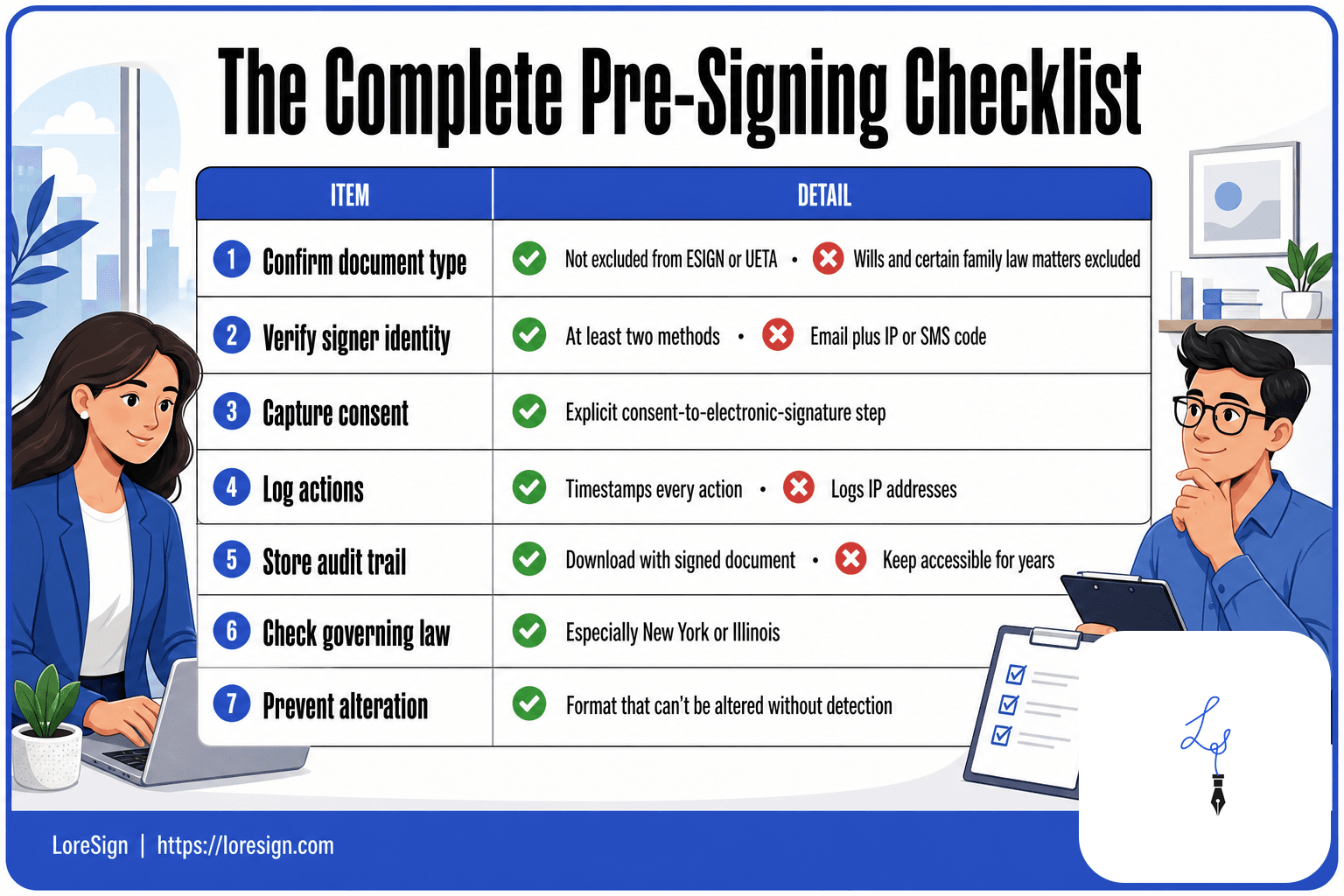
The complete pre-signing checklist
Run through this before you send anything:
- Confirm the document type isn't excluded from ESIGN or UETA (wills, some family law matters, certain court filings).
- Verify the signer's identity with at least two methods.
- Include an explicit consent-to-electronic-signature step.
- Use a platform that timestamps every action and logs IP addresses.
- Download and store the audit trail with the signed document.
- Check which state's law governs the contract, especially if New York or Illinois is involved.
- Keep the document in a format that can't be altered without detection.
The honest answer is that no checklist guarantees a win in court. But a document that follows these steps gives the other side very little to attack. That's the point.
Will DocuSign and Other E-Signature Platforms Hold Up in Court?
Yes. DocuSign, Adobe Sign, HelloSign, and similar platforms produce e-signatures that courts routinely accept. The platform itself isn't what makes the signature valid. What matters is whether it captures the evidence a judge needs: identity, intent, consent, and a tamper-evident record. DocuSign and its peers do this well enough that challenges rarely succeed on the signature itself.
What DocuSign and similar platforms provide
DocuSign logs the signer's email address, IP address, timestamp, and the exact document version they saw. It also captures the click path: open, review, sign. That's your attribution and consent record in one place. Adobe Sign and HelloSign do the same. The signature image you draw or type is cosmetic. The metadata behind it is the evidence.
The role of audit trails in court
When a signature is challenged, the judge doesn't ask "does this look like their handwriting?" They ask "can you show me who signed, when, and that they saw this document?" The audit trail answers that. It's a machine-generated log showing every action in sequence. Courts treat it as a business record, which makes it admissible under the Federal Rules of Evidence without needing a witness to testify about every click. That's the mechanism that makes platform e-signatures hold up.
What to look for in any e-signature platform
Not every tool captures the same evidence. Check for three things before you send anything. First, does it log IP addresses and timestamps for every action? Second, does it offer identity verification beyond email, like SMS codes or ID checks? Third, can you download the audit trail and the signed document together, not just view them in the app? LoreSign provides all three: ordered multi-signer routing, a certificate of completion with audit trail, and a public verification page on every plan. The platform matters less than the evidence it leaves behind. Pick one that leaves a lot.
Common Mistakes to Avoid When Using E-Signatures
Most e-signature failures in court aren't caused by the law. They're caused by the person using the tool. You can have a perfectly valid platform and still lose a dispute because you skipped a step or assumed something the law doesn't guarantee. Here are the mistakes I see most often, and what they cost you.
Skipping identity verification
Email alone is weak attribution. Anyone with access to an inbox can click "sign." If the other party later claims they never signed, you need more than a typed name on a PDF. Use a platform that offers SMS codes, knowledge-based questions, or ID verification for high-value agreements. The extra 30 seconds it takes the signer is cheaper than proving who clicked in front of a judge.
Not retaining the audit trail
The signed document is not the evidence. The audit trail is. If you download only the final PDF and delete the platform record, you've thrown away the timestamp, IP address, and click history that make the signature defensible. Keep both together. Store them somewhere you can find them in three years, not three weeks.
Using e-signatures for excluded documents
ESIGN and UETA don't cover everything. Wills, trusts, adoption papers, divorce decrees, court orders, and certain notices like utility shutoffs or evictions still require wet signatures or notarization in most states. Sending one of these through an e-signature platform doesn't make it valid. It makes it a void document with a timestamp on it. Check your state's list before you send.
Assuming all e-signature tools are equal
A free tool that drops a signature image on a PDF gives you none of the legal infrastructure. No audit trail, no identity verification, no certificate of completion. That's fine for a birthday card. It's not fine for a contract worth real money. The question "do e-signatures hold up in court" has a different answer depending on which tool produced the signature and what evidence it kept. Pick a platform that leaves a record you can defend, not just a pretty signature.
Frequently Asked Questions
Are e-signatures admissible in court?
Yes, e-signatures are generally admissible as evidence in court. Under the ESIGN Act and UETA, they carry the same legal weight as handwritten signatures, provided you can show the signer’s intent and identity.
Will DocuSign hold up in court?
Yes, DocuSign e-signatures are widely accepted in court, as the platform provides audit trails and authentication features that help prove validity. However, the outcome depends on how you use the tool—such as verifying signer identity and retaining records.
Do signed agreements hold up in court?
Most signed agreements, whether wet-ink or electronic, hold up in court if they meet basic contract requirements: offer, acceptance, consideration, and mutual intent. E-signatures are treated the same as handwritten ones under federal and state laws.
What are the legal requirements for electronic signatures?
Under the ESIGN Act and UETA, an e-signature is valid if it is attributable to the signer and the signer intended to sign. Courts also look for consent to do business electronically and a reliable method to identify the signer.
What makes an electronic signature legally binding?
An e-signature is legally binding when it clearly shows the signer’s intent to sign, is attributed to them (e.g., via unique credentials), and is part of a process where all parties consent to electronic transactions. Audit trails strengthen enforceability.
What is the difference between an electronic signature and a digital signature?
An electronic signature is any digital mark indicating intent, like a typed name or click. A digital signature is a specific type that uses encryption and certificates to verify identity and detect tampering, offering stronger legal evidence.
Can an e-signature be challenged in court?
Yes, a party can challenge an e-signature by claiming forgery, lack of intent, or improper authentication. To defend against this, use platforms with audit trails and identity verification, and keep records of the signing process.
About LoreSign
LoreSign helps For people looking to get documents and contracts signed. get this right. Track every signer and receive the completed document automatically. Whether you are working through do e signatures hold up in court or something adjacent, we publish what we have actually tested, including where it falls short.