How to Send a Contract for Signature
Most guides on how to send a contract for signature are written by e-signature vendors, and it shows. They walk you through their upload screen, their dashboard, their pricing page, and call it a tutorial. If you're a freelancer, solo professional, or small business owner, that's not what you need. You need the actual process: prepare the contract, verify the recipient, send it, track it, and know what to do when things go sideways. And you need to know what you can't do, like when a wet signature is still required or when a free plan will quietly cap you at three documents a month. This guide covers the full workflow from a vendor-neutral standpoint. You'll get a pre-send checklist, a step-by-step sending process that works in any tool, an honest breakdown of free versus paid options (LoreSign included as one option among several), and a plain list of the legal limits and common mistakes most guides skip.
| At a glance | Details |
|---|---|
| Typical time | Minutes to send, days to sign |
| Legal basis | E-signatures valid in most countries |
| Free options | Limited monthly documents, basic fields |
| Paid options | More templates, branding, reminders |
| Must-have | Clear signing fields and audit trail |
| Not suitable | Wills, some court documents, certain real estate |
In This Guide
- Before You Send: Prepare Your Contract Properly
- Free vs Paid E-Signature Tools: What You Actually Get
- How to Send a Contract for Signature: Step-by-Step
- Things to remember before you send a Contract for Signature : A Step-by-Step Guide
- Free vs Paid E-Signature Tools: What You Actually Get
- Can I Legally Write My Own Contract?
- What You Cannot Do with E-Signatures
- Common Mistakes When Sending a Contract for Signature
- How to Send a Contract in Docusign (and Alternatives)
- Final Thoughts on Sending Contracts for Signature
Before You Send: Prepare Your Contract Properly
Most signature failures happen before you hit send. The wrong email, a missing signature block, or a Word file that shifts formatting on the recipient's phone. Fix these before the request goes out.
Finalize all terms before you send
Once a contract is out for signature, edits create confusion. The signer sees version one, you change clause four, and now you're tracking two documents. Agree on scope, price, deadlines, and payment terms in writing first. A quick email saying "confirming: $1,500, due March 15, net 15" saves a rejected signature later.
Add a proper signature block
Every contract needs a signature block for each party: printed name, title, date, and a signature line. Don't leave the signer guessing where to sign. If you're using an e-signature tool, the fields get placed digitally. If you're sending a PDF by email, draw the lines in yourself.
Confirm recipient name and email
Typos here are the most common failure point. One wrong character and the contract sits in someone else's inbox. Confirm the exact spelling of the recipient's name and their current email address before you send. For companies, ask who has signing authority. Sending to the wrong person delays everything.
Choose the right file format (PDF vs Word)
PDF is the default for a reason: it renders the same on every device. Word files shift margins, fonts, and page breaks depending on the viewer's setup. Send a PDF unless the other party explicitly asks for an editable version to negotiate.
E-signatures are legally binding in most countries under laws like the US ESIGN Act and the EU eIDAS regulation, but certain documents;such as wills, divorce papers, and some court filings—may require a wet signature. Always check local requirements for your specific contract type.
Free vs Paid E-Signature Tools: What You Actually Get
| Factor | Free Tools | Paid Tools |
|---|---|---|
| Monthly document limit | Often 1–5 documents per month | Higher or unlimited (varies by plan) |
| Templates | Usually none or very basic | Multiple templates, reusable |
| Branding | Generic emails and pages | Custom logo, colors, email domain |
| Reminders & tracking | Manual follow-up only | Automated reminders, real-time status |
| Audit trail | Basic or none | Certificate of completion, detailed log |
How to Send a Contract for Signature: Step-by-Step
To send a contract for signature, upload the PDF to an e-signature tool, add the signer's name and email, place signature fields on the document, and send the request. The signer receives a link, signs online, and you get the completed PDF back automatically.
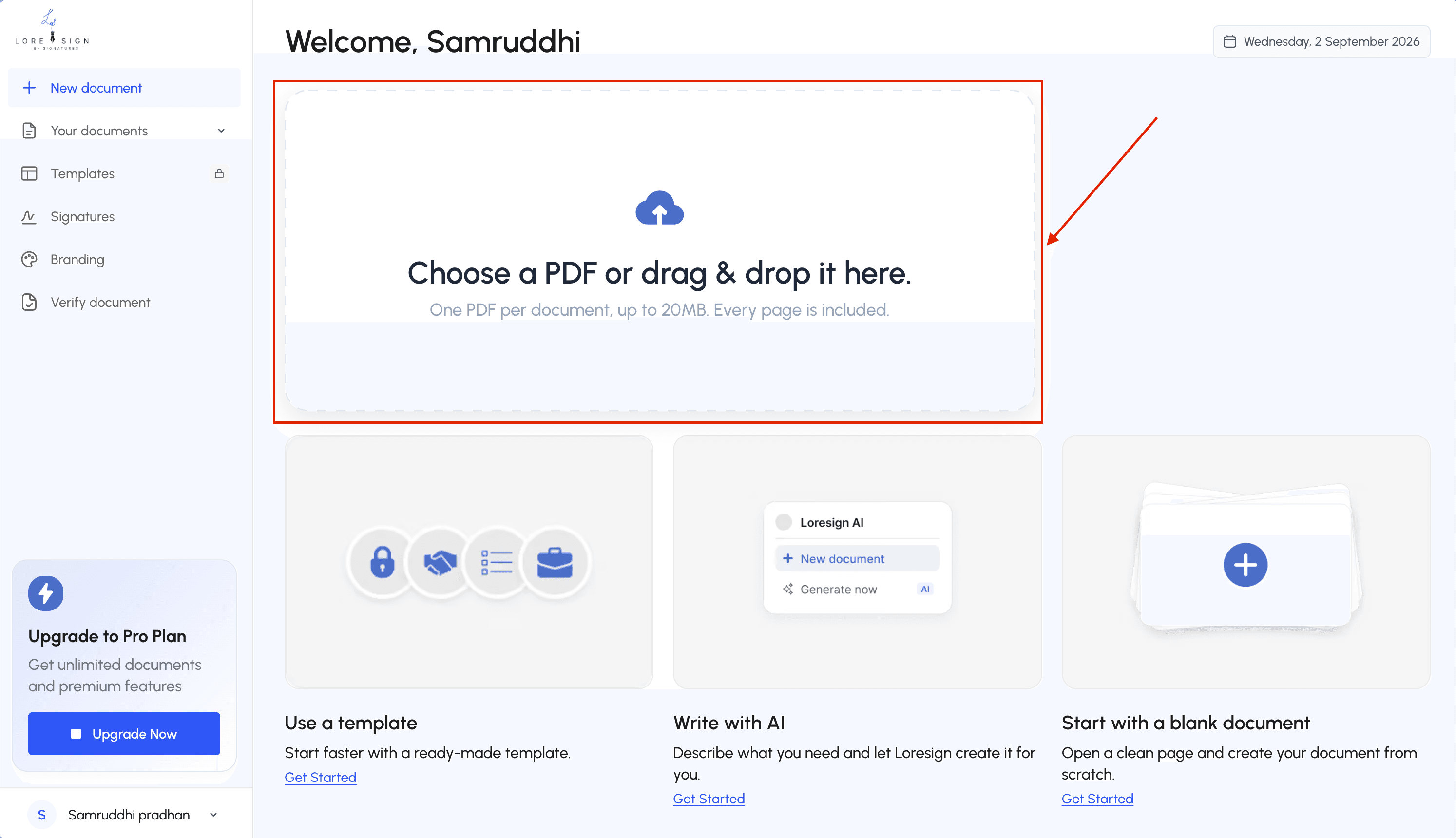
Step 1: Upload your contract
Upload the finalized PDF to your e-signature tool. Most tools accept PDF, Word, and Google Docs, but PDF is the safest. Word files can shift formatting when the tool converts them.
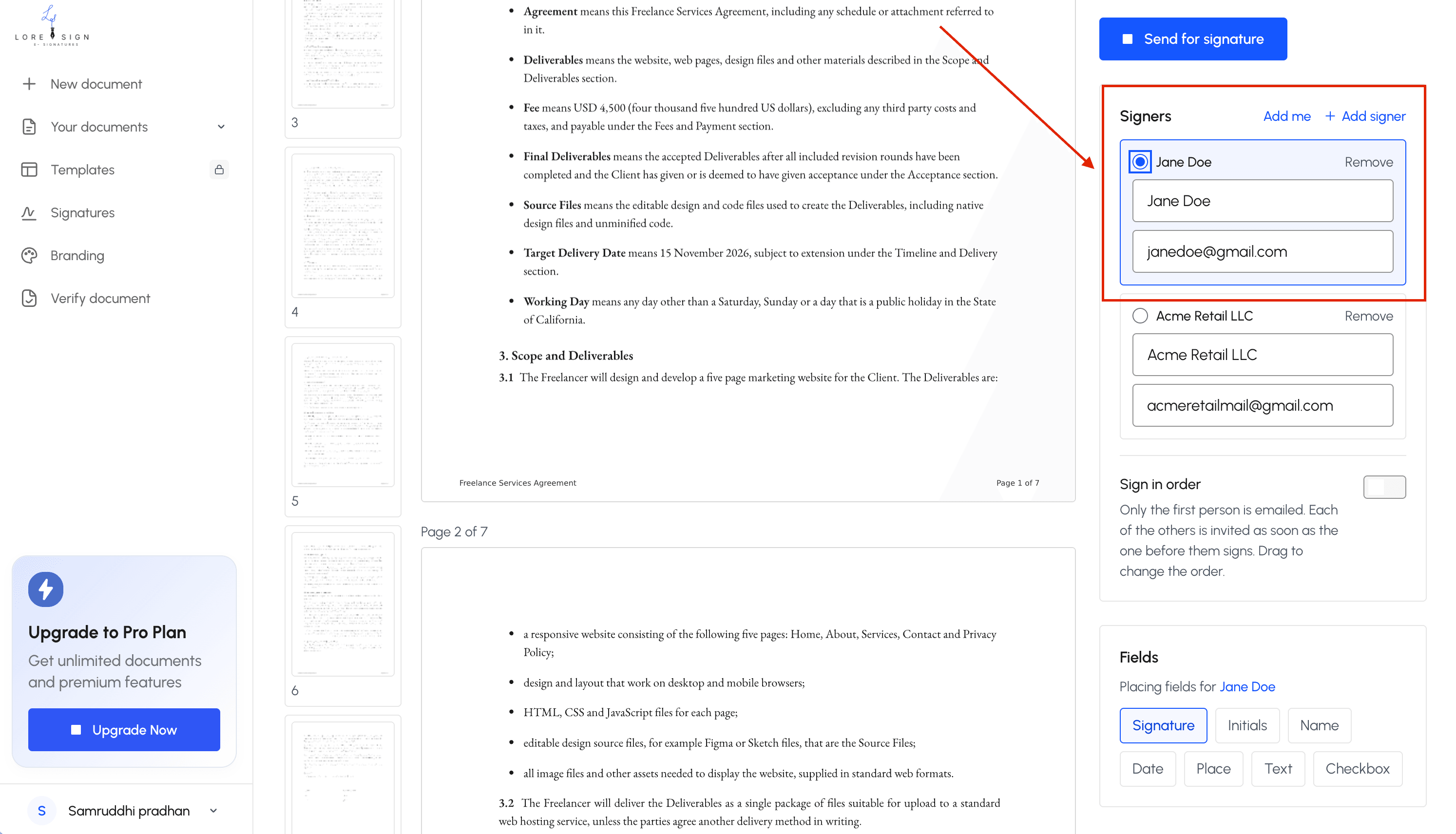
Step 2: Add signer details
Enter the signer's name and email exactly as confirmed earlier. If multiple people need to sign, add each one now. You can also add a message that goes in the request email.
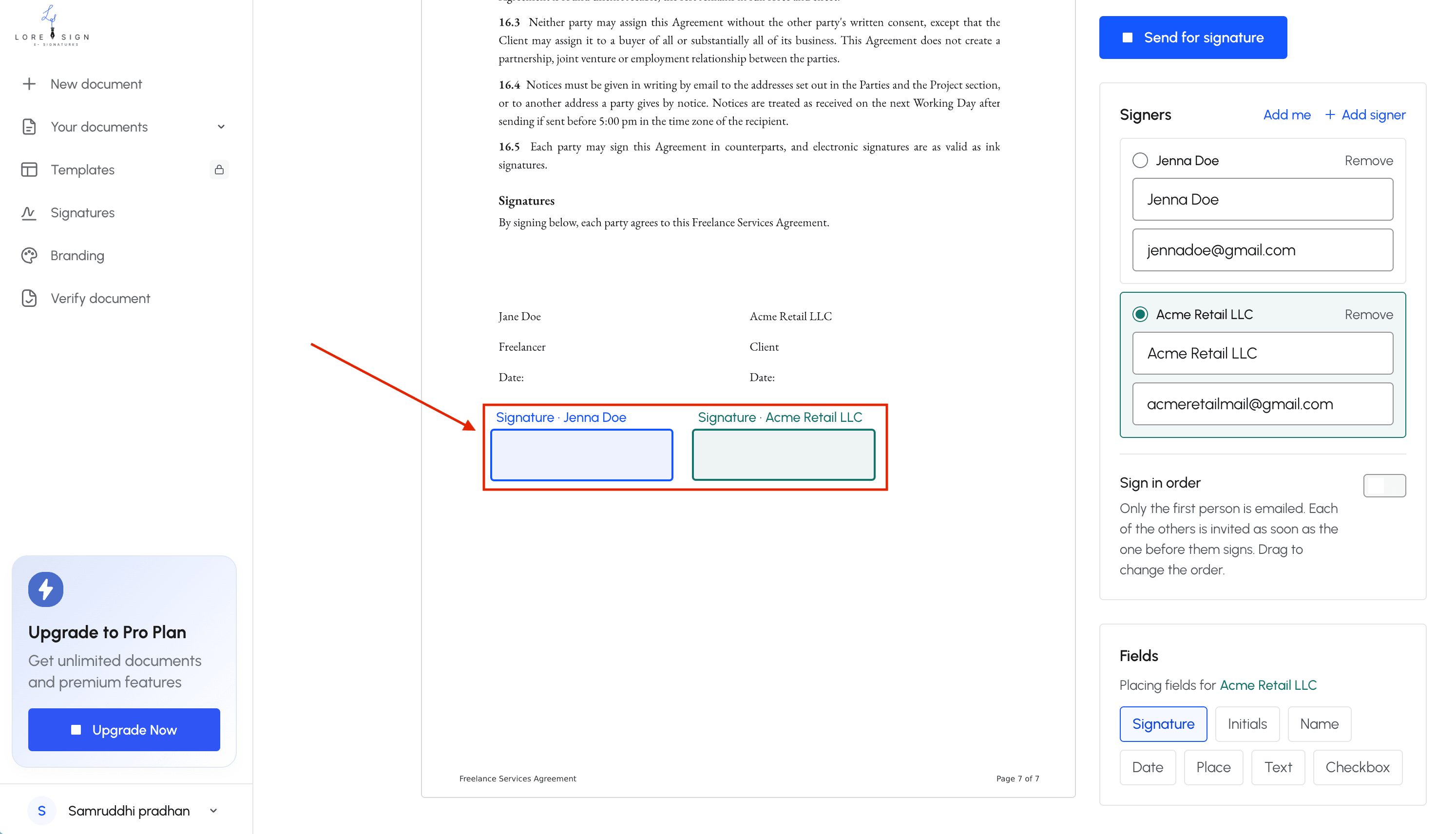
Step 3: Place signature fields
Drag signature, date, and initial fields onto the document where each signer needs to act. Don't skip this step. A contract sent without placed fields forces the signer to figure it out themselves, and many won't.
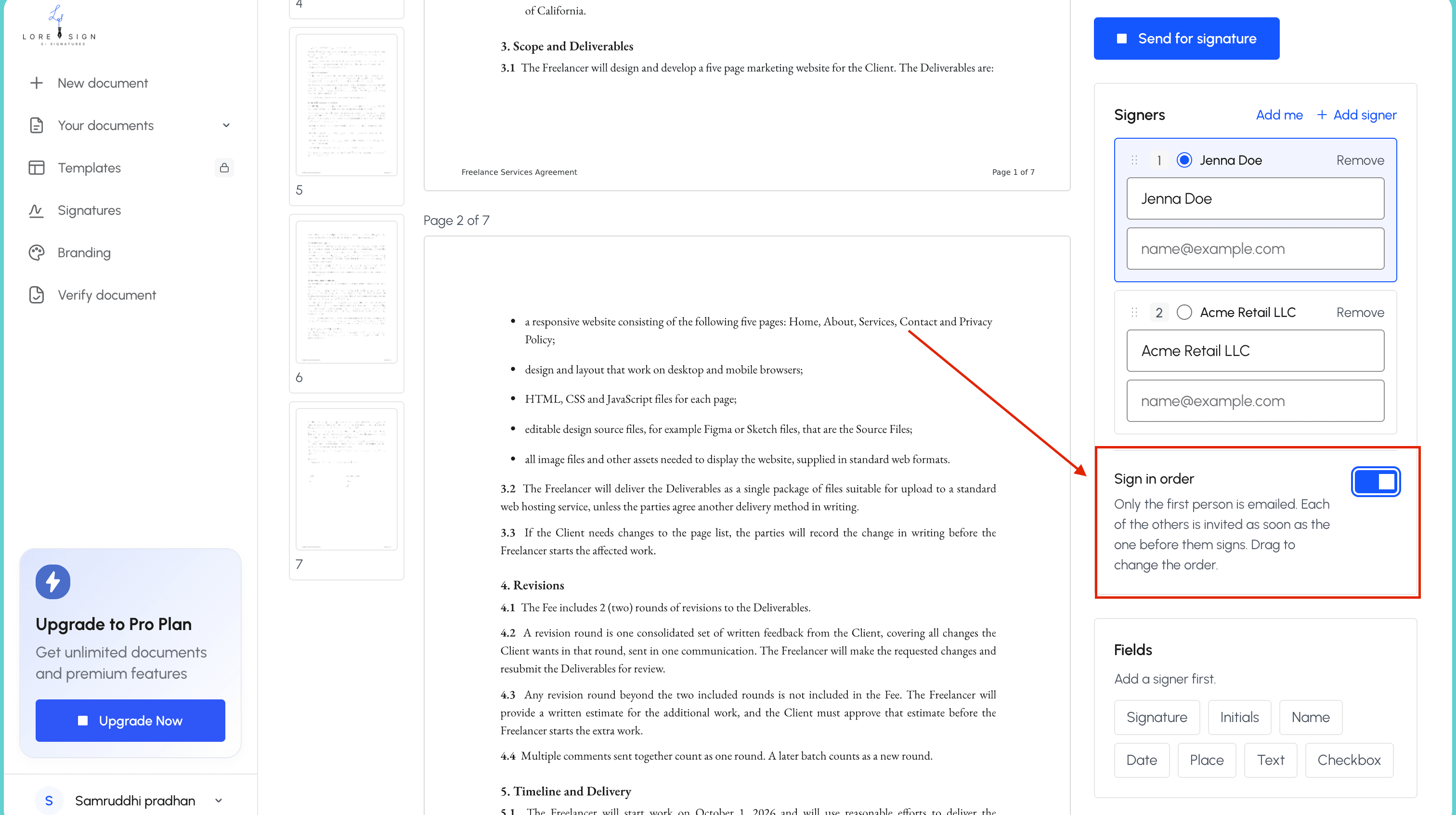
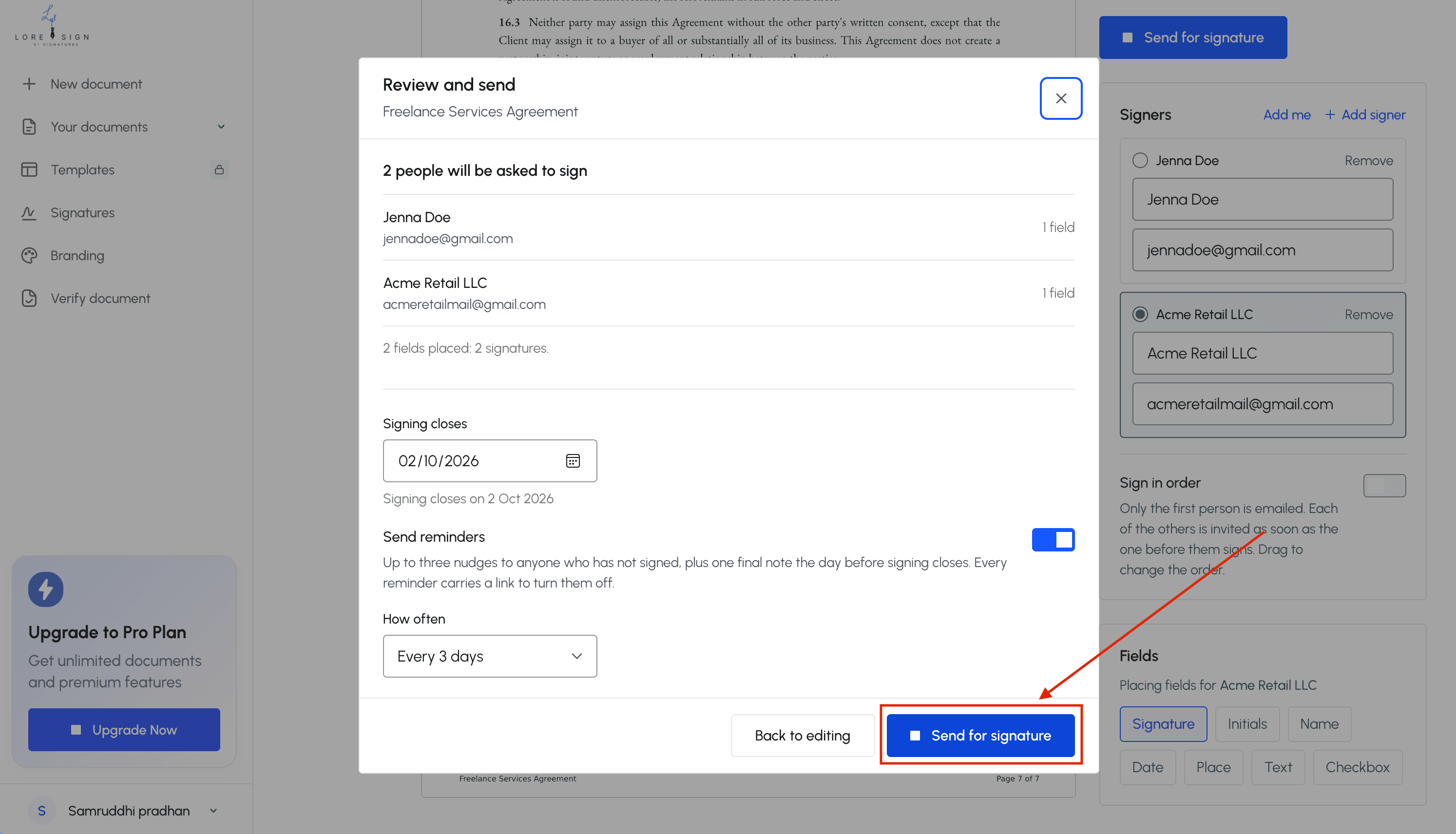
Step 4: Set signing order (if needed)
If one party must sign before another, set the order. The tool sends the document to the first signer, then automatically routes it to the next. If order doesn't matter, send to everyone at once.
Step 5: Send the signature request
Hit send. The signer gets an email with a secure link. They open it, review the contract, and sign. No account needed on most platforms.
Step 6: Track and follow up
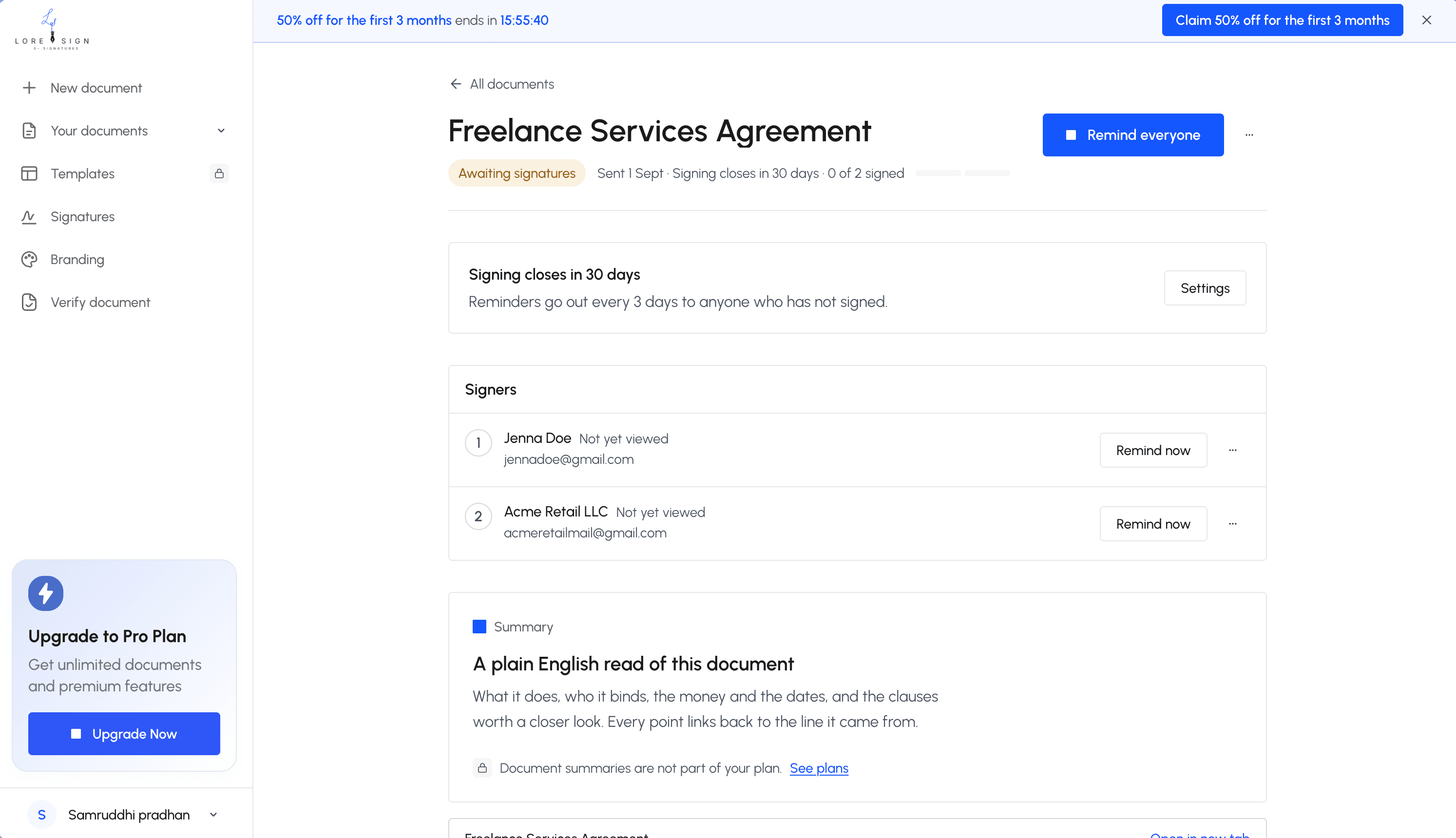
You'll see the status: sent, viewed, signed. Most tools send automatic reminders. If yours doesn't, follow up manually after three business days. Once everyone signs, you receive the completed PDF with a certificate of completion.
For freelancers and small business owners: always include a clear payment schedule and late fee clause in your contract, and use a tool that automatically sends a copy of the completed contract to all parties—this saves you from chasing paperwork later.
Things to remember before you Send A Contract For Signature: A Step-by-Step Guide
- Prepare your contract: finalize all terms, check for typos, and ensure all parties are correctly named.
- Choose your sending method: free e-sign tool, paid platform, or email with a PDF attachment.
- Upload the contract and add signing fields: drag-and-drop signature, date, and initials fields for each signer.
- Verify recipient details: double-check email addresses and set the signing order if multiple signers.
- Add a clear subject line and message: explain what the contract is and by when you need it signed.
- Send the contract and track progress: use the tool's dashboard to see who has viewed, signed, or is pending.
- Follow up politely if needed: send a reminder after a few days if the contract remains unsigned.
Free vs Paid E-Signature Tools: What You Actually Get
Free e-signature tools are real, and they work. But the gap between free and paid is not about whether you can send a contract. It's about how many you can send, how they look, and what proof you keep.
What free plans typically include
Most free plans give you three documents a month. That's the standard across the industry. You get basic signature fields, a simple signing link, and a completed PDF back. Some tools, including LoreSign, also include a public verification page on the free tier, so the signer can confirm the document hasn't been altered. You won't get that everywhere.
Common limitations of free e-signature tools
The main catch is the monthly cap. Send three contracts, and you're done until next month. Beyond that, free plans usually stamp their own branding on the signing page and the final PDF. You lose custom fields like dropdowns and checkboxes. Audit trails are often thinner, and automated reminders may not exist. If you send contracts weekly, free plans stop being free fast.
When a paid plan is worth it
It depends on volume and appearance. If you send more than three contracts a month, paid is the only practical option. If clients see your signing page, you want your logo on it, not a vendor's. Paid plans also unlock ordered multi-signer routing, automated reminders, and watermark-free PDFs. LoreSign's paid tiers start with unlimited templates and custom branding, which matters when you're sending the same contract repeatedly. For occasional use, free is fine. For anything recurring, pay.
Can I Legally Write My Own Contract?
Yes. You can write your own contract, and it can be legally binding. No law requires a lawyer to draft one.
What makes a contract legally binding
A contract needs three things: an offer, acceptance, and consideration. Consideration means each side gives something of value. Money for work. Work for money. Both parties must intend to be bound. Put the terms in writing, and you have evidence of what was agreed.
When to consult a lawyer
It depends on the stakes. High-value deals, real estate, intellectual property, or anything with liability exposure warrants a lawyer's review. For a standard freelance agreement, a template you understand is usually enough. The risk isn't writing it yourself. It's writing terms you don't fully understand.
What You Cannot Do with E-Signatures
E-signatures cover most business contracts. They don't cover everything. Some documents still require a pen, a notary, or both.
Documents that often require wet signatures
Wills and trusts are the big one. Most jurisdictions don't accept electronic signatures on a will. The same goes for certain family law documents: adoption papers, divorce decrees, some custody agreements. Real estate deeds and mortgage documents often need wet signatures too, though the rules vary by state and county. Court filings can go either way. Check with the specific court before you assume.
When notarization is required
Notarization means a third party verifies your identity and witnesses the signature. E-signature platforms can't replace that step. Some states now allow remote online notarization, where the notary watches you sign over video. But that's a separate service from standard e-signature tools. If your contract needs a notary, you'll need to arrange that outside the signing platform.
Jurisdictional differences to watch
The honest answer is it depends on where you are and what you're signing. The U.S. ESIGN Act and UETA make e-signatures legal in most commercial contexts. The EU has eIDAS. But specific document types fall outside these laws. A commercial lease might be fine to e-sign in one state and require wet ink in another. When the document involves real property, inheritance, or family law, verify the local rules before you send it.
Common Mistakes When Sending a Contract for Signature
Most failed signature requests come down to four avoidable errors. Here's what goes wrong and how to fix it.
Sending to the wrong email address
A typo sends your contract to a stranger. Or an old address. Check the recipient's email twice before you hit send. Better: ask them to confirm it in writing first.
Forgetting to place signature fields
You upload the PDF and send it. The signer opens it and finds nowhere to sign. Always place every signature, date, and initial field before sending. Test it yourself if the tool lets you.
Not setting a signing order
When two people sign, order matters. Without a set order, the wrong person signs first and the document goes back. Set the sequence upfront.
Failing to follow up
People forget. A reminder after three days gets most stragglers moving. Don't wait two weeks.
How to Send a Contract in Docusign (and Alternatives)
Docusign is the most-searched e-signature tool, so here's the specific path. The workflow mirrors the universal steps above, but the menus differ.
Docusign step-by-step
Log in and click Start, then Send an Envelope. Upload your PDF, then add recipients in the order they should sign. Drag signature, date, and initial fields onto the document. Set a signing order if you have multiple signers. Click Send. Docusign emails each signer a link. You track progress from the Manage tab.
The main catch: Docusign's free trial expires, and the cheapest paid plan starts around $10 per month (verify at publish). For one-off sends, that's steep.
Alternatives to Docusign
Dropbox Sign works well if you already store contracts in Dropbox. LoreSign lets you upload any PDF, place signing fields, and send one secure link, with automatic delivery of the completed document once everyone signs. Free options like DocuSeal or PandaDoc's free tier handle basic sends without a subscription.
Final Thoughts on Sending Contracts for Signature
Sending a contract for signature comes down to four things: prepare the document properly, pick a tool that fits your budget, know what e-signatures can't do, and follow up until everyone signs.
Free tools handle basic sends fine. Paid plans earn their cost when you need audit trails, branded documents, or volume. LoreSign covers the practical middle: upload a PDF, place fields, send one link, and get the completed document automatically.
The primary keyword matters less than the workflow. Get the contract right before you send it.
Frequently Asked Questions
Can I legally write my own contract?
Yes, in most cases you can write your own contract as long as it contains all essential elements: offer, acceptance, consideration, and mutual intent to be bound. However, for complex or high-value agreements, it's wise to have a lawyer review it to ensure enforceability.
How do I send something for a signature?
You can send a document for signature via email with a PDF attachment, or use an e-signature tool that lets you upload the document, place signing fields, and send a secure link. The tool tracks when the recipient views and signs, and returns the completed document automatically.
How do I send a document that requires a signature?
First, prepare the document and decide on the signing method. For electronic signatures, upload the file to an e-signature platform, add fields for signature, date, and initials, then enter the recipient's email and send. For wet signatures, print, sign, and mail or scan and email back.
How do I send a contract in DocuSign?
In DocuSign, log in, click 'New' then 'Send an Envelope', upload your contract, add recipients and signing fields, then send. The recipient receives an email with a link to sign. DocuSign offers a free trial but paid plans for ongoing use.
Is it legal to send a contract via email?
Yes, sending a contract via email is generally legal, and electronic signatures are valid under laws like the ESIGN Act in the US and eIDAS in the EU. However, the contract must be clear and both parties must agree to conduct business electronically.
What if the recipient doesn't sign?
If the recipient doesn't sign, you can send a polite reminder through the e-signature tool or directly by email. If they still don't sign, you may need to follow up with a phone call or consider whether the contract is still needed. Some tools offer automated reminders.
Can I send a contract for signature for free?
Yes, many e-signature tools offer free plans with limited documents per month, and you can also send a PDF via email for the recipient to print, sign, and return. Free options may lack advanced features like templates, branding, and automated reminders.
About LoreSign
LoreSign helps For people looking to get documents and contracts signed. get this right. Track every signer and receive the completed document automatically. Whether you are working through How to send a contract for signature or something adjacent, we publish what we have actually tested, including where it falls short.