Using E Signatures: A Practical Guide for Getting Documents Signed
A contract, an offer letter, or a background check form is sitting in your inbox, and someone is waiting for your signature. You're not sure if clicking "sign" is legally safe, or if you need to print, sign, scan, and email it back. The short answer: an e-signature is any electronic mark, typed name, drawn signature, or uploaded image, that shows your intent to agree to a document. It's legally binding in most everyday situations, but there are real limits you need to know before you click. LoreSign handles the mechanics: upload a PDF, place the signing fields, and send one secure link. But the decisions are yours. This guide covers exactly how to sign step by step, what makes an e-signature legally valid, the mistakes that void or weaken one, and the specific documents you cannot sign electronically no matter what tool you use.
| At a glance | Details |
|---|---|
| Legally binding? | Yes, for most documents under US ESIGN and UETA |
| Typical setup time | A few minutes to upload and place fields |
| What you need | An email address, a device, and the document |
| Common formats | PDF, Word, or a link sent by the sender |
| Not valid for | Wills, certain court filings, some family-law documents |
| Proof after signing | Audit trail and certificate of completion |
In This Guide
- What Is an E-Signature?
- Typed vs Drawn E-Signatures: Which Should You Use?
- Types of E-Signatures: Simple, Advanced, and Qualified
- Using E Signatures: A Step-by-Step Guide Using LoreSign
- Are E-Signatures Legally Binding?
- How to Use E Signatures: A Step-by-Step Walkthrough
- What You Cannot Do with E-Signatures
- Common Mistakes When Using E Signatures
- Free vs. Paid E-Signature Tools
- Using E Signatures for Job Applications
What Is an E-Signature?
An e-signature is any electronic mark, typed name, drawn signature, or uploaded image that you attach to a document to show you agree to its terms. It carries the same legal weight as a pen-and-ink signature when the document meets basic consent and intent requirements.
In practice, you're not signing paper. You're clicking a button that applies your mark to a digital file. The platform records the action, timestamps it, and stores a record of what you signed.
E-signature vs. digital signature: what's the difference
People use the two terms interchangeably. They aren't the same thing.
An e-signature is the legal act of agreeing. A digital signature is the technical layer underneath: encryption that locks the document so nobody can alter it after you sign. Think of the e-signature as your intent, and the digital signature as the tamper-proof seal.
Most signing platforms handle both. You click once, and the tool applies your e-signature and secures the file with a digital signature behind the scenes. You don't need to manage either one separately.
In the United States, the ESIGN Act and most states' UETA make e-signatures legally valid for most contracts, but a small set of documents, wills, certain court filings, and some family-law papers, still require a wet signature or notarization.
Typed vs Drawn E-Signatures: Which Should You Use?
| Factor | Typed signature | Drawn signature |
|---|---|---|
| How it works | You type your name; the tool renders it in a script font | You draw with a mouse, finger, or stylus |
| Best for | Speed and consistency across many documents | Documents where a handwritten look feels expected |
| Legal weight in the US | Generally equivalent under ESIGN/UETA | Generally equivalent under ESIGN/UETA |
| Accessibility | Works on any device, including screen readers | Needs a pointer or touch input |
| Audit trail | Captures name, email, timestamp, and IP | Captures the same data plus the drawn image |
Types of E-Signatures: Simple, Advanced, and Qualified
Not all e-signatures carry the same weight. The law recognizes three tiers, and the one you need depends on what you're signing and where.
Simple electronic signatures (SES)
This is the everyday tier. A typed name, a drawn signature, a checkbox, or a click-to-sign button all count. There's no identity verification built in. The platform records that someone clicked, but it doesn't prove who that someone was.
Most contracts, offer letters, NDAs, and forms only need this level. It's legally binding in the US under ESIGN and UETA.
Advanced electronic signatures (AES)
An AES adds a layer of identity proof. The signature is uniquely linked to the signer, and the document locks so any later change is detectable. Think two-factor authentication before signing, or a certificate tied to your email or phone.
You'll see AES used in regulated industries or higher-value agreements where someone might dispute who signed.
Qualified electronic signatures (QES)
This is the strictest tier, and it's mostly a European concept under eIDAS. A QES requires a government-approved identity check, usually through a certified provider, and carries the same legal status as a handwritten signature in court.
In the US, the equivalent is a notarized e-signature. You won't need a QES for routine documents. Most everyday signing stops at SES.
If you're signing as part of a job application or onboarding packet, sign every field the sender placed, missing an initial or date is the most common reason a packet gets bounced back and delays your start date.
Using E Signatures: A Step-by-Step Guide using LoreSign
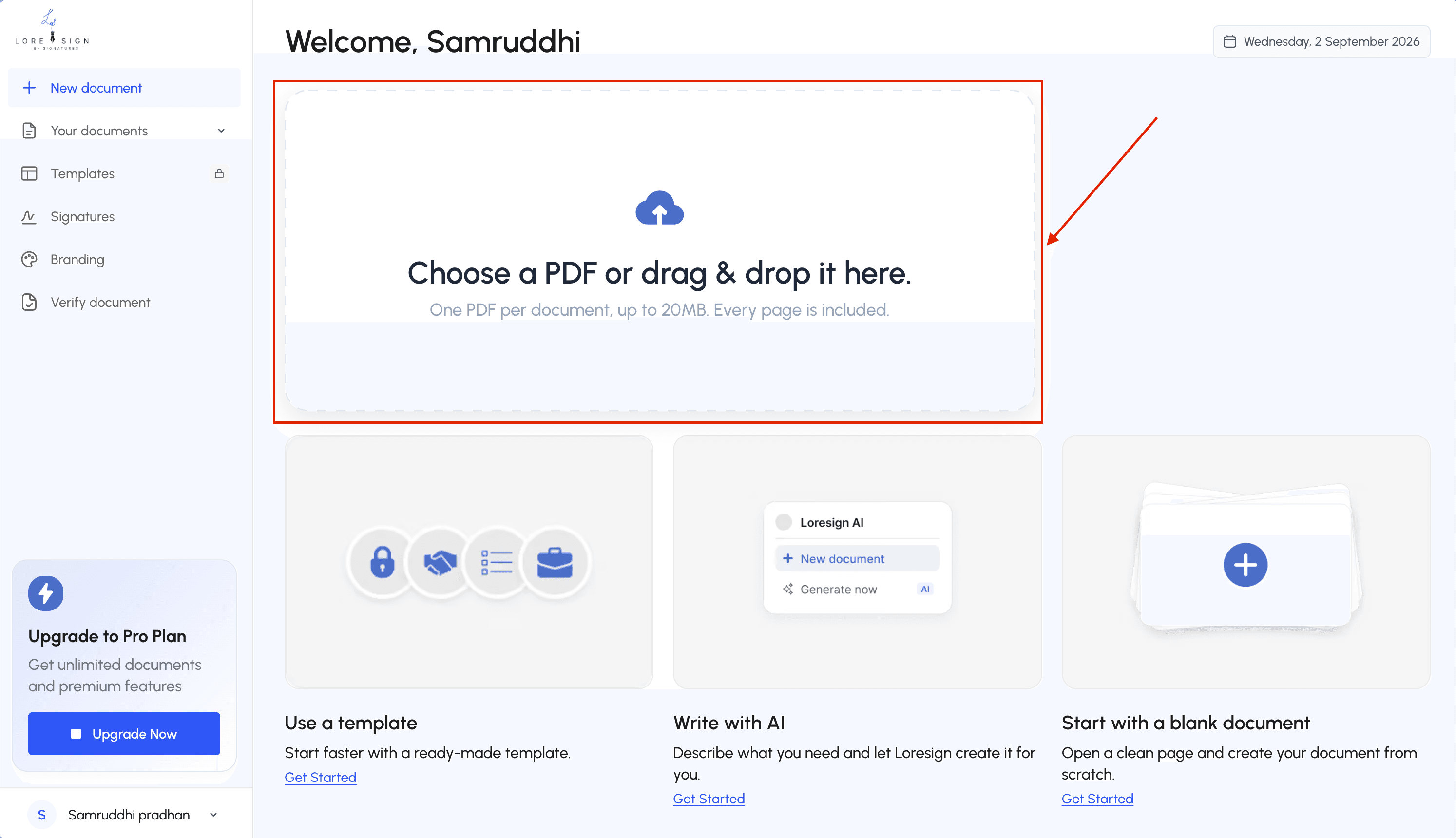
Step 1: Go to LoreSign and create an account.
Step 2: Upload the PDF or document you need signed.
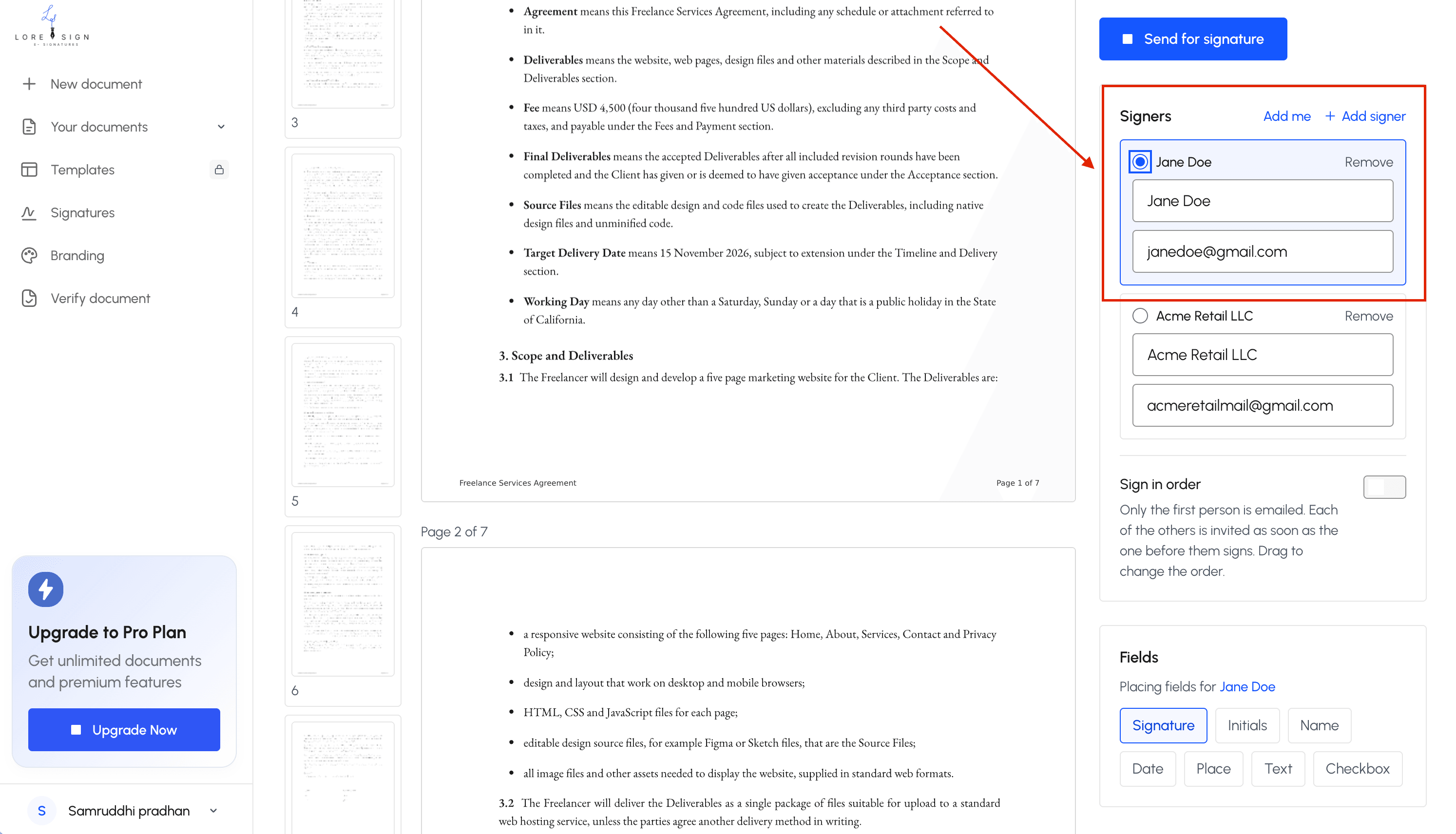
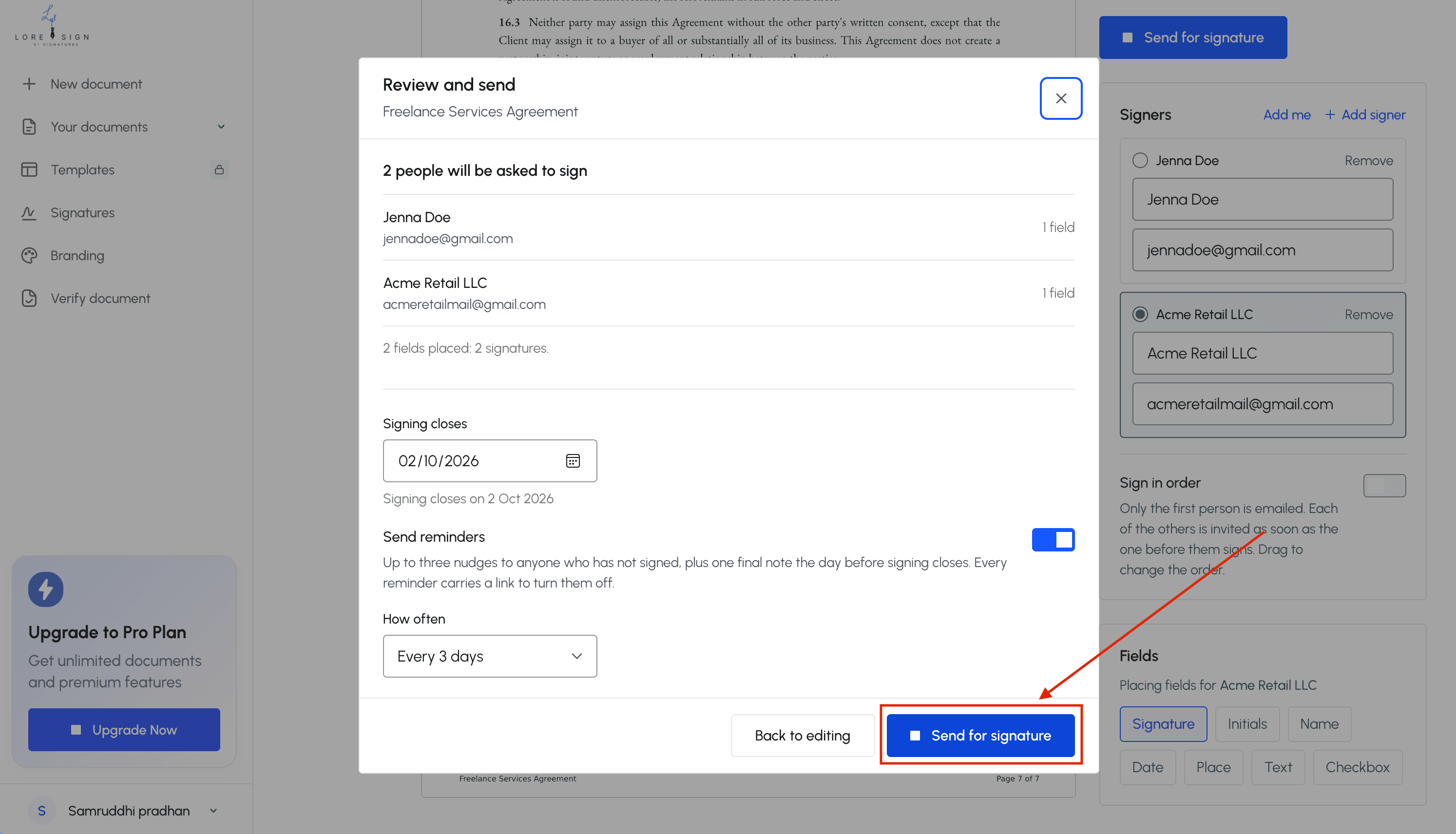
Step 3: Add the signer's name and email address, and set the signing order if multiple people are involved.
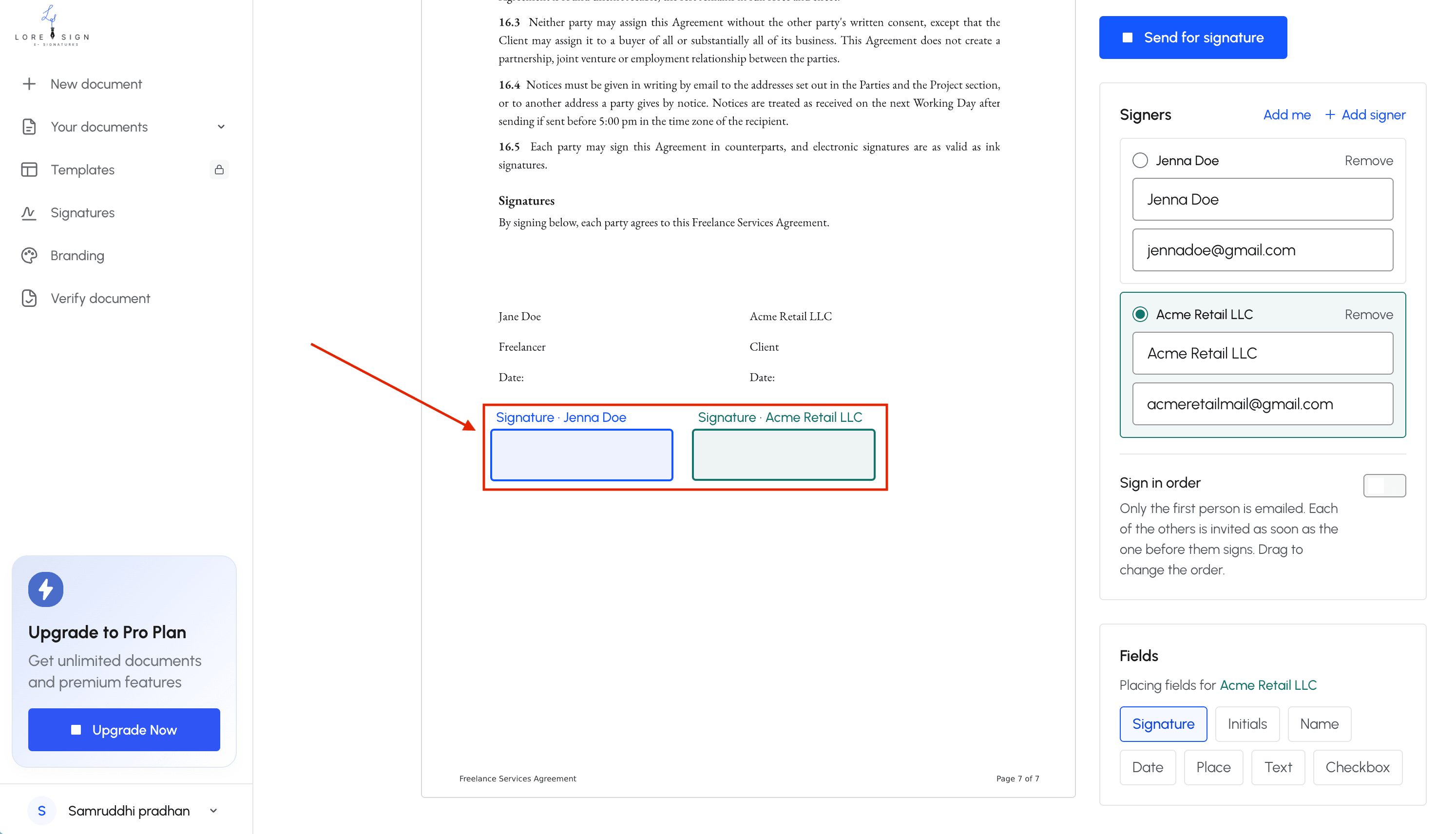
Step 4: Place the signing fields (signature, date, initials) where they belong.
Step 5: Send the secure link the signer receives an email with instructions.
Step 6: Track progress and send reminders if needed.
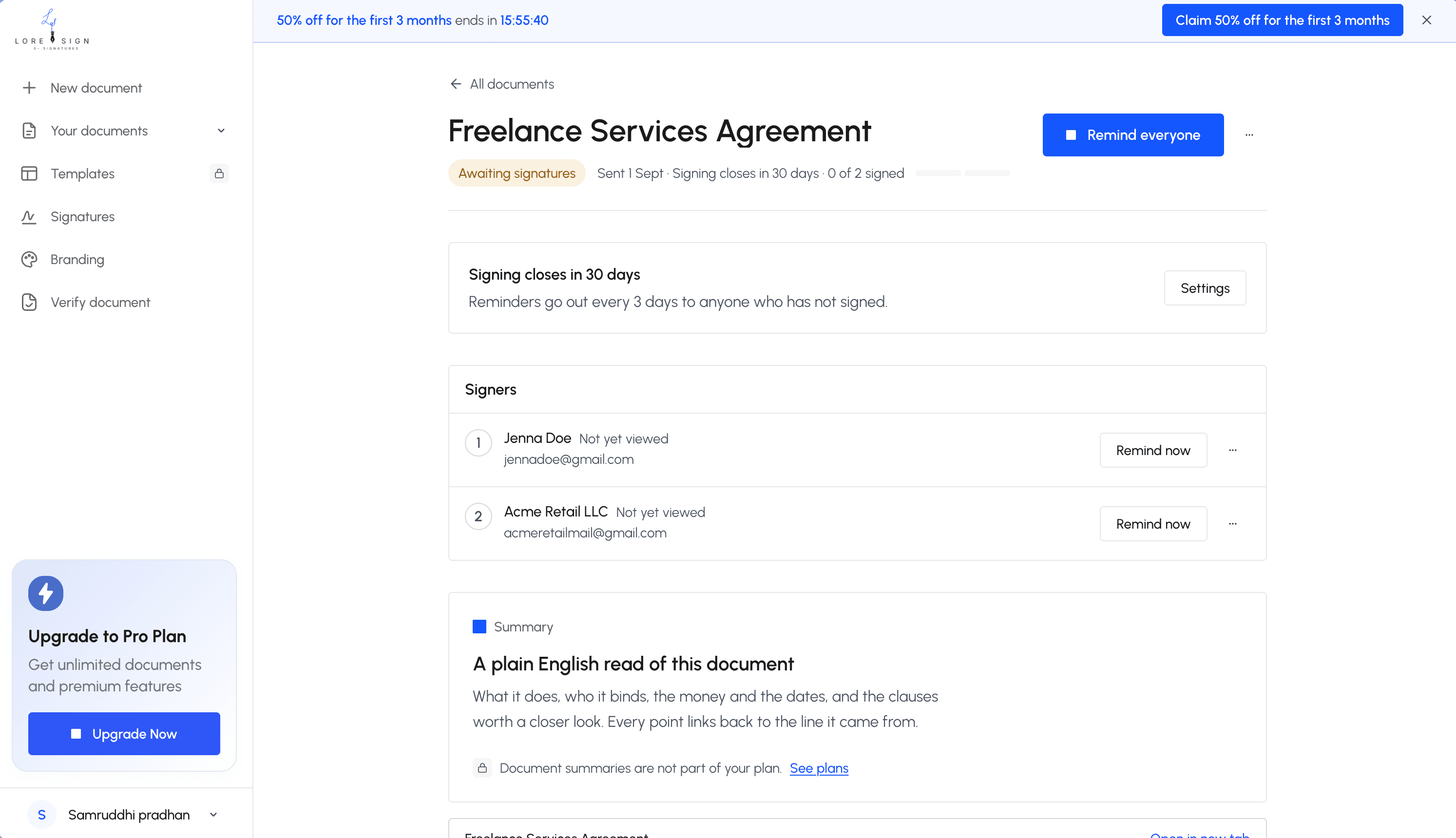
Step 7: Receive the completed, signed PDF automatically once everyone has signed.
Are E-Signatures Legally Binding?
Yes. In the US, the ESIGN Act (2000) and UETA give e-signatures the same legal force as wet-ink signatures, as long as both parties agree to sign electronically. In the EU, eIDAS does the same.
ESIGN Act and UETA in the United States
Two laws cover this. The federal ESIGN Act says a contract can't be rejected just because it was signed electronically. UETA is the state-level version, adopted by 49 states. New York has its own equivalent.
The key requirement: all parties must consent to doing business electronically. That consent can be implied. Clicking "I agree" and signing counts.
eIDAS in the European Union
eIDAS sets the rules across EU member states. It defines the three tiers covered earlier: simple, advanced, and qualified. A simple e-signature is valid for most contracts. A qualified one carries the same weight as a handwritten signature in court.
What makes an e-signature legally valid
Three things matter, and none of them are the tool you used.
First, intent. The signer meant to sign. Second, consent. Both sides agreed to sign electronically. Third, an audit trail. The platform records who signed, when, and from what device.
If those three hold, the signature is enforceable. The software brand doesn't change that.
How to Use E Signatures: A Step-by-Step Walkthrough
The process is the same whether you're signing an offer letter, a lease, or an NDA. You'll get a link by email or text. Click it, and the document opens in your browser. No app install needed.
Step 1: Open the document and verify the sender
Check the sender's email address before you click anything. If you weren't expecting the document, call the person or company directly using a number you already have, not one in the email. Phishing attacks often disguise themselves as signature requests.
Step 2: Review the document before signing
Read the whole thing. Not just the summary. Check names, dates, dollar amounts, and any blank fields. If something's wrong or missing, don't sign. Ask the sender to fix it and resend.
Step 3: Create or apply your signature
Most platforms let you type your name, draw it with a mouse or finger, or upload an image. Typed is fine and legally valid. Drawn looks more like ink but isn't more binding.
Step 4: Confirm consent and sign
You'll see a checkbox or a button like "I agree to sign electronically." That's your consent, and it's what makes the signature enforceable. Click it, then click Sign.
Step 5: Download or save the signed copy
The platform emails you a completed PDF once everyone has signed. Save it. The audit trail inside records who signed, when, and from what device. Keep that copy. You may need it later.
What You Cannot Do with E-Signatures
E-signatures cover most business and personal agreements, but not everything. Some documents still require a pen on paper, and signing them electronically can make them invalid. Know the limits before you click.
Documents that typically require wet ink
Wills and trusts are the big one. Most states don't accept electronic signatures on a will, and some require witnesses in person. Court filings vary by jurisdiction. Some federal courts accept e-signatures, but many state and local courts still demand wet ink. Adoption papers, divorce decrees, and certain real estate deeds fall into the same category. Check with the court or agency first.
When notarization is still required
A notary verifies your identity in person, which an e-signature alone can't do. Documents like property transfers, powers of attorney, and some affidavits need a notary. Remote online notarization exists in many states, but it's a separate process from a standard e-signature. If the document says "notarized," don't assume a typed signature is enough.
Common Mistakes When Using E Signatures
Most e-signature problems come from rushing, not from the technology. The honest answer is that the tool matters less than what you do with it. Here are the mistakes that actually cost people.
Signing without reading the full document
You wouldn't sign a paper contract blind. Don't do it with a PDF either. Scroll through every page before you click. Check the dates, the amounts, the names. A typed signature carries the same legal weight as ink, so treat it the same way.
Not verifying the signer's identity
When you send a document, make sure the person signing is who they say they are. A simple e-signature doesn't prove identity on its own. Use a platform that logs the signer's email, IP address, and timestamp. If the document is high-stakes, require two-factor authentication.
Using e-signatures for non-compliant documents
Wills, some court filings, and certain notarized documents still need wet ink. Signing them electronically can void them. If you're unsure, check with the court or agency before you sign.
Ignoring the audit trail
The audit trail is your proof. It shows who signed, when, and from where. Download it and keep it with the signed document. If a dispute comes up later, that record is what protects you.
Free vs. Paid E-Signature Tools
Free tools handle the basics. You upload a PDF, place a signature field, and send it. The signer clicks, types or draws a name, and you get the completed document back. That's enough for a one-off lease, a permission slip, or a single contract.
What free e-signature tools typically include
Most free tiers cap you at a small number of documents per month, often three to five. You'll get a simple signature, an audit trail, and email delivery. What you won't get: templates, automated reminders, team roles, or branding controls.
When paid plans are worth it
It depends on volume and repetition. If you send the same document type weekly, templates save real time. If signers stall, automated reminders chase them without you lifting a finger. Paid plans also add ordered multi-signer routing, so a contract moves from one person to the next in sequence. For a single document, free is fine. For a workflow, pay.
Using E Signatures for Job Applications
Employers expect you to sign offer letters, NDAs, and onboarding forms electronically. It's standard practice now. The document arrives by email, you click a link, and you sign. No printing, no scanning, no faxing.
Common documents you'll sign during hiring
You'll typically see an offer letter, a background check authorization, an NDA, and tax forms. Some companies bundle these into one onboarding packet. Others send them one at a time.
How to sign an offer letter electronically
Open the link, check the salary and start date match what you agreed to, then apply your signature. Most platforms let you type your name or draw it. Download the signed copy for your records before you close the tab.
Using e signatures is straightforward once you know the rules. The signature itself is the easy part. What protects you is reading the document, checking the sender, and keeping the audit trail. Skip those steps and the tool won't save you.
Frequently Asked Questions
What are the risks of using e-signatures?
The main risks are signing a document you haven't fully read, using a tool that doesn't produce a usable audit trail, and applying an e-signature to a document type that legally requires a wet signature. Choosing a reputable tool and reading before you sign covers most of the exposure.
What are the requirements to use e-signatures?
You need a way to show intent to sign, consent to do business electronically, and a record that can be retained and reproduced later. In practice that means an email address, a device, and a tool that logs who signed and when.
What's the best way to do an e-signature?
Use a dedicated e-signature tool rather than pasting an image of your signature into a PDF. A dedicated tool captures the audit trail, sends automated reminders, and delivers the completed document automatically once everyone has signed.
How can I create an e-signature?
Open the document in your chosen tool, drag a signature field onto the page, then either type your name or draw it with your mouse or finger. Save it as a reusable signature if you expect to sign often.
Can I use a free e-signature tool for work documents?
Free tiers usually cover occasional signing, but sending to multiple signers, templates, and branded documents are typically paid features. Check whether the free plan watermarks the PDF before you send anything client-facing.
What can't I do with an e-signature?
You generally can't use an e-signature for wills, certain court filings, and some family-law or notarized documents. If a document must be notarized or witnessed in person, an e-signature alone won't satisfy the requirement.
How do I know the signed document is valid?
Look for a certificate of completion and an audit trail showing each signer's name, email, timestamp, and IP address. Many tools also provide a public verification page so a third party can confirm the document's status.
About LoreSign
LoreSign helps For people looking to get documents and contracts signed. get this right. Track every signer and receive the completed document automatically. Whether you are working through using e signatures or something adjacent, we publish what we have actually tested, including where it falls short.