IRS E-Signatures: A Practical Guide to What's Allowed and How to Sign
Printing, signing, scanning, and mailing IRS forms feels like a time capsule nobody asked for. The good news is the IRS does accept e-signatures on many forms, including Form 8879, Form 8878, and Form 2848. The main catch is that not every form qualifies, and the rules are specific about what counts as a valid electronic signature.
For individual taxpayers and small business owners in the US, the honest answer is this: you can e-sign more IRS paperwork than you probably think, but you need to match the right method to the right form. LoreSign handles the signing part cleanly. The compliance part is on you.
This guide covers which forms accept e-signatures, what's still wet-ink only, the identity verification requirements, and a step-by-step process to sign correctly the first time.
| At a glance | Details |
|---|---|
| IRS e-sign status | Accepted for many forms, not all |
| Common accepted forms | 1040, 2848, W-9, 4506 |
| Still need wet signature | Some forms and sworn statements |
| Signature type | Electronic or digital signatures |
| Tool examples | LoreSign, DocuSign, Adobe Sign |
| Key requirement | Signer intent and record retention |
In This Guide
- What Are IRS E-Signatures?
- E-Signature Tools for IRS Forms: What to Compare
- Which IRS Forms Accept E-Signatures?
- Irs E-signatures: A Step-by-Step Guide
- IRS E-Signature Requirements: What Makes a Signature Valid?
- How to E-Sign an IRS Form: Step-by-Step using LoreSign
- What You Cannot E-Sign with the IRS
- Will the IRS Accept DocuSign Signatures? (And Other Tools)
- Common Mistakes When Using IRS E-Signatures
- Final Thoughts on IRS E-Signatures
What Are IRS E-Signatures?
An IRS e-signature is an electronic mark the IRS accepts in place of a handwritten signature on specific tax forms, under specific conditions. It's not a scanned image of your pen-and-ink signature. It's a digital action you take to approve a document, tied to your identity through verification steps the IRS requires.
Electronic signature vs. digital signature: what's the difference?
An electronic signature is the broad term. Clicking "I agree," typing your name, or drawing your signature on a screen all count. A digital signature is a specific type of electronic signature that uses encryption to lock the document and prove it hasn't been altered after signing. The IRS accepts both. The form and the method determine which one applies.
The IRS e-Signature Program (IRM 10.10.1) explained simply
The IRS runs its e-signature rules through the Internal Revenue Manual, section 10.10.1. That's the policy document that says which forms can be signed electronically, what identity checks are required, and which signature methods are approved. If a form isn't on the approved list, or you skip the verification step, the signature doesn't count. The program is narrow by design. It covers a limited set of forms, not everything the IRS processes.
The IRS accepts electronic signatures on many forms, but acceptance is form-specific and can change; always verify the current instructions for the exact form you are filing before you sign.
E-Signature Tools for IRS Forms: What to Compare
| Factor | LoreSign | DocuSign |
|---|---|---|
| IRS form support | Any PDF you upload, including IRS forms | Any PDF you upload, including IRS forms |
| Signer tracking | Track every signer and receive completed document automatically | Track signer status and completion |
| Audit trail | Certificate of completion and audit trail included | Audit trail and certificate available |
| Public verification | Public verification page on every plan | Verification features vary by plan |
| Pricing model | Free tier plus paid plans with AI drafting limits | Subscription-based, typically higher entry cost |
Which IRS Forms Accept E-Signatures?
The IRS doesn't allow e-signatures across the board. It approves them form by form, and the list changes as the agency updates its policy. The forms below are the ones most individual taxpayers and small business owners actually need.
Individual tax forms (Form 1040, Form 8878, Form 8879)
Form 1040, the standard individual income tax return, can be signed electronically when you file through IRS e-file. Your e-file provider handles the signature through a Self-Select PIN or a practitioner PIN. You don't upload a signature image. You verify your identity and the software records your approval.
Form 8878 and Form 8879 are the authorization forms tied to e-filing. Form 8878 covers IRS e-file signature authorization for Form 4868 (extension requests). Form 8879 covers e-file authorization for the return itself. Both can be signed electronically through your tax preparer's software, which is how most e-filed returns get authorized.
Authorization and disclosure forms (Form 2848, Form 8821)
Form 2848, Power of Attorney and Declaration of Representative, accepts electronic signatures. That's a recent change, and it matters because this form lets a tax professional act on your behalf. The IRS requires the tax professional to verify your identity before accepting an e-signature on it.
Form 8821, Tax Information Authorization, works the same way. It lets a third party receive your tax information without representing you. You can sign it electronically, but the recipient must confirm who you are first.
Other commonly e-signed IRS forms (Form 4506-T, Form W-9)
Form 4506-T, Request for Transcript of Tax Return, accepts electronic signatures when submitted through an authorized e-signature provider. Form W-9, Request for Taxpayer Identification Number and Certification, also accepts them, which is why banks and payment processors send you e-signature links for it.
Keep in mind: the IRS updates its approved list periodically. Before you sign anything electronically, check the current IRM 10.10.1 or the form's instructions to confirm it's still on the list.
If you are signing an IRS form that requires a spouse, preparer, or officer signature, use ordered multi-signer routing so each person signs in the correct sequence and you receive the completed PDF automatically.
Irs E-signatures: A Step-by-Step Guide using LoreSign
**Step 1:**Confirm the specific IRS form accepts electronic signatures by checking the form instructions or IRS.gov. **Step 2:**Download the official form from IRS.gov and save it as a PDF.
**Step 3:**Upload the PDF to your e-signature tool, such as LoreSign.

**Step 4:**Place the signing fields where the IRS requires a signature, date, and any required identifiers.
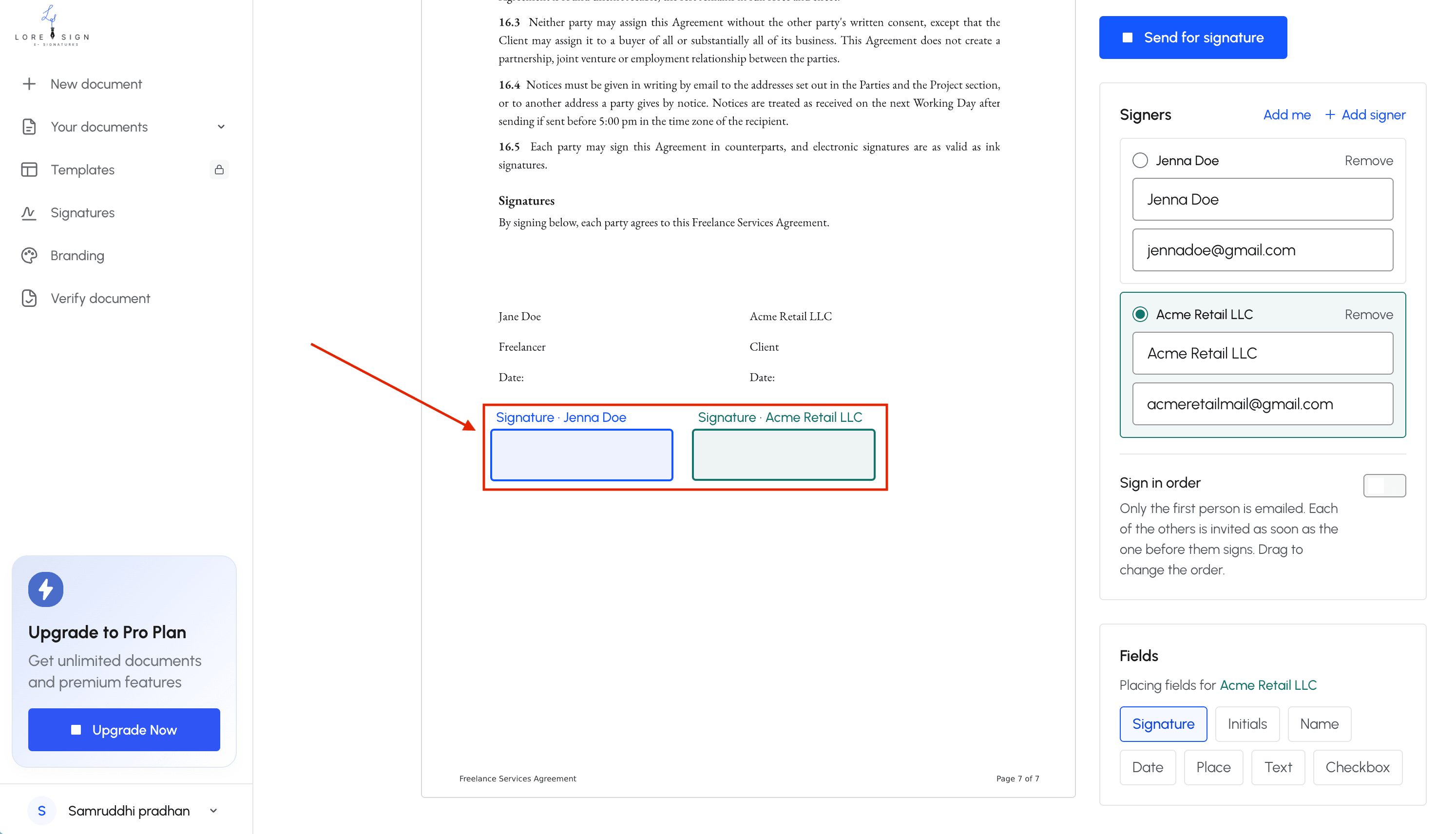
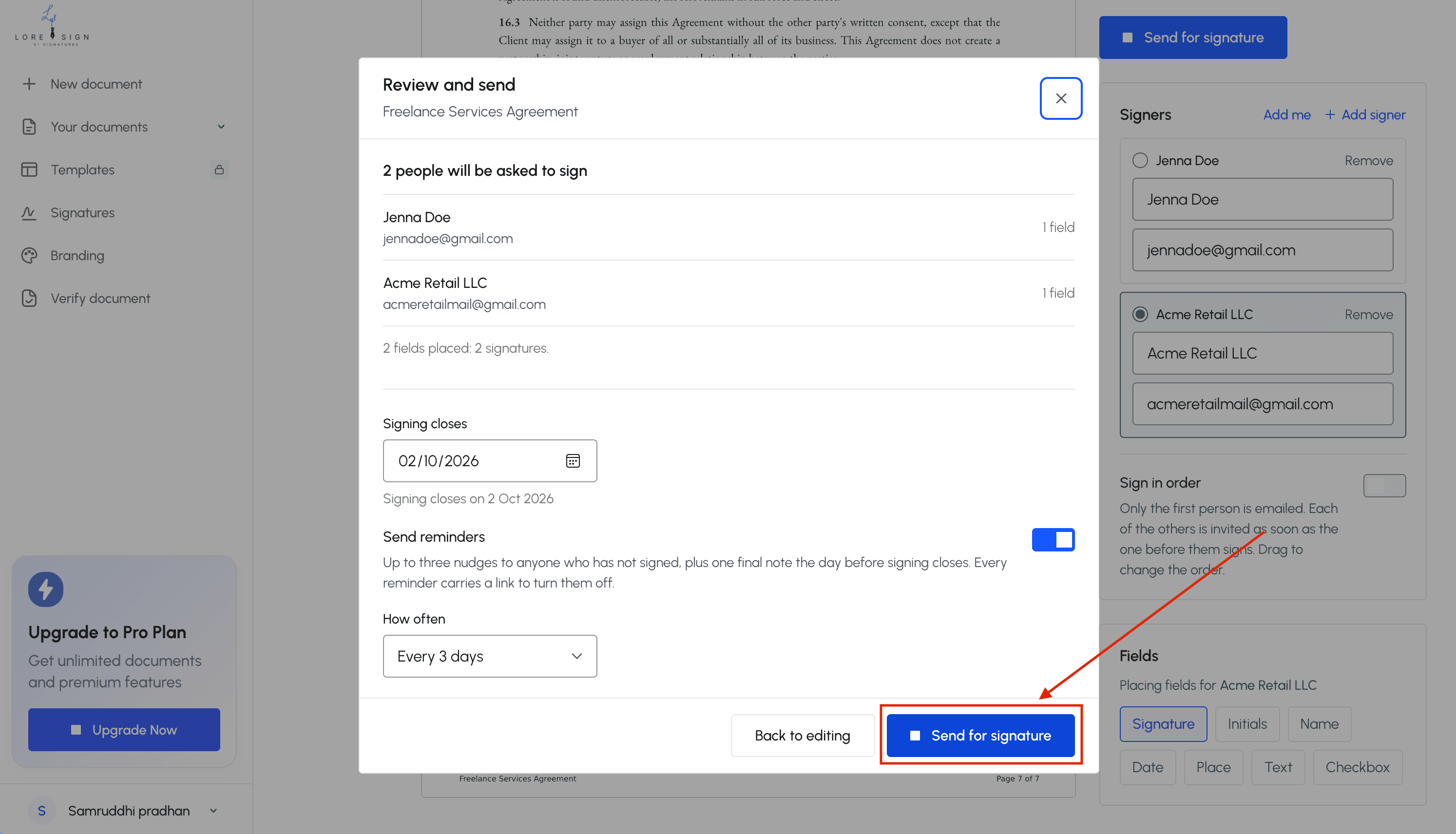
**Step 5:**Send one secure link to each signer, using ordered routing if multiple signatures are needed.
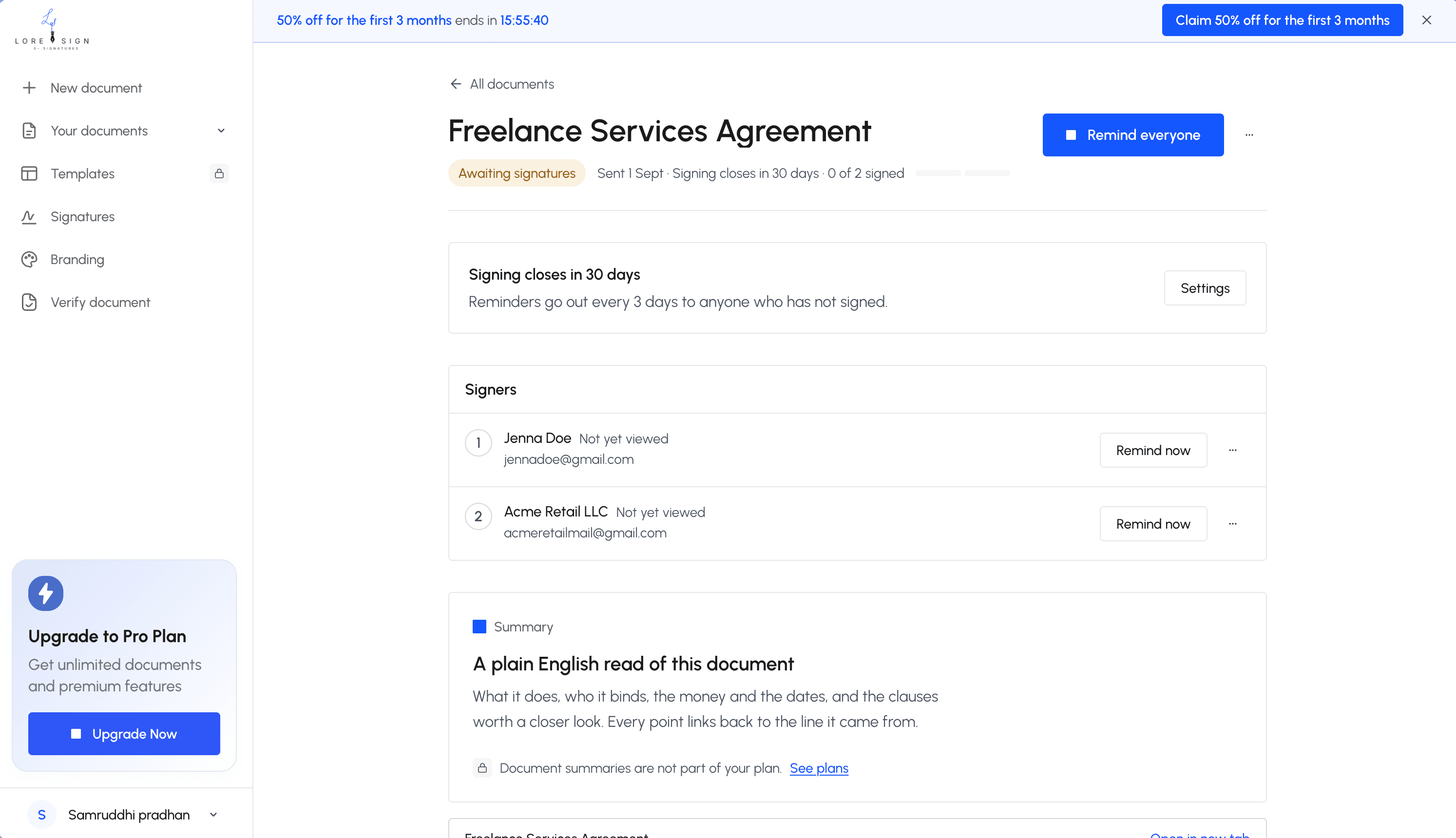
**Step 6:**Track signer progress and send automated reminders for any unsigned documents.
**Step 7:**Download the completed, signed PDF and retain the certificate of completion and audit trail for your records.
IRS E-Signature Requirements: What Makes a Signature Valid?
The IRS doesn't accept just any electronic signature. It accepts specific methods under specific conditions, and the burden is on you to meet them. If you don't, the form gets rejected and you start over.
Identity verification and Knowledge-Based Authentication (KBA)
The IRS requires the signer to prove who they are before an e-signature counts. The standard method is Knowledge-Based Authentication, or KBA. You answer questions drawn from your credit history and public records: previous addresses, loan amounts, vehicle makes. Get enough right and the system accepts your identity.
KBA isn't optional for most IRS e-signature scenarios. Tax professionals and e-signature providers use it to confirm you're the person named on the form. If you can't pass KBA, you may need to fall back to a wet signature.
Approved e-signature methods the IRS accepts
The IRS approves two broad categories. The first is the Self-Select PIN, which you create when you e-file your return. The second is a practitioner PIN, where your tax preparer verifies your identity and signs on your behalf through their software.
For forms like 2848 and 8821, the IRS accepts electronic signatures through approved e-signature providers that meet IRM 10.10.1 standards. These providers must include identity verification, an audit trail, and a tamper-evident seal on the signed document.
Secure storage and recordkeeping requirements
A valid IRS e-signature isn't just about the moment you sign. You must keep a copy of the signed form and the verification record. The IRS can ask for proof of who signed, when, and how.
Keep the signed PDF, the KBA confirmation, and any email or system log showing the signature event. Store them together. If the IRS questions the signature later, you'll need all three.
How to E-Sign an IRS Form: Step-by-Step
The process isn't complicated once you know the rules. Here's the walkthrough, start to finish.
Step 1: Confirm your form accepts e-signatures
Don't skip this. Not every IRS form accepts an electronic signature, and signing the wrong form electronically just means you'll redo it by hand.
Check the list in the previous section. Form 2848, Form 8821, Form 4506-T, and Form W-9 are common ones that accept e-signatures. Form 1040 accepts e-signatures only through the e-file process with a Self-Select PIN or practitioner PIN. If your form isn't on the approved list, print it and sign with a pen.
Step 2: Choose an e-signature method or tool
You have two paths. If you're e-filing your return through tax software, the software handles the signature for you. You'll create a Self-Select PIN or your preparer will use a practitioner PIN.
For standalone forms like 2848 or W-9, you need an e-signature tool that meets IRM 10.10.1 standards. Look for three things: identity verification built in, an audit trail, and a tamper-evident seal on the final PDF. DocuSign, Adobe Sign, and LoreSign all offer these. Pick one and upload your form.
Step 3: Complete identity verification
The tool will run you through Knowledge-Based Authentication. You'll answer questions about your credit history and public records. This is the IRS's way of confirming you're actually you.
If you fail KBA, you can't just retry indefinitely. Most providers lock you out after a few attempts. At that point, your fallback is a wet signature. Don't fight the system.
Step 4: Sign and download the signed document
Place your signature field where the form requires it. Sign. The tool applies a tamper-evident seal and generates an audit trail showing who signed, when, and how.
Download the signed PDF. Then download the KBA confirmation and the audit log. Keep all three together. The IRS can ask for any of them.
Step 5: Submit the form to the IRS
How you submit depends on the form. Some go through your tax professional's e-file system. Others get uploaded through the IRS's secure portal. A few still go by mail, even with an e-signature.
Check the form's instructions for the correct submission channel. Sending an e-signed form to the wrong place is the same as not sending it.
What You Cannot E-Sign with the IRS
The IRS e-signature program covers a specific list of forms. Everything else still needs a pen.
Forms that still require wet signatures
Form 1040 is the big one. You can e-sign it only through the e-file process with a Self-Select PIN or practitioner PIN. If you're paper-filing your return, you must sign it by hand. No e-signature tool gets you around that.
Most other tax returns follow the same rule. Form 1120 for corporations, Form 1065 for partnerships, and Form 1041 for estates and trusts all require wet signatures when filed on paper. The e-signature option exists only inside the e-file system.
Amended returns are stricter. Form 1040-X does not accept electronic signatures in most cases, even when e-filed. You'll print, sign, and mail it or submit through your preparer's system with a handwritten signature.
Certain specialized forms also stay wet-ink only. Form 706 (estate tax return) and Form 709 (gift tax return) require handwritten signatures. The IRS has not moved these into the e-signature program.
Common misconceptions about IRS e-signatures
The biggest one: people assume any e-signature tool makes any IRS form valid. It doesn't. The form has to be on the IRS's approved list, and the signature method has to meet IRM 10.10.1 standards. Using DocuSign on a form the IRS doesn't accept electronically doesn't make it valid. You'll get it back.
Another misconception is that a typed name counts as an e-signature. For IRS purposes, it doesn't. The IRS requires either a digital signature with identity verification or a handwritten signature. Typing your name at the bottom of a PDF is neither.
Some taxpayers think e-signing means the IRS receives the form automatically. It doesn't. You still have to submit the signed form through the correct channel, whether that's e-file, a secure portal, or mail. The e-signature just replaces the pen. It doesn't replace the submission step.
Will the IRS Accept DocuSign Signatures? (And Other Tools)
Yes, the IRS accepts DocuSign signatures on forms covered by its e-signature program. The catch is the same one from the last section: the form has to be on the approved list, and the signature has to meet IRM 10.10.1 standards. DocuSign itself doesn't make a form IRS-compliant. The form and the method do.
DocuSign and IRS compliance: what you need to know
DocuSign is a general-purpose e-signature platform. It handles identity verification, audit trails, and secure storage, which covers the IRS's core requirements for approved forms. If you're signing Form 2848 or Form 4506-T, DocuSign works. If you're trying to e-sign a paper Form 1040, it doesn't. No tool does.
The main catch with DocuSign is cost and fit. It's built for businesses sending hundreds of documents, not a taxpayer signing one form a year. You'll pay for features you won't use. The interface assumes you're managing a signing workflow, not just putting your name on a single PDF.
LoreSign for IRS e-signatures: a practical option
LoreSign handles the same core job: upload a PDF, place the signing field, send one secure link. The signer gets identity verification, and you get a certificate of completion plus an audit trail. That covers what the IRS needs for approved forms.
Where LoreSign differs is the pricing shape. The free tier includes three templates and one AI draft, which is enough for a taxpayer who signs a handful of IRS forms each year. Paid tiers add unlimited templates, automated reminders, and watermark-free PDFs. You're not paying for an enterprise workflow you'll never touch.
The honest limit: LoreSign doesn't make ineligible forms eligible. Form 1040-X still needs a pen. Form 706 still needs a pen. The tool handles the signature mechanics, not the IRS's form list.
Other e-signature tools to consider
Adobe Acrobat Sign and Dropbox Sign both meet the same IRM 10.10.1 baseline. Adobe is the most expensive option for a single user. Dropbox Sign is simpler but ties you to the Dropbox ecosystem. PandaDoc is built for sales contracts, not tax forms.
None of these tools changes what the IRS accepts. Pick based on what you'll actually sign, not on which one claims the most IRS-specific marketing.
Common Mistakes When Using IRS E-Signatures
Most IRS e-signature rejections come down to three errors. None of them are hard to avoid once you know what to look for.
Using an unapproved e-signature method
The IRS only accepts specific methods under IRM 10.10.1. Typing your name into a PDF, pasting a scanned signature image, or drawing with a mouse doesn't count unless the tool you're using meets the IRS's identity verification and audit trail standards. A generic PDF editor won't. Use a platform that records who signed, when, and how.
Skipping identity verification
The IRS requires the signer to prove who they are, usually through Knowledge-Based Authentication or a similar check. If you skip this step, the signature is invalid even if the form looks signed. Don't assume your e-signature tool handles it automatically. Check before you send.
Failing to keep a copy of the signed form
Once the form is signed, download the completed PDF and store it somewhere you can find it. The IRS can ask for proof of signature later, and your e-signature platform won't keep records forever on a free tier. Save the certificate of completion and the audit trail alongside the form itself.
Final Thoughts on IRS E-Signatures
The rules boil down to three things. Know which forms accept e-signatures. Use an approved method with identity verification. Keep your records.
Most individual forms, including Form 1040, Form 8878, and Form 8879, work electronically when you go through the right channel. Authorization forms like Form 2848 and Form 8821 qualify too. But some forms still need a wet signature, and no e-signature tool changes that.
The practical path is straightforward. Pick a tool that handles identity verification and audit trails, confirm your specific form is on the approved list, sign, and save the completed PDF. LoreSign covers the signing side: upload the form, place the fields, send one link, and get the signed document back automatically with a certificate of completion. You still need to check the IRS rules for your form before you start.
IRS e-signatures aren't complicated once you know the boundaries. Get the form right, verify who you are, and keep the paper trail. That's the whole job.
Frequently Asked Questions
What electronic signatures does the IRS accept?
The IRS accepts electronic signatures on a range of forms, including Form 1040, Form 2848, Form W-9, and Form 4506, among others. Acceptance is form-specific, so check the instructions for the exact form you are signing. The signature must reflect the signer's intent to sign and be retained in the records.
How can I get a digital signature for income tax filing?
You can use an e-signature tool to sign a PDF of your tax form before filing. Upload the form, place the signature fields, and send a secure link to each signer. After signing, download the completed PDF and keep the audit trail.
Will the IRS accept DocuSign signatures?
The IRS does not endorse a specific e-signature vendor. If the form permits electronic signatures and the signature meets IRS requirements for intent and record retention, a DocuSign signature can be accepted. The same applies to other tools, including LoreSign.
What is IRS e-file signature authorization?
IRS e-file signature authorization is a form, such as Form 8879, that lets a taxpayer authorize an electronic return originator to file their return electronically. It is separate from signing the return itself and has its own signature rules.
Does the IRS accept electronic signatures on Form 2848?
Yes, the IRS accepts electronic signatures on Form 2848, Power of Attorney and Declaration of Representative, when the form is submitted through an approved channel. Check the current form instructions for any specific requirements.
Does the IRS accept electronic signatures on Form W-9?
Yes, the IRS accepts electronic signatures on Form W-9. The form may be signed electronically and delivered to the requester, provided the signature meets the standard for electronic signatures.
Which IRS forms still require a wet signature?
Some IRS forms and sworn statements still require a wet signature, and the list can change. Forms that include a jurat or notarization requirement typically need a physical signature. Always check the form instructions before signing.
About LoreSign
LoreSign helps For people looking to get documents and contracts signed. get this right. Track every signer and receive the completed document automatically. Whether you are working through irs e-signatures or something adjacent, we publish what we have actually tested, including where it falls short.