Examples of E-Signatures: What They Look Like and When to Use Them
You've just received an email asking you to sign a contract, and you're staring at a blank box wondering what actually counts as a signature. An e-signature is any electronic mark that shows your intent to agree to a document. It can be a typed name at the bottom of an email, a finger-drawn squiggle on a tablet, or a checked box that says "I agree."
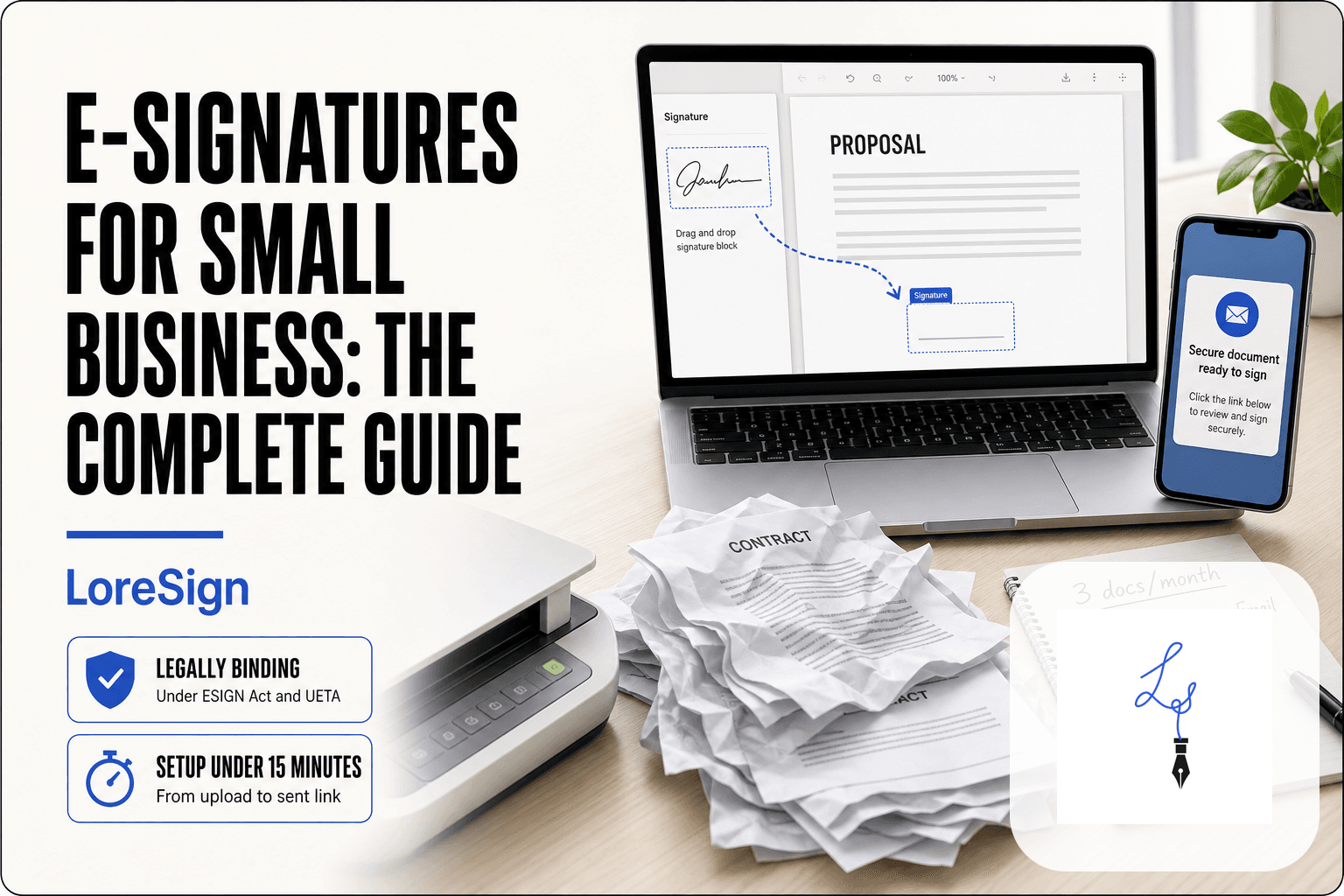
The good news is you don't need a scanner or a printer. You can create a legally valid e-signature in under five minutes using a tool like LoreSign, which lets you upload any PDF, place the signing fields, and send one secure link. The main catch is that e-signatures aren't accepted everywhere, and pretending otherwise gets people into trouble.
This guide covers what e-signatures actually look like, the three legal types, when each is valid, what they cannot do, and how to create one today.
| At a glance | Details |
|---|---|
| What it is | Any electronic mark showing intent to sign |
| Legal basis | ESIGN Act and UETA in the US |
| Common types | Typed, drawn, clicked, digital certificate |
| Typical use | Contracts, NDAs, invoices, consent forms |
| Cannot be used | Wills, some IRS forms, certain court filings |
| Proof of signing | Audit trail and certificate of completion |
In This Guide
- What Is an Electronic Signature?
- E-Signature vs Handwritten Signature: Legal Weight and Proof
- The Three Types of Electronic Signatures (With Examples)
- Examples of E-Signatures by Format
- E-Signature vs Digital Signature: What's the Difference?
- E-Signature vs Handwritten Signature: Legal Weight Compared
- When Are E-Signatures Legally Valid?
- What E-Signatures CANNOT Do
- How to Create an E-Signature using LoreSign (Step by Step)
- Common Use Cases for E-Signatures
- Examples of E-Signatures: The Bottom Line
What Is an Electronic Signature?
An electronic signature is any digital mark that shows a person's intent to agree to a document. A typed name, a drawn signature, a checked box, or an uploaded image all count. It's the legal equivalent of signing in ink, just applied to a screen instead of paper.
A simple definition in plain English
An e-signature is not a font. It's not a picture of your handwriting pasted onto a PDF, though that can be one form of it. What makes it a signature is intent: you're saying "I agree to this" in a way that can be tied back to you. The law cares less about what the mark looks like and more about whether you meant to sign.
One concrete example: a typed name at the bottom of an email
You've already seen one. When someone types their full name at the bottom of an email to confirm a deal, that's an e-signature. A court can enforce it. The same goes for typing your name into a signature box on a PDF, clicking "I Agree" on a website, or drawing your signature with a finger on a tablet. The format changes. The legal weight doesn't.
An e-signature is not the same as a digital signature. A digital signature uses cryptographic certificates to verify identity and detect tampering, while an e-signature is any electronic mark — typed, drawn, or clicked — that shows intent to sign.
E-Signature vs Handwritten Signature: Legal Weight and Proof
| Factor | E-Signature | Handwritten Signature |
|---|---|---|
| Legal validity | Valid under ESIGN/UETA for most contracts | Valid everywhere, including wills and some court filings |
| Burden of proof | Must show intent, consent, and record integrity | Generally presumed authentic once identified |
| Speed and logistics | Signed in minutes from any device | Requires printing, mailing, or in-person signing |
| Audit trail | Timestamp, IP address, and signer identity logged | No automatic record unless notarized or witnessed |
| Best for | Remote deals, freelancers, small business contracts | Wills, adoptions, divorce, some government forms |
The Three Types of Electronic Signatures (With Examples)
Not all e-signatures carry the same weight. The law recognizes three tiers, and the difference comes down to one thing: how strongly the signature is tied to the person who made it.
Simple Electronic Signatures (SES): typed name, scanned image, checkbox
A simple electronic signature is exactly what it sounds like. You type your name into a box. You paste a scanned image of your handwritten signature onto a document. You check a box that says "I agree." That's it.
The catch: an SES is the easiest to dispute. If someone claims they didn't sign, the other party has to prove they did. There's no built-in verification linking the mark to a specific person at a specific time. For low-stakes documents, that's fine. For a six-figure contract, it's thin.
Advanced Electronic Signatures (AdES): linked to signer identity, audit trail
An advanced electronic signature adds proof. The signature is uniquely linked to the signer, and the signer has sole control over the signing key. Any change to the document after signing breaks the signature.
In practice, this is what most e-signature platforms produce. When you sign through a tool that logs your email address, IP address, and a timestamp, and then locks the document against edits, you're looking at an AdES. The audit trail is the evidence. If someone disputes the signature, the trail shows who signed, when, and from where.
Qualified Electronic Signatures (QES): third-party authentication, highest legal weight
A qualified electronic signature is the top tier. It requires a qualified trust service provider to verify the signer's identity, usually through a face-to-face check or government ID, and issue a digital certificate tied to that person.
The legal weight is the highest available. Under eIDAS in the EU, a QES has the same legal effect as a handwritten signature, automatically. No court argument needed. You'll see QES used for notarized documents, certain government filings, and high-value cross-border contracts. It's overkill for a freelance agreement, but it exists for when the stakes justify it.
If you are a freelancer or small business owner, always enable the audit trail and certificate of completion on every contract you send. If a client ever disputes the agreement, that timestamped record is your proof of who signed and when.
Examples of E-Signatures by Format
The three types above tell you the legal tier. The format tells you what you'll actually see on screen. Four formats cover nearly every e-signature you'll encounter or create.
Typed name (most common)
You type your full name into a field, and the platform renders it in a cursive or script font. It looks like a signature but carries no handwriting analysis. For most contracts, NDAs, and onboarding forms, this is enough. It's fast, works on any device, and leaves a clean audit trail when the platform logs the timestamp and email.
Drawn signature on a touchscreen or trackpad
You sign with your finger on a phone, a stylus on a tablet, or your mouse on a trackpad. The result is a raster image of your actual handwriting. It feels more like a "real" signature, which matters for client-facing documents where perception counts. The downside: drawing with a mouse looks shaky, and the image quality varies by device.
Uploaded image of a handwritten signature
You sign a piece of paper, scan or photograph it, crop the image, and upload it. The document then shows your actual ink signature as an image. This is the closest visual match to a wet signature. The catch: it's still just an image. Anyone with a photo of your signature could paste it onto another document, so it offers no authentication on its own.
Clickwrap: checking a box or clicking 'I Agree'
You check a box next to "I agree to the terms" or click a button labeled "I Agree." No name, no drawing, no image. The act of clicking is the signature. You've done this hundreds of times with software licenses and website terms. It's legally valid for many agreements, but it's the weakest format for proving who clicked.
E-Signature vs Digital Signature: What's the Difference?
People use these terms interchangeably. They are not the same thing. An e-signature is the act of signing. A digital signature is the encryption technology underneath that proves the document hasn't been tampered with.
E-signature: the legal intent to sign
An e-signature is any electronic mark that shows you intended to agree. A typed name, a drawn signature, a checkbox, an uploaded image. The law cares about intent, not the visual form. Under the ESIGN Act and UETA, an e-signature is valid as long as you consented to sign electronically and the record is retained.
Digital signature: the encryption that secures it
A digital signature is not something you draw or type. It's a cryptographic seal created by software when you sign through a platform like DocuSign or Adobe Sign. Behind the scenes, the platform generates a unique hash of the document, encrypts it with your private key, and attaches a certificate. If anyone changes one character after signing, the hash breaks and the signature shows as invalid.
A simple analogy to remember the difference
Think of an e-signature as your handwritten name on a contract. Think of a digital signature as the tamper-evident seal on the envelope. You can have an e-signature without a digital signature, like a typed name in an email. You can't have a digital signature without an e-signature, because the encryption wraps around the act of signing. Most modern e-signature platforms apply both automatically. You sign, and the platform adds the cryptographic layer without you noticing.
E-Signature vs Handwritten Signature: Legal Weight Compared
In court, both carry the same legal weight. The ESIGN Act and UETA put e-signatures on equal footing with ink, as long as you consented to sign electronically and the record is retained. A judge doesn't prefer one over the other.
Are e-signatures as legally binding as ink?
Yes. The law doesn't distinguish between a typed name and a pen stroke. What matters is intent and consent. If you clicked "I agree" or typed your name after being told it counts as a signature, that's binding.
What happens if someone disputes an e-signature?
The burden of proof shifts. With ink, the person denying the signature usually has to prove it's forged. With an e-signature, the party enforcing it may need to show the signer actually signed. Audit trails, timestamps, and IP logs do that work.
Common misconceptions about enforceability
The biggest one: that e-signatures are easier to challenge. They're not. A typed name with a platform's audit trail is often harder to dispute than a handwritten signature with no witness. The catch is you need that trail. A bare typed name in an email offers less evidence than one signed through a platform that logs the action.
When Are E-Signatures Legally Valid?
An e-signature is valid when the law says it is. In the US, that means two statutes: the ESIGN Act (federal) and UETA (state-level, adopted in 47 states). Both say the same thing: a signature can't be denied legal effect just because it's electronic.
The ESIGN Act and UETA in plain English
ESIGN passed in 2000. It says electronic signatures and records carry the same weight as paper ones, as long as both parties agree to go electronic. UETA is the state version. New York, Illinois, and Washington have their own rules, but they track UETA closely. The practical effect: if you'd sign it on paper, you can usually sign it electronically.
What makes an e-signature legally binding
Three things. Intent: the signer meant to sign. Consent: they agreed to do it electronically. Attribution: you can show who signed. A typed name at the bottom of an email meets the first two. A platform that logs the signer's email, IP address, and timestamp covers the third.
Consent and intent to sign
Consent isn't automatic. You can't email someone a contract and assume they've agreed to electronic signing. They need to opt in, usually by clicking through a disclosure or checking a box. Intent is simpler: if someone types their name or clicks "I agree" after being told it counts as a signature, that's intent. The law doesn't require a specific format. It requires a clear act.
What E-Signatures CANNOT Do
E-signatures cover most business documents. They don't cover everything. Some documents still require ink on paper, and no e-signature platform can change that.
Documents that still require handwritten signatures
Wills and trusts are the big one. Most states require a physical signature with witnesses present. Some court filings also demand wet ink, depending on the jurisdiction. Certain notarized documents need a notary who may or may not accept electronic signatures.
Industry-specific restrictions (IRS, real estate, family law)
The IRS accepts e-signatures on many forms but not all. Some tax forms still require a handwritten signature. Real estate varies by state: some counties accept electronic signatures on deeds, others don't. Family law documents, like adoption papers or divorce decrees, often require physical signatures.
When to consult a lawyer before using an e-signature
If the document involves inheritance, real property transfer, or a court filing, check with a lawyer first. The cost of a bad signature is higher than the cost of a consultation. For routine contracts, NDAs, and onboarding forms, e-signatures are fine.
How to Create an E-Signature (Step by Step)
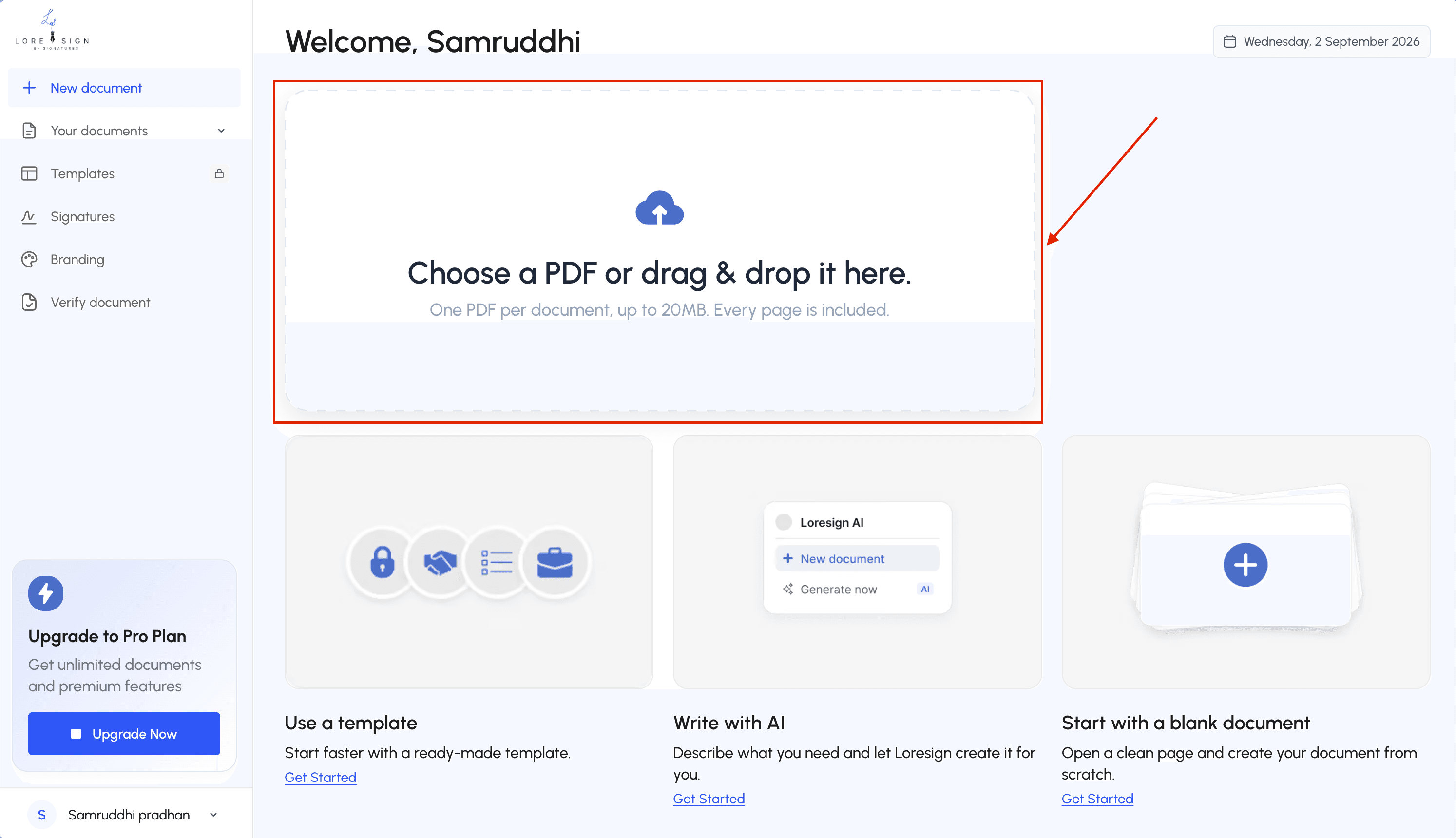
You can create an e-signature in under five minutes. You don't need special software, a scanner, or a stylus. A typed name works. A drawn signature works. An uploaded photo of your ink signature works too.
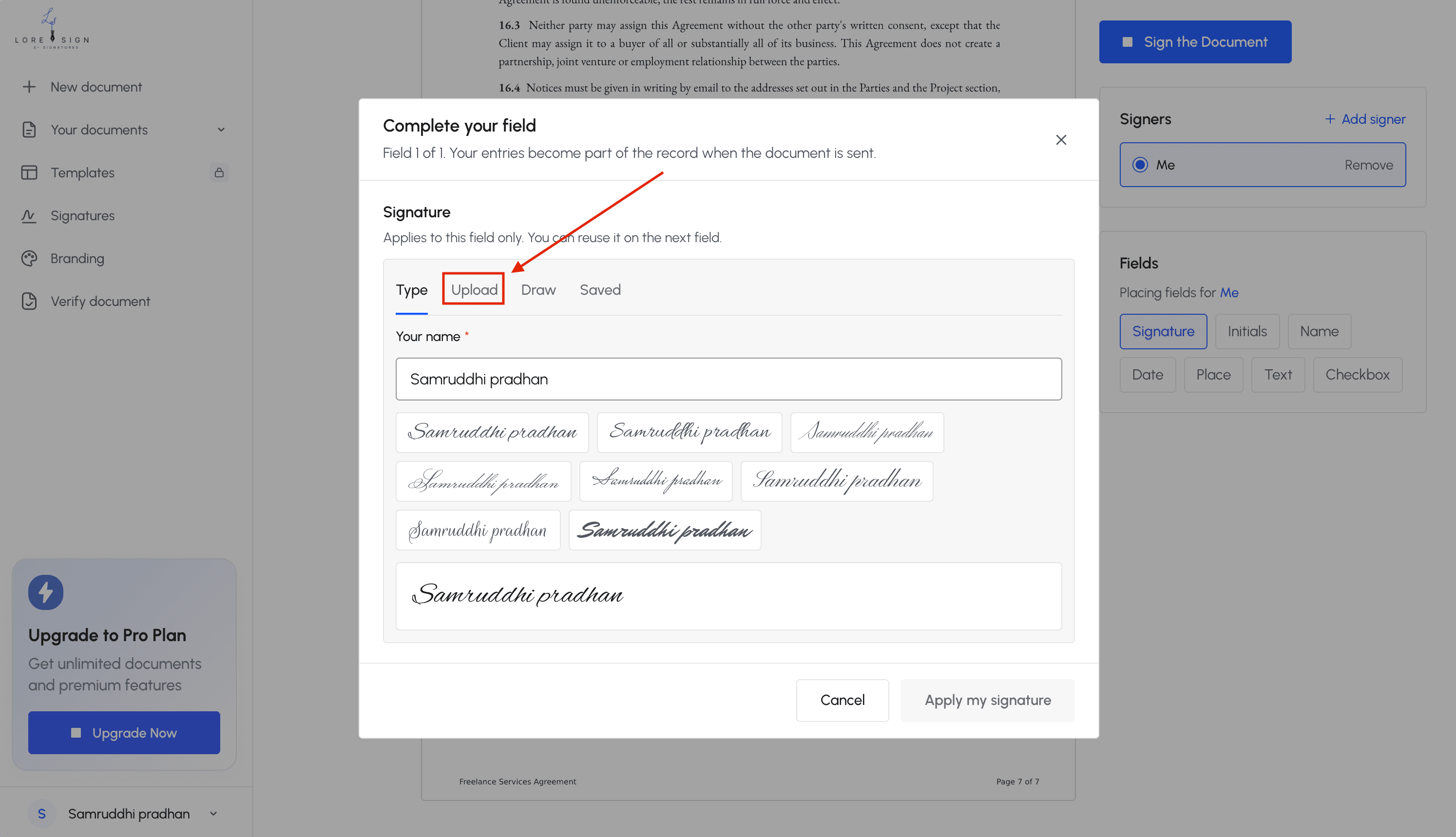
Step 1: Choose your method (typed, drawn, or uploaded)
Typed is fastest. You type your name, pick a font, and the tool renders it as a signature. Drawn gives you more control: you sign with a mouse, trackpad, or finger on a touchscreen. Uploaded is best when you want your e-signature to look exactly like your ink signature. Take a photo or scan of your handwritten name, crop it, and upload it.
The honest answer is it depends on what you're signing. For a contract with a client, a typed name is legally sufficient. For something that needs to feel personal, like a letter of intent, a drawn or uploaded signature reads better.
Step 2: Create your signature
Open any e-signature tool. LoreSign, DocuSign, Adobe, or a free PDF editor all work. Look for a "Sign" or "Signature" button. Choose your method, then create the signature once. Most tools save it so you can reuse it on future documents.
Don't overthink the design. A legible signature is more useful than a pretty one.
Step 3: Apply it to your document
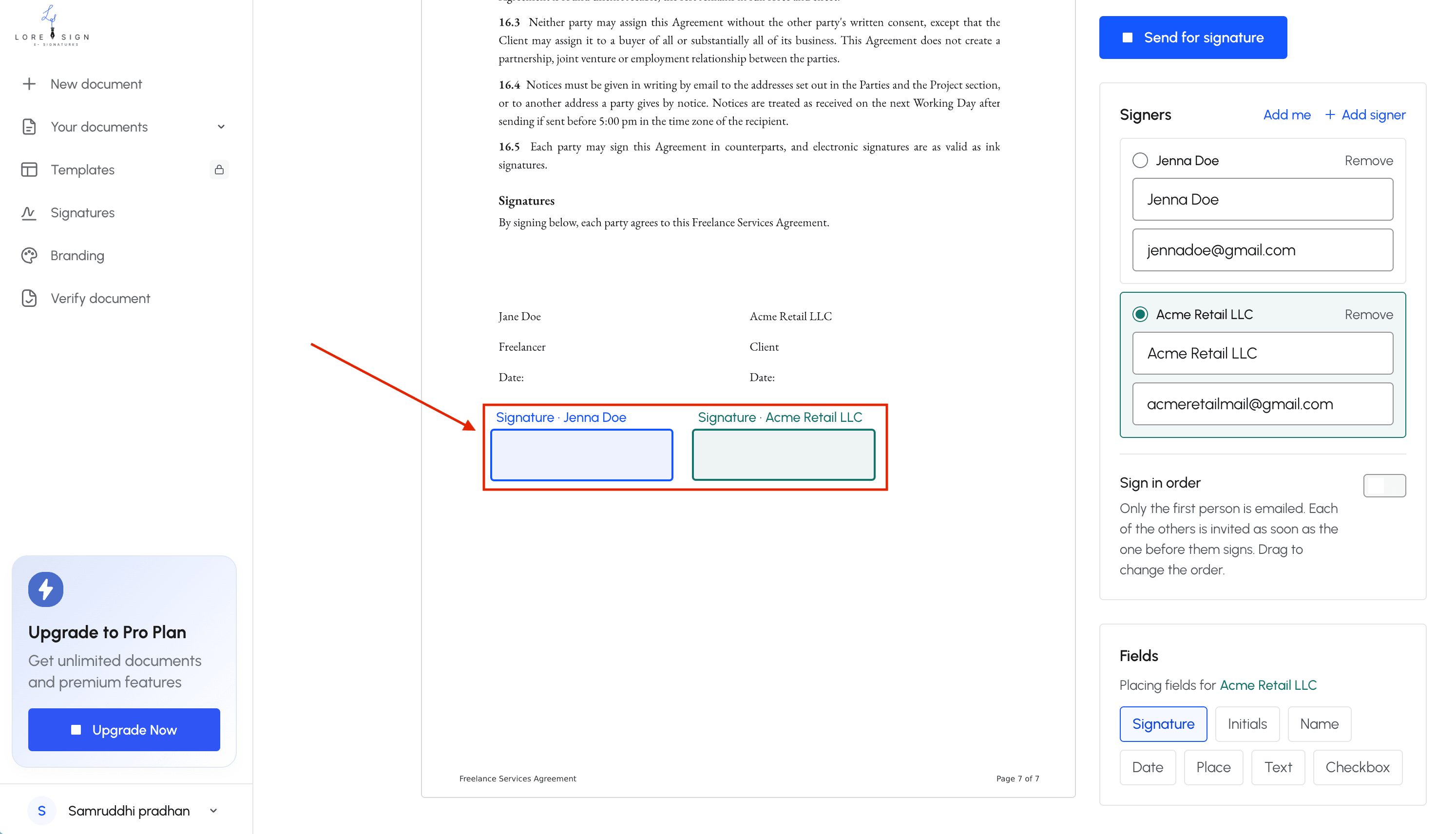
Upload your PDF or document. Drag the signature field to the signature line. Resize it if needed. If you're signing a multi-page contract, check every signature field before you finish. Missing one delays the whole deal.
Step 4: Save and send
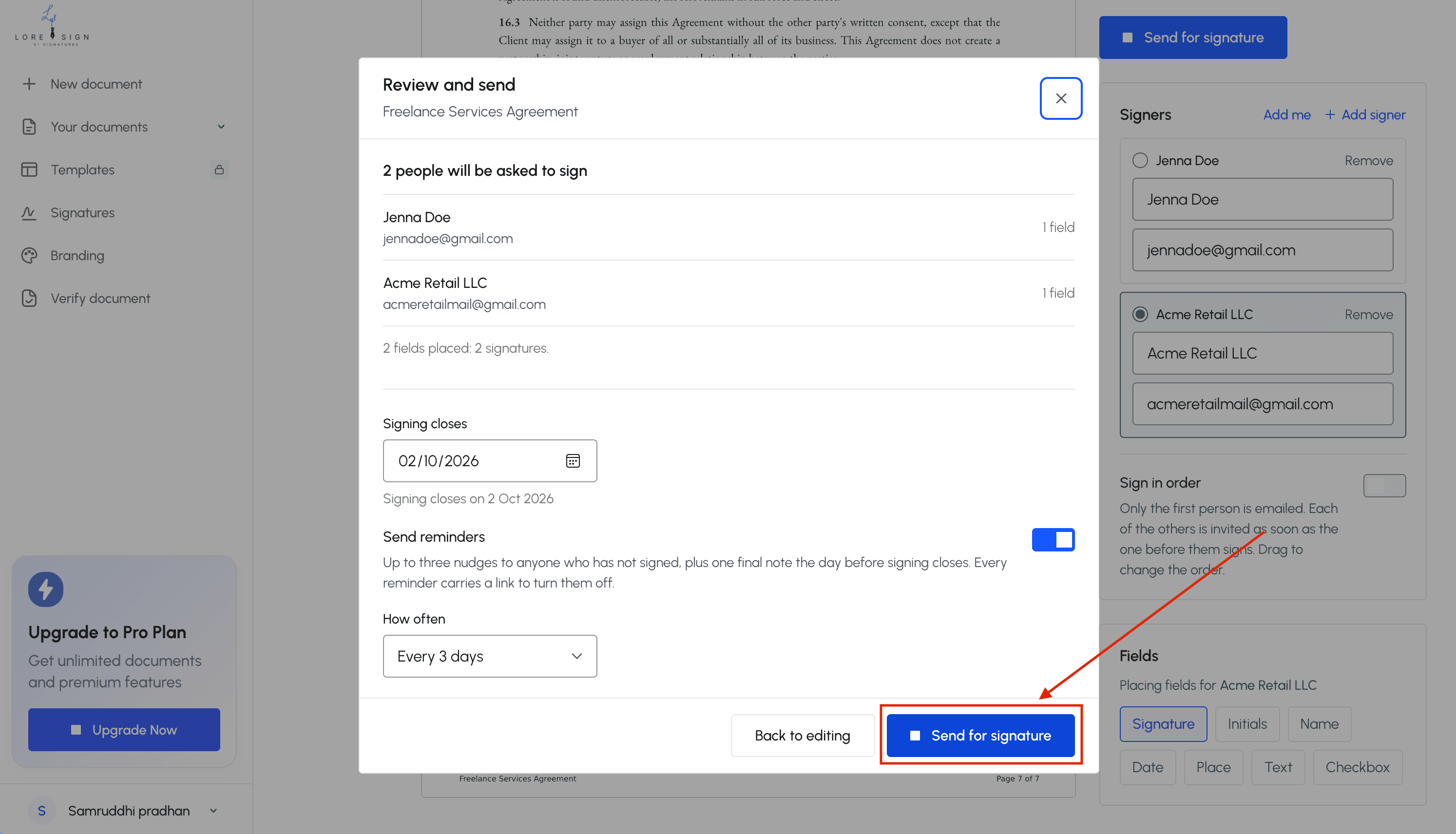
Save the signed document as a PDF. Send it back to whoever requested it. If you're the one requesting signatures, use a tool that tracks who has signed and who hasn't. LoreSign does this automatically: you upload the document, place the fields, and send one link. You get the completed PDF back once everyone signs.
Common Use Cases for E-Signatures
E-signatures show up wherever a document needs a yes from someone who isn't in the room. If you've signed a lease, accepted a job offer, or closed a freelance contract online, you've already used one.
Contracts and agreements
NDAs, service agreements, and sales contracts are the most common. You send one link, the other party signs, and you both get a copy. No printing, no scanning, no courier.
HR and onboarding documents
Offer letters, tax forms, and employee handbooks. New hires sign everything before day one. It cuts the first-day paperwork stack to zero.
Real estate and lease agreements
Leases, purchase offers, and disclosure forms. Buyers and tenants sign from different cities. The audit trail matters here: it shows who signed what, and when.
Freelance and consulting work
Statements of work, invoices, and IP assignments. Freelancers send a contract, the client signs, and work starts the same day. The signed PDF is your proof if payment disputes come up later.
Examples of E-Signatures: The Bottom Line
Examples of e-signatures are everywhere once you know what to look for. A typed name in an email, a checkbox on a website, a finger-drawn squiggle on a tablet. They all carry legal weight when intent and consent are clear, and the right platform adds the audit trail that makes them hard to dispute. For most contracts, NDAs, and onboarding forms, an e-signature is faster than ink and just as binding. For wills, some IRS forms, and certain court filings, it's not an option. Know the difference before you sign.
Frequently Asked Questions
What is an example of an e-signature?
Common examples include typing your name into a signature field, drawing your signature with a mouse or finger, clicking an 'I agree' button, or uploading a scanned image of your handwritten signature. All of these count as e-signatures if they show intent to sign and are linked to the document.
Can you give me an example of a digital signature?
A digital signature is a specific type of e-signature that uses a cryptographic certificate. For example, when you sign a PDF with a verified digital ID, the software creates a unique fingerprint of the document that changes if anyone alters it. This is common in government filings and enterprise contracts.
How do I create an eSignature?
You can create one using an e-signature tool: upload your PDF, place the signing fields, and send a secure link to the signer. The signer then types, draws, or clicks to sign. The tool records the action and returns the completed document automatically.
What are the three types of electronic signatures?
The three main types are simple electronic signatures (typed name or click-to-agree), advanced electronic signatures (which include identity verification and tamper-evident seals), and qualified electronic signatures (which meet specific EU legal standards). Most everyday contracts use simple e-signatures.
Are e-signatures legally binding?
Yes, for most contracts and agreements. In the US, the ESIGN Act and UETA give e-signatures the same legal weight as handwritten signatures, as long as all parties consent and the record is retained. However, certain documents like wills and some court filings still require handwritten signatures.
What can e-signatures NOT be used for?
E-signatures generally cannot be used for wills, codicils, adoption papers, divorce decrees, and certain IRS forms or court filings. Some states also restrict their use for eviction notices and other specific legal documents. Always check your local rules before relying on an e-signature.
How do I know an e-signature is valid?
A valid e-signature should be accompanied by an audit trail showing who signed, when, and from what IP address. Many tools also provide a certificate of completion. If the document includes these records, it is much easier to prove authenticity if a dispute arises.
About LoreSign
LoreSign helps For people looking to get documents and contracts signed. get this right. Track every signer and receive the completed document automatically. Whether you are working through examples of e signatures or something adjacent, we publish what we have actually tested, including where it falls short.