E-Signatures vs Digital Signatures: A Practical Guide for Getting Documents Signed
E-signatures vs digital signatures: if you've ever stared at a signing tool wondering whether a simple typed name will hold up in court, you're not alone. The confusion is real, and most vendor content makes it worse by pushing cryptographic certificates as if every contract needs them. It doesn't. The honest answer is that for most everyday documents, a basic e-signature is legally sufficient, faster to set up, and costs less. A digital signature is a specific security technology, not a synonym for "better signature," and you only need it in narrow, high-assurance scenarios. LoreSign handles the everyday case: upload a PDF, place the signature fields, send one link, and track every signer until the completed document lands back in your inbox. This guide covers the plain-language difference, the legal framework in the US and EU, when a simple e-signature is enough, when a digital signature is actually required, and a step-by-step way to get your document signed today.
| At a glance | Details |
|---|---|
| E-signature | Any electronic mark showing intent to sign |
| Digital signature | Cryptographic signature using a certificate (PKI) |
| Legal validity | E-signatures are legally valid for most agreements |
| Best for | E-signatures for everyday contracts and forms |
| When you need digital | Regulated filings, tamper-proofing, strict compliance |
| Typical tools | LoreSign, Adobe, Docusign, Entrust |
In This Guide
- What Is an Electronic Signature?
- E-Signature vs Digital Signature: What's the Difference?
- What Is a Digital Signature?
- E Signatures Vs Digital Signature: A Step-by-Step Guide
- E-Signatures vs Digital Signatures: Key Differences
- Legal Recognition: Are E-Signatures Legally Valid?
- When to Use Each Type of Signature
- When You DON'T Need a Digital Signature
- How to Create an E-Signature (Step-by-Step with LoreSign)
- What You Cannot Do with E-Signatures
- E-Signatures vs Digital Signatures: Which Should You Choose?
What Is an Electronic Signature?
An electronic signature is any electronic mark that shows a person's intent to agree to a document. It's a legal concept, not a specific technology. A typed name, a drawn signature, a checked box, or clicking an "I agree" button all count.
The law doesn't care how fancy the mark looks. It cares whether you meant to sign.
Common examples of e-signatures
- Typing your name at the bottom of an email or form
- Drawing your signature with a finger or mouse on a screen
- Checking a box that says "I agree to the terms"
- Clicking a button labelled "Accept" or "Sign"
How e-signatures work in practice
You upload a PDF to a signing tool, place a signature field, and send a link. The signer opens it, types or draws their name, and clicks done. The tool records who signed, when, and from what device. That record is the audit trail. It's what makes the signature hold up if someone later disputes it.
An e-signature is a broad category that includes any electronic mark showing intent to sign, while a digital signature is a specific technical implementation of an e-signature that uses cryptography and a certificate.
E-Signature vs Digital Signature: What's the Difference?
| Factor | E-Signature | Digital Signature |
|---|---|---|
| What it is | Typed name, drawn mark, or click-to-sign | Cryptographic signature tied to a digital certificate |
| How it's verified | Audit trail, email, IP, timestamps | Certificate authority and public-key cryptography |
| Legal standing | Valid for most contracts and agreements | Also valid; often required for specific regulated filings |
| Setup effort | Low — upload, place fields, send a link | Higher — requires certificates and key management |
| Best for | Small business contracts, freelancers, everyday forms | Enterprise, government, and high-assurance workflows |
What Is a Digital Signature?
A digital signature is a specific cryptographic technology, not a broad legal concept. It uses public key infrastructure (PKI) and a digital certificate to bind a signer's identity to a document and prove the document hasn't changed since signing.
How digital signatures use encryption and certificates
When you sign, the software creates a hash of the document, a unique string of characters. Your private key encrypts that hash. Anyone can check it with your public key. If the document changes by one character, the hash no longer matches. The certificate, issued by a certificate authority, ties the keys to you.
A simple analogy: tamper-evident seal vs. typed name
A typed name is like signing a paper with a pen. A digital signature is like sealing the envelope with a tamper-evident sticker. Open it, and the seal breaks. The sticker doesn't prove you wrote the letter. It proves nobody altered it after you sealed it.
If you're a freelancer or small business owner, start with an e-signature tool that includes an audit trail and a certificate of completion that combination covers the legal validity most clients actually ask about, without the cost and setup of certificate-based digital signatures.
E Signatures Vs Digital Signature: A Step-by-Step Guide
- Identify what the document is for — a standard contract, a regulated filing, or an internal form.
- Check whether the recipient or regulator specifies a digital signature or certificate.
- If no specific requirement exists, choose an e-signature tool that fits your workflow.
- Upload your PDF, place the signing fields, and send one secure link to each signer.
- Track every signer and let automated reminders nudge anyone who hasn't signed.
- Receive the completed, signed PDF automatically once everyone has signed.
- Keep the certificate of completion and audit trail with the document for your records.
E-Signatures vs Digital Signatures: Key Differences
The short version: every digital signature is an e-signature, but almost no e-signature is a digital signature. One is a legal concept. The other is a specific technology.
| E-signature | Digital signature | |
|---|---|---|
| What it is | Legal concept: intent to sign | Cryptographic process using PKI |
| Technology | Typed name, drawn signature, checkbox | Digital certificate + private key |
| Security level | Basic authentication | Tamper-evident integrity |
| Legal weight | Valid for most contracts | Stronger evidentiary proof |
| Cost | Free to low monthly fee | Certificate infrastructure required |
| Ease of use | Minutes to set up | Requires certificate management |
Technology: legal concept vs. cryptographic process
An e-signature is whatever the law says counts as signing electronically. A digital signature is a specific encryption method that proves two things: who signed, and that nothing changed afterward.
Security: basic authentication vs. tamper-evident integrity
An e-signature proves intent. A digital signature proves integrity. If someone alters a digitally signed PDF, the signature breaks. A typed name offers no such protection.
Cost and effort: simple tools vs. certificate infrastructure
E-signature tools cost little and take minutes to use. Digital signatures require a certificate from a certificate authority, which means setup, renewal, and ongoing management. For most documents, that's overkill.
Legal Recognition: Are E-Signatures Legally Valid?
Yes. In most countries, a simple e-signature is legally binding for everyday contracts. The laws that make this true are decades old.
US laws: ESIGN Act and UETA
The ESIGN Act (2000) and UETA (1999) established that electronic signatures carry the same legal weight as wet ink. Neither law requires cryptography. A typed name, a drawn signature, or a clicked "I agree" all count, as long as you intended to sign.
EU regulations: eIDAS and QES
The EU's eIDAS regulation (2016) defines three tiers: simple, advanced, and qualified electronic signatures (QES). Simple e-signatures are valid for most contracts. QES, which requires a government-approved certificate, is only mandatory for specific filings like certain court documents or notarized acts.
What legal validity actually means for your contracts
Legal validity doesn't mean a signature can't be challenged. It means the law won't reject it just because it's electronic. A digital signature adds stronger evidence if a dispute lands in court. For most agreements, that extra layer isn't required.
When to Use Each Type of Signature
The legal framework is clear: simple e-signatures are valid for most contracts. The practical question is which documents actually need the extra cryptographic layer. Here's the honest answer: most don't.
Everyday documents: e-signature is enough
An e-signature handles the vast majority of what you'll actually sign. NDAs, freelancer agreements, internal approvals, rental agreements, offer letters, sales contracts, onboarding paperwork. If both parties agree to sign electronically and no regulation demands otherwise, a typed name or drawn signature is sufficient.
That covers roughly 95% of what a small business or freelancer deals with. You don't need a certificate authority involved to sign a consulting agreement.
High-assurance scenarios: when digital signatures are required
Digital signatures matter when the document's integrity or the signer's identity will be scrutinized later. Certain government filings, regulated industries like healthcare or finance, and high-value transactions where tampering is a real risk. In the EU, some court documents and notarized acts require QES specifically.
If a regulator, court, or counterparty explicitly asks for a digital signature, that's your signal. Otherwise, you're adding cost and friction without a legal requirement.
Quick decision checklist
Ask yourself three questions:
- Does a law or regulation require a digital signature or QES for this document?
- Will the document's authenticity likely be challenged in court?
- Is the counterparty demanding cryptographic proof?
If you answered no to all three, a simple e-signature is enough. If you answered yes to any, look into digital signature options.
When You DON'T Need a Digital Signature
The previous section gave you the decision framework. Now the honest part: most people reading this don't need a digital signature at all.
The vendor bias problem
Vendors selling digital signature certificates have a reason to make you think you need one. Every contract, every agreement, every PDF becomes a candidate for their product. That's not advice. That's a sales funnel.
The reality is simpler. ESIGN and UETA don't require cryptography for a signature to be legally binding. They require intent and consent. A typed name in an email satisfies that. So does clicking "I agree" on a checkbox.
Documents that don't require cryptographic signatures
Here's what a basic e-signature handles without issue:
- NDAs and confidentiality agreements
- Freelance and consulting contracts
- Offer letters and onboarding forms
- Rental and lease agreements
- Internal approvals and sign-offs
- Sales quotes and order forms
None of these need a digital certificate. If the document would hold up with a wet ink signature, it'll hold up with an e-signature. The legal standard is the same: did both parties intend to sign?
Don't pay for infrastructure you don't need.
How to Create an E-Signature (Step-by-Step) with LoreSign
Creating an e-signature takes about five minutes. The process is the same across most tools: pick a platform, upload your file, place the signature fields, send the link, and wait for the signed copy to come back.
Step 1: Choose a signing tool
You need a tool that handles the workflow for you. LoreSign does this, and so do Docusign, HelloSign, and Adobe Sign. Pick one with a free tier if you're signing a single document. Don't overthink it.
Step 2: Upload your document
Upload the PDF or Word file. Most tools accept both. The document stays in your account while you prepare it.
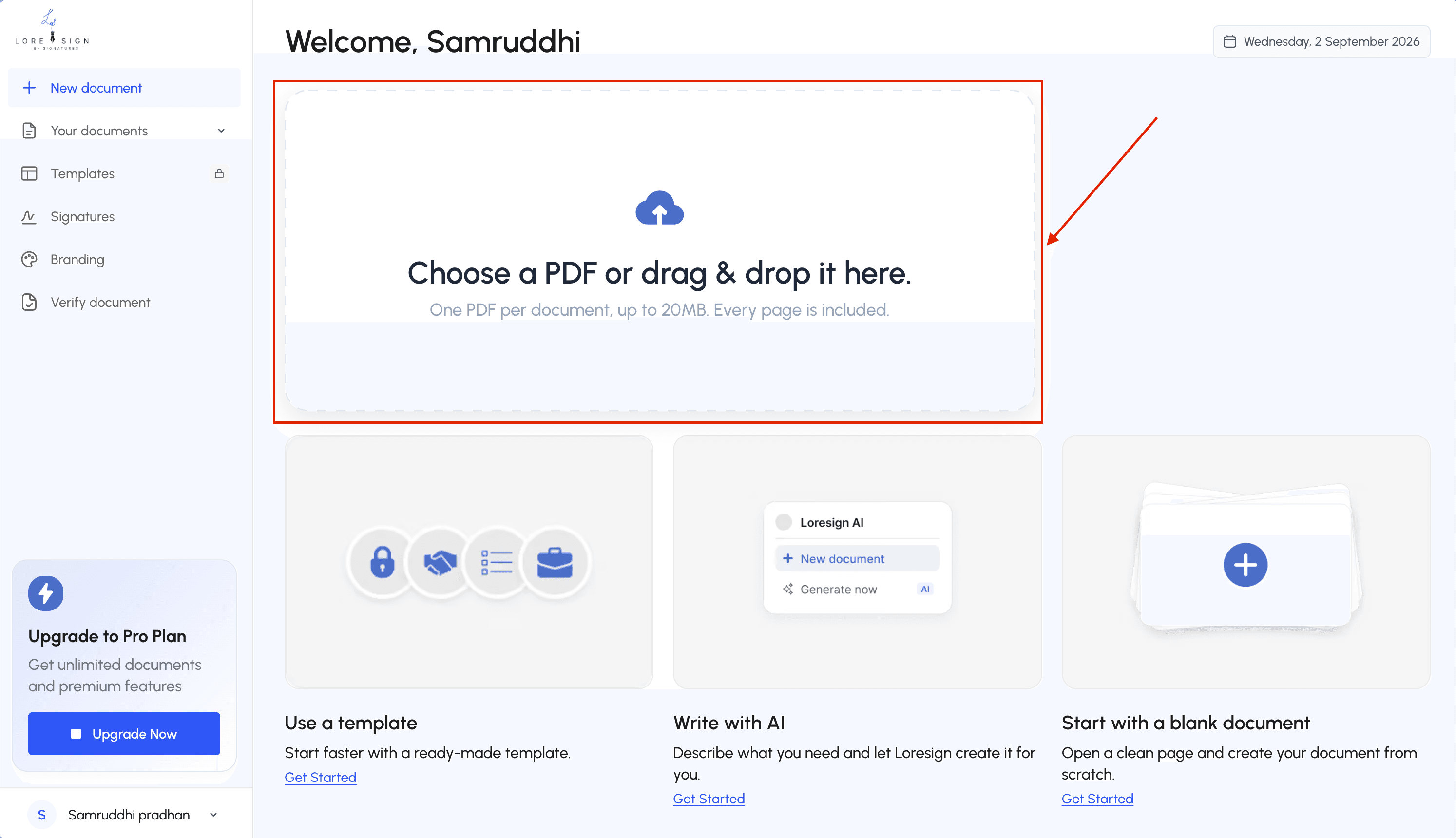
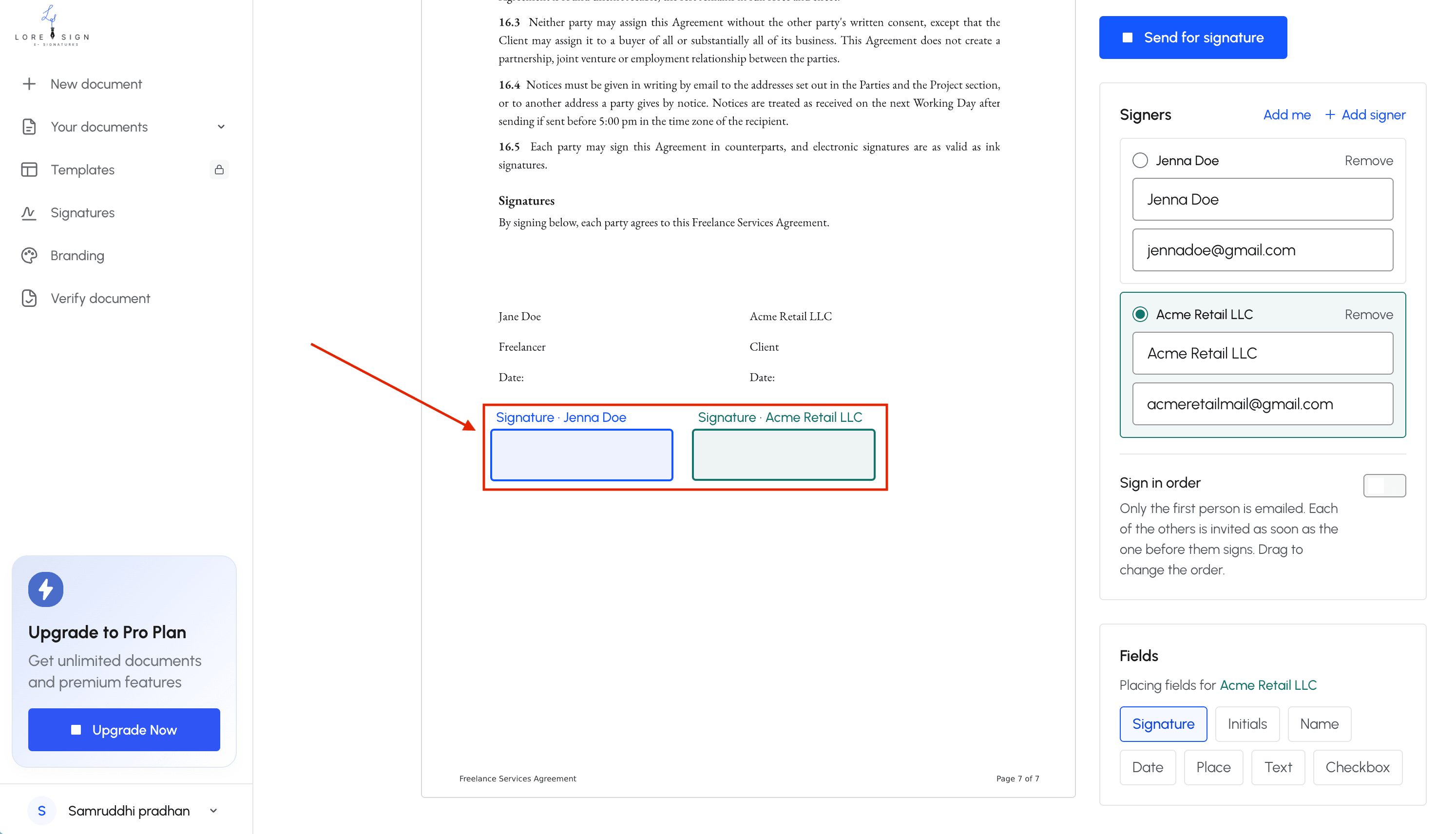
Step 3: Add signature fields and send
Drag a signature box onto the page where each person signs. Add name and date fields if you need them. Then enter the signer's email and send. They get a secure link. No account required on their end.
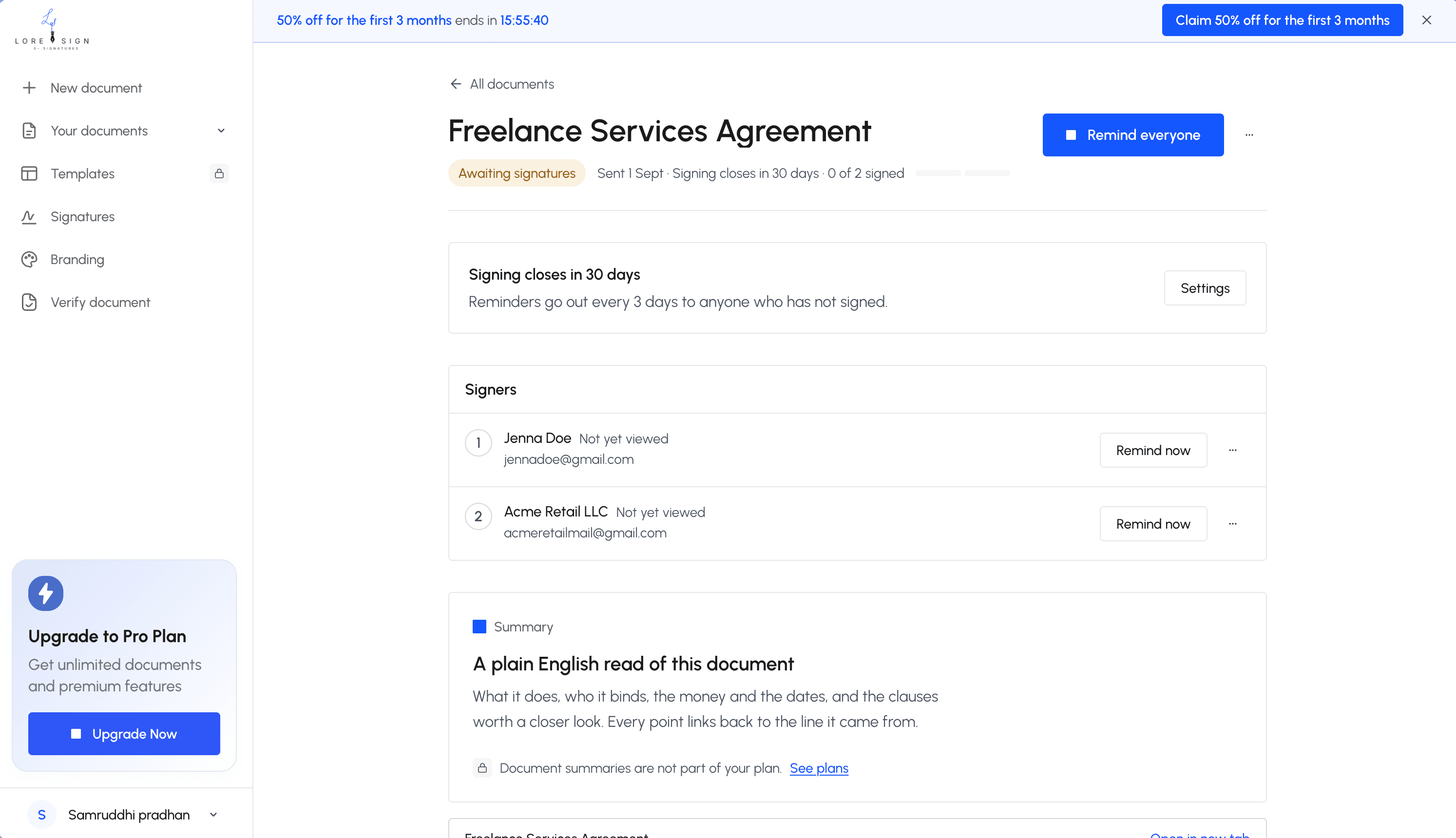
Step 4: Track and store the signed document
You'll see who has signed and who hasn't. Most tools send automatic reminders. Once everyone signs, the completed PDF is delivered to your inbox with a certificate of completion and an audit trail.
What You Cannot Do with E-Signatures
E-signatures are not a universal key. Some documents still demand a wet signature or a digital signature with cryptographic backing, and no signing tool changes that.
Documents that may require wet signatures or digital signatures
Courts, wills, and certain government forms often reject basic e-signatures. Check the specific agency or court before you send. Highly regulated industries, like parts of healthcare and finance, may also require digital signatures or qualified electronic signatures under eIDAS.
Limitations of basic e-signature security
A typed name proves intent, not identity. It won't show whether the document changed after signing. Digital signatures add a tamper-evident seal; basic e-signatures don't. For everyday contracts, that's fine. For high-value or disputed documents, it isn't.
E-Signatures vs Digital Signatures: Which Should You Choose?
The short answer
For most people getting contracts, NDAs, and freelancer agreements signed, a simple e-signature is enough. It's legally valid, faster to set up, and costs less. Digital signatures matter only when a specific regulation or high-assurance scenario demands cryptographic proof of identity and document integrity.
When to upgrade to digital signatures
Upgrade when the document's evidentiary weight matters more than convenience. That means certain government filings, regulated healthcare or finance transactions, and high-value deals where a dispute is likely. If someone could challenge the signature in court and you need to prove the document didn't change, a digital signature earns its cost.
For everything else, don't overthink it. Pick an e-signature tool, upload the PDF, place the fields, and send the link. The e-signatures vs digital signature debate ends where your actual risk does.
Frequently Asked Questions
Are e-signature and digital signature the same?
No. An e-signature is any electronic mark that shows intent to sign, such as a typed name or a drawn signature. A digital signature is a specific type of e-signature that uses cryptography and a digital certificate to verify the signer and detect tampering.
How can I create an e-signature?
Most e-signature tools let you type your name, draw your signature, or upload an image of it. You then place signing fields on the document and send a secure link to the other parties. The completed document is returned to you automatically once everyone has signed.
Is an e-signature legally valid?
Yes, in most countries e-signatures are legally valid for a wide range of contracts and agreements. Some specific documents, such as certain wills, court filings, or regulated forms, may require a digital signature or a wet-ink signature — check the rules for your document type.
Can you give me an example of a digital signature?
A common example is a PDF signed with a certificate issued by a certificate authority, where the signature is embedded in the file and shows a green check or similar indicator in Adobe Reader. Another example is a document signed through a government or enterprise portal that requires a digital certificate.
Do I need a digital signature for a contract?
In most everyday business situations, no. A standard e-signature with an audit trail and certificate of completion is sufficient for contracts, NDAs, and client agreements. You only need a digital signature when a specific regulation, counterparty, or jurisdiction requires it.
What is the difference between e-signature and digital signature in Adobe?
In Adobe, an e-signature typically refers to the fill-and-sign workflow where you type or draw your signature. A digital signature in Adobe uses a digital ID (certificate) to cryptographically sign the PDF, which provides stronger identity verification and tamper detection.
Can I use an e-signature for international contracts?
Yes, many countries recognize e-signatures under laws similar to the US ESIGN Act and the EU eIDAS regulation. However, requirements vary, so for cross-border agreements it's wise to confirm whether the other party or local law expects a specific signature type.
About LoreSign
LoreSign helps For people looking to get documents and contracts signed. get this right. Track every signer and receive the completed document automatically. Whether you are working through e signatures vs digital signature or something adjacent, we publish what we have actually tested, including where it falls short.