E-Signatures Have Made the Handwritten Signature Extinct Or Have They?
E-signatures have made the handwritten signature extinct in most workflows, but the claim breaks down the moment you need a notary, a court filing, or a government form that still demands ink. For small business owners, freelancers, and anyone in the United States who signs contracts, leases, and agreements regularly, the honest question isn't whether ink is dead. It's where ink still matters and where it doesn't.
The good news is that the legal shift is real. The ESIGN Act and UETA made electronic signatures as enforceable as wet ink in most commercial and personal transactions. A typed name, a drawn signature on a screen, a click-to-sign button. All of them can bind you, provided consent and intent are clear. LoreSign handles the practical side: upload a PDF, place signing fields, send one secure link, and get the completed document back automatically.
| At a glance | Details |
|---|---|
| Legal status | E-signatures valid under ESIGN and UETA |
| Handwritten status | Declining but not extinct |
| Still required for | Notarization, certain court and agency filings |
| Best for speed | E-signatures for most business contracts |
| Audit proof | Certificate of completion plus audit trail |
| Verification | Public verification page on every plan |
In This Guide
- What Is a Handwritten Signature?
- Handwritten Signature vs Electronic Signature: What Actually Changed?
- What Is an E-Signature?
- E-signatures Have Made The Handwritten Signature Extinct: A Step-by-Step Guide
- Are E-Signatures Legally Valid?
- Handwritten Signature vs E-Signature: A Direct Comparison
- How to Get Documents Signed Electronically: A Step-by-Step Guide
- When You Still Need a Handwritten Signature
- Common Mistakes When Using E-Signatures
- Is the Handwritten Signature Actually Extinct?
What Is a Handwritten Signature?
A handwritten signature is any mark you make by hand on paper with the intent to authenticate a document. It doesn't have to be legible. It doesn't have to be your name. A scrawl, an X, a stylized flourish all count. What matters is intent.
The legal definition of a wet ink signature
Legally, a wet ink signature is a physical mark made by a person on a document to show agreement or approval. Courts don't require it to match a sample perfectly. They look at whether you made the mark and whether you meant to sign. That's the whole test.
Why handwritten signatures became the standard
Paper was the only game for centuries. If you wanted to bind yourself to a contract, you had to put ink on the page. There was no alternative. The signature became the default because it was the only option, not because it was especially secure. Forgery has always been possible. A signature just gives you a starting point for proving who agreed to what.
The ESIGN Act and UETA give electronic signatures the same legal effect as handwritten ones for most contracts, but they do not override rules that specifically require a wet-ink signature, such as notarization or certain court and government filings.
Handwritten Signature vs Electronic Signature: What Actually Changed?
| Factor | Handwritten Signature | Electronic Signature |
|---|---|---|
| Legal validity | Valid everywhere; the traditional default | Valid for most documents under ESIGN and UETA |
| Speed | Days to weeks with printing and mailing | Minutes once the document is uploaded and sent |
| Tracking | No built-in tracking; relies on follow-up | Track every signer and receive the completed document automatically |
| Still required | Notarization, certain court and agency filings | Not accepted for some wills, adoptions, and specific filings |
| Proof of signing | Wet-ink original, if you keep it | Certificate of completion plus audit trail |
What Is an E-Signature?
An e-signature is any electronic mark you make with intent to sign a document. It can be a typed name, a drawn signature on a screen, a click-to-sign button, or an uploaded image of your handwritten signature. The form doesn't matter. What matters is that you meant to sign and the other party agreed to accept it electronically.
Electronic signature vs digital signature: what's the difference?
People use these terms interchangeably. They're not the same thing.
An electronic signature is the broad category. It's your intent to sign, captured electronically. A digital signature is a specific type of e-signature that uses encryption to verify the signer's identity and detect tampering. Think of it this way: every digital signature is an e-signature, but not every e-signature is a digital signature. Most e-signature tools handle the encryption behind the scenes, so you don't need to know the difference to sign a contract.
Common types of e-signatures
The most common form is a typed name at the bottom of an email or document. Click-to-sign buttons work the same way: you check a box or click "I agree" and that's your signature. Drawn signatures on a touchscreen or trackpad mimic ink but are still electronic. Uploaded images of your handwritten signature are also e-signatures, though they offer no real security benefit over a typed name.
Can a handwritten signature be electronic? Yes, if you scan it or photograph it and attach it to a document. The moment it becomes a digital file, it's an e-signature.
If you send the same type of contract often, save it as a template with the signing fields already placed—Starter includes 3 templates, and Pro and Business include unlimited templates—so you can send the next one in minutes instead of rebuilding it.
E-signatures Have Made The Handwritten Signature Extinct: A Step-by-Step Guide with Loresign
Software For E Signatures: A Step-by-Step Guide using LoreSign
Step 1: Go to LoreSign and create an account.
Software For E Signatures: A Step-by-Step Guide using LoreSign
** Step 1:** Go to LoreSign and create an account.
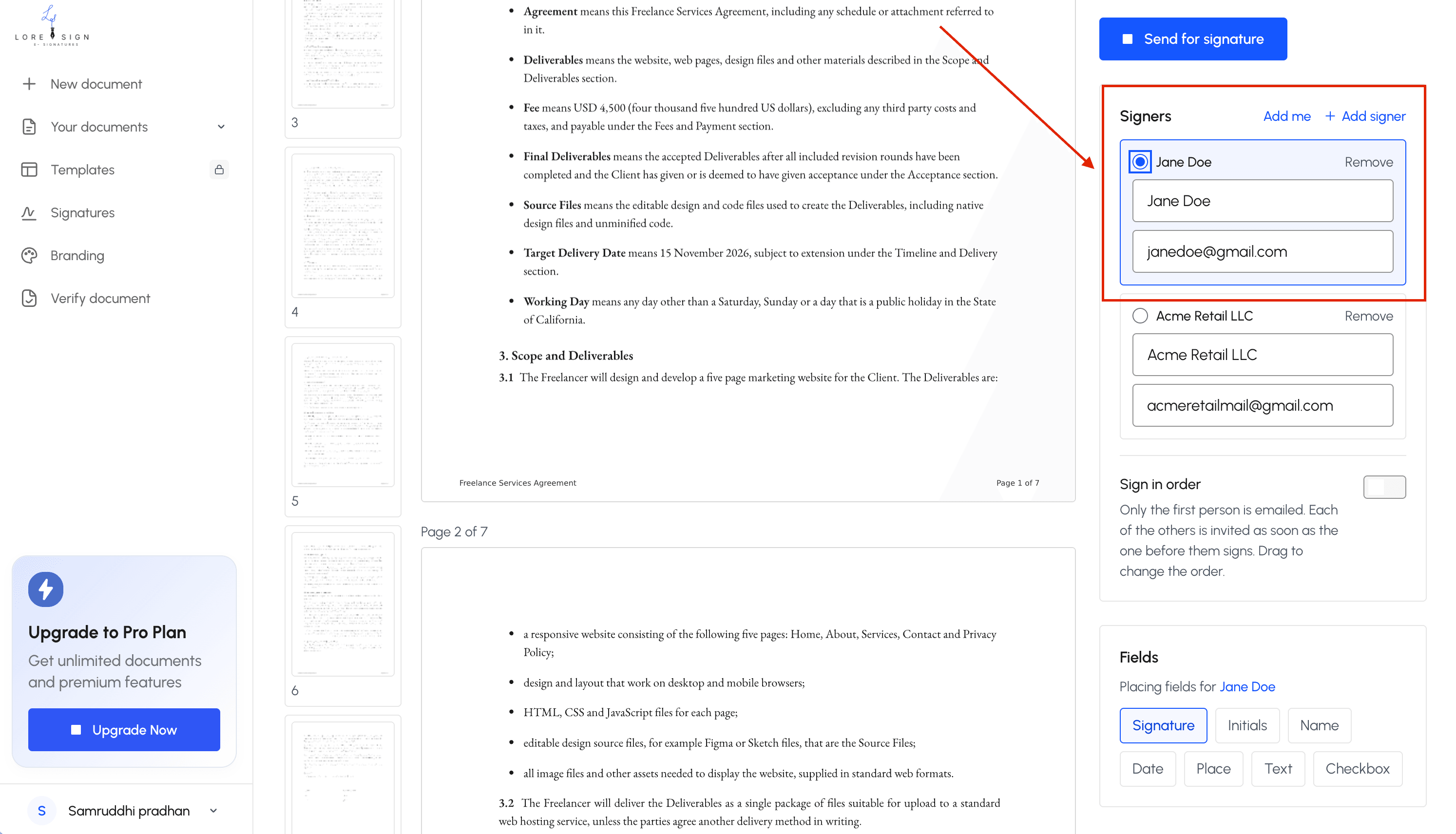
Step 2: Upload the PDF or document you need signed.
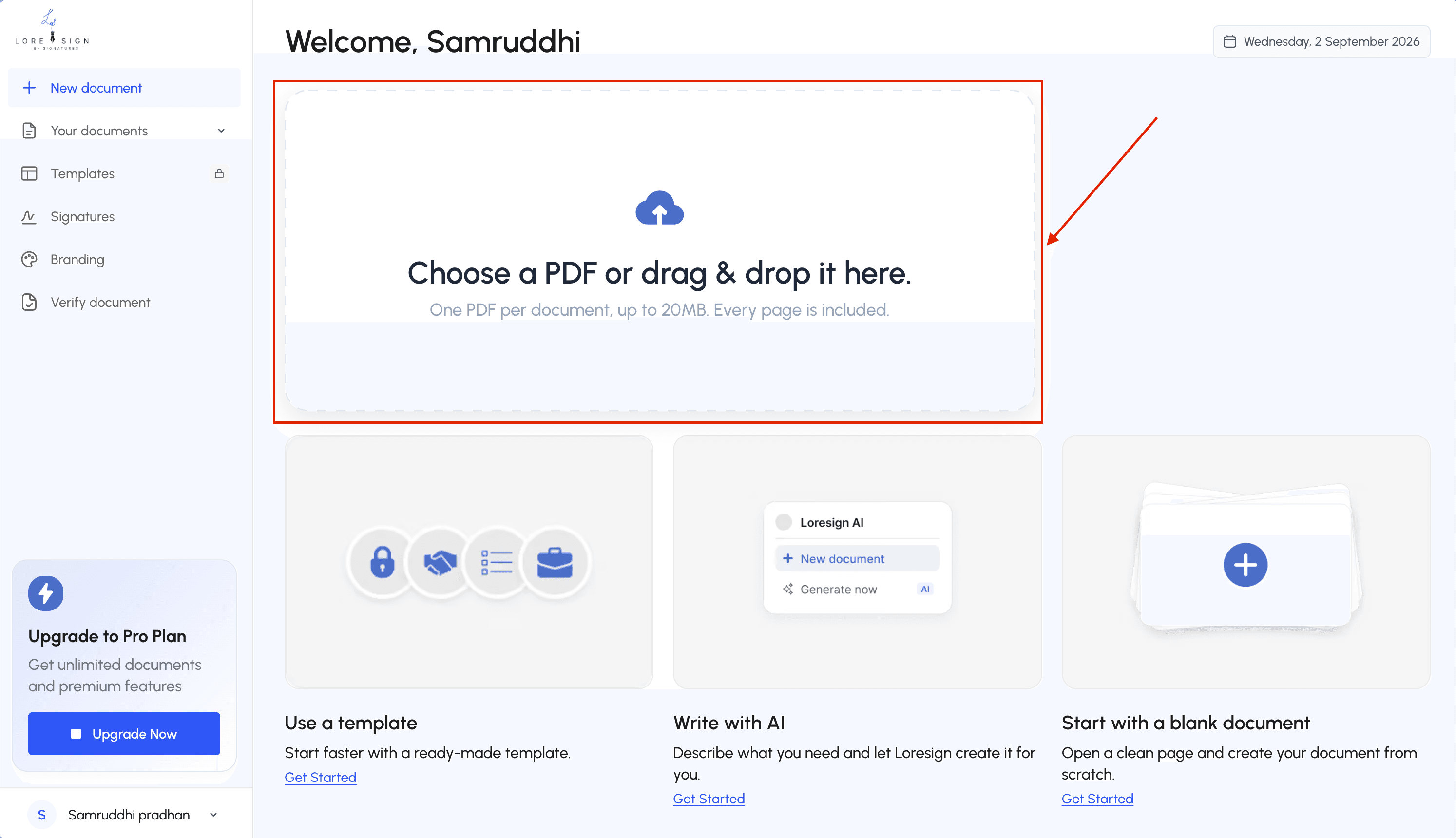
Step 3: Add the signer's name and email address, and set the signing order if multiple people are involved.
Step 4: Place the signing fields (signature, date, initials) where they belong.
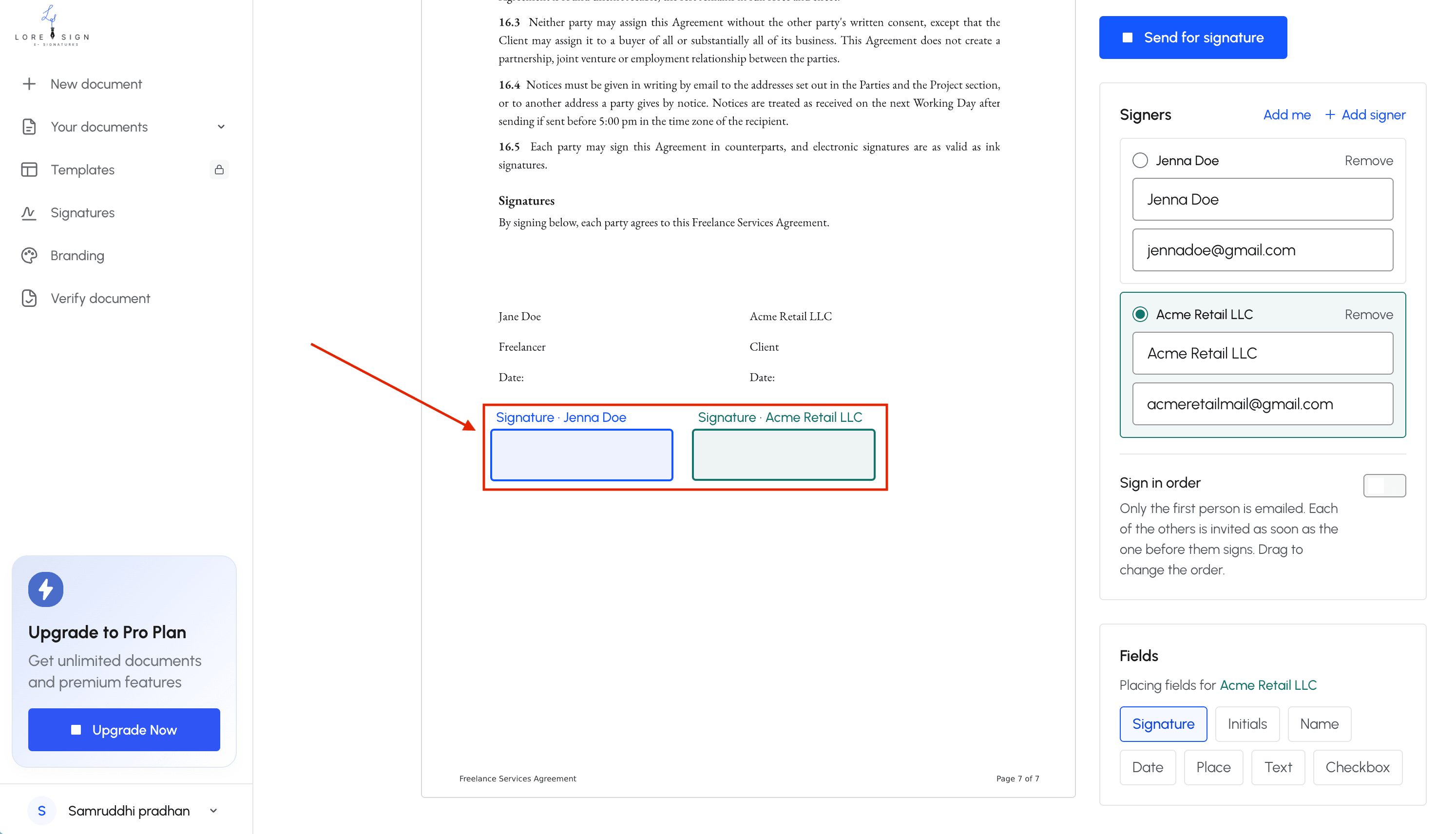
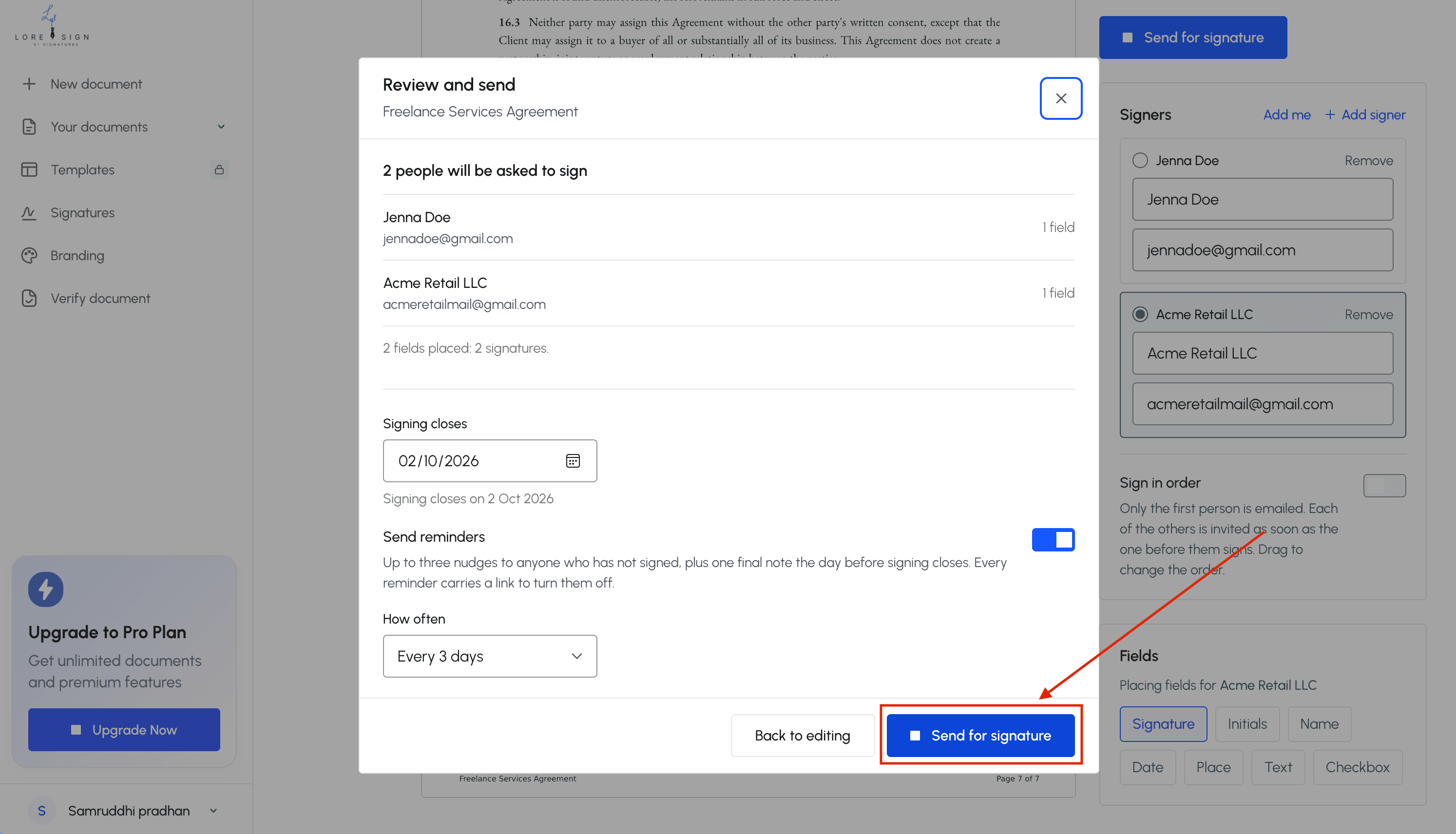
Step 5: Send the secure link the signer receives an email with instructions.
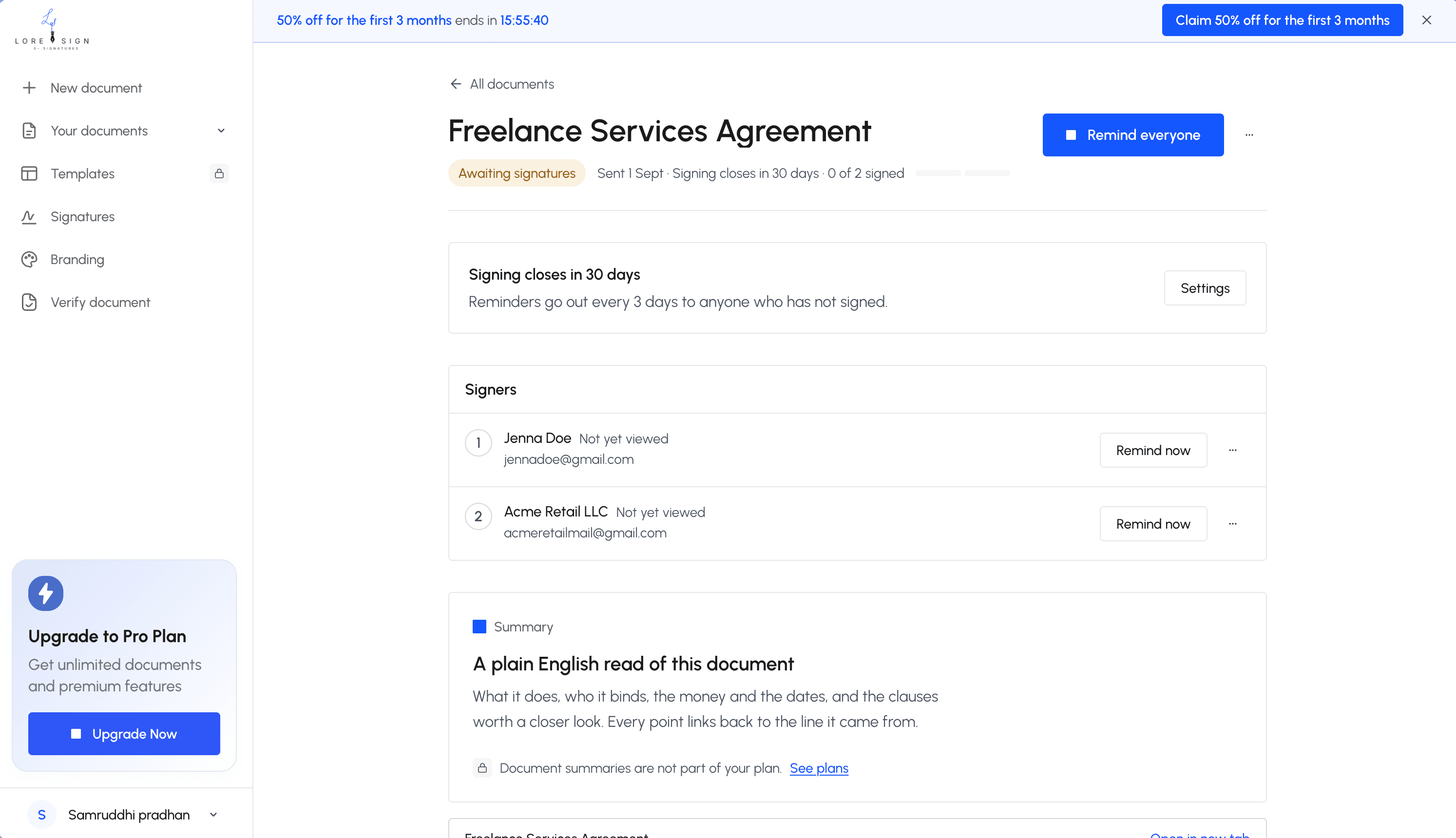
Step 6: Track progress and send reminders if needed.
Step 7: Receive the completed, signed PDF automatically once everyone has signed.Keep the certificate of completion and audit trail for your records, and share the public verification page if a third party needs to confirm it.
Are E-Signatures Legally Valid?
Yes. In the United States, e-signatures are generally as legally valid as handwritten signatures. The ESIGN Act (2000) and UETA give electronic signatures the same legal weight as ink, as long as both parties agree to sign electronically and the record can be retained.
The ESIGN Act and UETA explained
Two laws govern e-signatures in the US. The ESIGN Act is federal, passed in 2000. It says a signature can't be denied legal effect just because it's electronic. UETA is the state-level version, adopted by 47 states, Washington DC, and the US Virgin Islands. The three states that haven't adopted UETA (New York, Illinois, and Washington) have their own statutes that do the same thing.
Both laws work on the same principle: an electronic record satisfies any law that requires a writing, and an electronic signature satisfies any law that requires a signature. The form of the mark doesn't matter. A typed name, a click, a drawn signature on a screen, all count.
What makes an e-signature legally binding?
Four things have to be true.
First, intent. The person signing has to mean to sign. Clicking "I agree" after reading a contract shows intent. So does typing your name in a signature field.
Second, consent. Both parties have to agree to do business electronically. Most e-signature tools handle this with a consent checkbox or a disclosure statement before signing.
Third, attribution. You have to be able to show who signed. E-signature tools log the signer's email address, IP address, and timestamp. That's the audit trail.
Fourth, record retention. The signed document has to be accessible and reproducible. The signer needs to be able to download or print a copy.
If all four are met, the e-signature holds up in court the same way a wet ink signature does.
When courts have rejected e-signatures
Courts don't reject e-signatures because they're electronic. They reject them when one of the four elements is missing. No consent. No audit trail. No way to prove who actually clicked. A signature pasted onto a document with no record of who did it or when is easy to challenge.
The honest answer is that e-signatures are valid when the process around them is sound. The signature itself is rarely the problem.
Handwritten Signature vs E-Signature: A Direct Comparison
The difference comes down to friction. A handwritten signature needs paper, a pen, and physical presence or mail. An e-signature needs a device and an internet connection. Everything else follows from that.
Speed and convenience
A handwritten signature takes days when mail is involved. Print, sign, scan, email back, or worse, courier it. An e-signature takes minutes. You send a link, the signer opens it on their phone, and the document is done. For a contract with three signers in different states, ink can take a week. E-signature takes an afternoon.
Security and authentication
Here's the counterintuitive part: e-signatures are often harder to forge than ink. A handwritten signature is just a mark. Anyone can copy it. An e-signature comes with an audit trail: email address, IP address, timestamp, and a record of every action taken on the document. That's evidence a wet ink signature doesn't produce on its own.
The catch is that a basic e-signature doesn't verify identity the way a notary does. It proves a specific email account clicked sign. It doesn't prove who was holding the phone.
Legal validity and enforceability
Both are legally valid in the US. The ESIGN Act and UETA put them on equal footing. The difference is in how easy each is to challenge. A handwritten signature can be disputed with a handwriting expert. An e-signature can be disputed by claiming someone else accessed the email account. The audit trail usually settles it faster than a handwriting analysis.
Cost and environmental impact
Ink costs paper, printing, postage, and storage. For a business sending 20 contracts a month, that's real money and real filing cabinets. E-signatures cost a monthly subscription and nothing per document. No paper, no toner, no courier fees.
The environmental side is straightforward: fewer printed pages, fewer envelopes, fewer delivery trucks. Not the main reason to switch, but it's not nothing.
How to Get Documents Signed Electronically: A Step-by-Step Guide
The workflow is the same whether you're sending a freelance contract, a lease agreement, or a service form. You prepare the file, add signature fields, send a link, and wait for the signer to click. Here's the exact process.
Step 1: Prepare your document
Start with a final PDF. Don't send a Word file that can shift formatting when opened on another device. Export to PDF first, then check that every blank line, date field, and signature block is where you want it. If the document needs initials on every page, mark those spots now. A messy source file means a messy signed document.
Step 2: Choose an e-signature tool
You need a tool that lets you upload a PDF, place signature fields, and send a link. LoreSign does this: upload any PDF, place the signing fields, and send one secure link. Other options exist, but the core requirement is the same. Pick one that gives you an audit trail and automatic delivery of the completed document once everyone signs. Don't pick a tool that makes signers create an account just to sign. That's friction you don't need.
Step 3: Upload and add signature fields
Upload the PDF and drag signature fields onto the page. Place a signature field where the signer signs, a date field where they date it, and text fields for printed name or other details. If you need multiple signers in a specific order, set the routing now. Ordered multi-signer routing means signer two doesn't get the link until signer one finishes.
Step 4: Send to signers
Enter the signer's email address and send. They get a link, open it on any device, and sign by typing, drawing, or uploading an image. You can add a message explaining what the document is. Automated reminders handle the follow-up if they don't sign within a few days.
Step 5: Track and store the signed document
You can see who has opened the document, who has signed, and who hasn't. Once everyone signs, the completed PDF is delivered to you automatically. Store it somewhere you can find it later. The certificate of completion and audit trail matter if the signature is ever challenged. Keep both with the signed document.
When You Still Need a Handwritten Signature
E-signatures cover most business and personal agreements. They don't cover everything. Some documents still require a pen, a notary's stamp, or a paper filing. If you send an e-signature link for one of these, the other party will reject it, or worse, accept it and find out later the document isn't enforceable.
Notarized documents
A notary verifies identity in person and witnesses the signature. That's the whole point. You can't replicate it with a click-to-sign link. Some states now allow remote online notarization, where the notary watches you sign over video and applies an electronic seal. But traditional notarization still means paper and ink in most places. Check your state's rules before assuming you can skip the notary visit.
Court filings and legal proceedings
Many courts accept e-filed documents with typed signatures. Many don't. Federal courts generally allow electronic signatures on filings through their e-filing systems, but some state and local courts still require wet ink on paper forms. Affidavits, sworn statements, and certain motions often need a handwritten signature plus notarization. If you're filing anything in court, check the local rules first. Don't guess.
Government forms and agencies
This is the messiest category. The IRS accepts e-signatures on most tax forms filed through approved software. The Social Security Administration accepts some electronic signatures but not others. Passport applications, certain immigration forms, and some state agency documents still require a physical signature. There's no single rule. Each agency sets its own policy, and those policies change.
Wills, trusts, and estate documents
Most states require a will to be signed in the presence of two witnesses, in ink. Some states have adopted electronic will statutes, but they're the minority. Even where electronic wills are legal, the requirements are strict and the risk of challenge is higher. For estate planning documents, the safe default is still paper and ink with witnesses present.
Industry-specific requirements
Real estate transactions are the big one. Some states allow e-signatures on deeds and mortgages. Others require wet ink for the deed itself even when the rest of the closing is electronic. Certain banking documents, insurance forms, and healthcare records also have industry-specific rules that override the general validity of e-signatures.
The honest answer is: check before you send. If the document involves a notary, a court, a government agency, or a will, assume you need ink until you confirm otherwise.
Common Mistakes When Using E-Signatures
Most e-signature failures aren't legal problems. They're process problems. You skip a step, use the wrong tool for the document, or lose the evidence you need later. Here are the mistakes that actually cost people.
Skipping consent or disclosure
The ESIGN Act requires the other party to consent to doing business electronically. You can't just email a link and assume consent is implied. Most e-signature tools handle this with a checkbox or a "click to agree" step before signing. If you're sending documents yourself without a tool, include a line stating the signer agrees to sign electronically. Without it, the signature can be challenged.
Using e-signatures where ink is required
We covered this in the previous section. But it's the most common mistake, so it bears repeating. If the document needs a notary, a court filing, or a government stamp, an e-signature won't work. Sending one anyway wastes days and can invalidate the document. Check the requirements first.
Failing to retain an audit trail
The signature itself is only half the evidence. The audit trail shows who signed, when they signed, and from what IP address. If you use a tool like LoreSign, the audit trail is generated automatically. If you're collecting signatures through email or a shared drive, you have no audit trail. When a dispute arises, you'll need it.
Why PDF signatures disappear or become unreadable
This happens for two reasons. First, some PDF viewers don't render digital signature fields correctly, especially older versions of Adobe Reader or third-party mobile apps. The signature is there, but the viewer can't display it. Second, if you flatten a PDF after signing, the signature layer gets merged into the document and can become distorted or invisible. The fix is to use a tool that generates a proper digital signature field, not an image pasted on top of the page. And don't flatten signed PDFs unless you have to.
Is the Handwritten Signature Actually Extinct?
No. The handwritten signature is not extinct. It has been displaced as the default for most business and personal agreements, but it still exists and still carries legal weight in specific contexts. The shift is behavioral, not legal.
What has actually changed
The default changed. Twenty years ago, signing a contract meant printing it, signing with a pen, scanning it, and emailing it back. Today, most people click a button or type their name. That's the real shift. The handwritten signature went from being the only option to being one option among several.
The speed difference drove this. A contract that took three days to sign by mail now takes minutes. When both parties are remote, ink is a bottleneck. E-signatures removed the bottleneck. So businesses and individuals moved to them not because ink stopped working, but because it stopped being convenient.
What hasn't changed
The legal status of a handwritten signature hasn't changed. A wet ink signature is still valid on any document where it was valid before. No law eliminated it. The ESIGN Act and UETA didn't replace ink; they added electronic signatures as an equivalent option. The handwritten signature lost market share, not legal standing.
What also hasn't changed: certain institutions still demand ink. Notaries, some courts, and specific government agencies require a physical signature. That's not nostalgia. It's a requirement tied to the document type, not the signature's quality.
The future of handwritten signatures
The honest answer is that handwritten signatures will keep shrinking in everyday use but won't disappear. They'll persist where identity verification or physical presence matters: notarized documents, certain estate paperwork, some real estate closings. Everywhere else, e-signatures have made the handwritten signature the exception rather than the rule.
So the claim that e-signatures have made the handwritten signature extinct is mostly right in practice and wrong in law. The signature didn't die. It just stopped being the default.
Frequently Asked Questions
Can a handwritten signature be electronic?
A handwritten signature can be captured electronically in two common ways: drawing it with a finger, stylus, or mouse on a touchscreen, or typing a name and applying it as an e-signature. Both are generally treated as electronic signatures, and their validity depends on the document and jurisdiction rather than the method itself.
Why does my PDF signature keep disappearing?
A disappearing signature usually means the PDF was edited or re-saved after signing, or the signature was added as a temporary annotation rather than a locked field. Using a dedicated e-signature tool that flattens the signed document and issues a certificate of completion prevents this problem.
Is an e-signature legally valid?
Yes, for most contracts and agreements in the United States. The ESIGN Act and UETA give electronic signatures the same legal effect as handwritten ones, provided the signer intends to sign and can access the record. Some documents, like certain wills and court filings, still require a handwritten or notarized signature.
Why are signatures unreadable?
Many people sign quickly or use a stylized mark rather than writing their name clearly, and that has always been true of handwritten signatures. What matters legally is intent to sign and the ability to attribute the signature to a person, which is why audit trails and certificates of completion matter more than legibility.
When do I still need a handwritten signature?
You typically still need a handwritten signature when a document must be notarized, when a specific court or government agency requires a wet-ink original, or when state law excludes a document type from electronic signature rules. Common examples include certain wills, adoption papers, and some real estate filings.
What is the difference between a physical signature and an electronic signature?
A physical signature is applied with ink on paper, while an electronic signature is applied digitally to a document. Both can be legally binding, but electronic signatures add tracking, automated reminders, and a certificate of completion that a paper signature does not provide.
How do I prove a document was signed electronically?
Use a tool that generates a certificate of completion and an audit trail showing who signed, when, and from what IP address. A public verification page lets a third party confirm the document's authenticity without contacting you directly.
About LoreSign
LoreSign helps For people looking to get documents and contracts signed. get this right. Track every signer and receive the completed document automatically. Whether you are working through e-signatures have made the handwritten signature extinct or something adjacent, we publish what we have actually tested, including where it falls short.