E Signatures Value Proposition: An Honest Guide for People Who Need Documents Signed
You need a contract signed, and you're deciding whether to send it electronically.
You've probably heard that e-signatures are faster and easier. You may also have heard concerns about whether they are legally valid or secure enough for important agreements.
The e signatures value proposition is fairly simple: electronic signing can reduce the time and administrative work involved in getting documents completed, while also creating a clearer record of the signing process.
But that doesn't mean e-signatures are right for every document.
This guide explains where electronic signatures work well, where they fall short, and what freelancers and small businesses should consider before replacing paper signing with a digital workflow.
E Signatures at a Glance
| Question | Quick answer |
|---|---|
| Are e-signatures legally recognized? | Yes, for many agreements in the US under the ESIGN Act and applicable state electronic-transactions laws |
| Best suited for | Contracts, NDAs, service agreements, consent forms, and remote business agreements |
| May not be suitable for | Certain wills, court documents, property transactions, or documents with special formalities |
| What does the signer need? | Usually an email or signing link, internet access, and a browser |
| Typical sender setup | Upload the document, add fields, add recipients, and send |
| What evidence can be recorded? | Timestamps, signer activity, IP data, document history, and completion records depending on the platform |
| Main advantage | Faster signing without printing or mailing |
| Main limitation | Legal requirements and signer preferences still vary |
What Is an E-Signature?
An e-signature is an electronic action used to show that someone intends to sign or agree to a document.
That can include:
- Typing a name
- Drawing a signature with a mouse or finger
- Uploading an image of a handwritten signature
- Clicking an agreement button
- Completing a signing process through an e-signature platform
The important part is not whether the signature looks handwritten.
What matters is the intent behind the signing action and the evidence around it.
E-Signature vs. Digital Signature
These terms are often used interchangeably, but they refer to different things.
| Factor | E-Signature | Digital Signature |
|---|---|---|
| Primary purpose | Capture intent to sign | Verify integrity and authenticity |
| What you see | Typed, drawn, uploaded, or electronic signature action | Usually works behind the signing process |
| Focus | Agreement | Security and verification |
| Typical use | Everyday contracts and agreements | Higher-assurance or certificate-based workflows |
A simple way to think about it is:
E-signature = the act of signing.
Digital signature = a technical method that can help verify and protect a signed document.
Not every e-signature platform uses the same security model, so the exact protections depend on the tool and workflow being used.
What Does "Intent to Sign" Mean?
The appearance of a signature is usually only one piece of evidence.
A signing process may also show that someone:
- Received the document.
- Opened the signing request.
- Reviewed the agreement.
- Took a deliberate action to sign.
- Submitted the completed document.
That surrounding activity can help show that the person intended to sign the agreement.
[!note]
Electronic signatures are recognized for many common agreements, but some documents have additional legal, witnessing, notarization, or jurisdiction-specific requirements. Always check the requirements that apply to your document.
E-Signature vs. Wet Signature vs. Digital Signature
Different signing methods solve different problems.
| Factor | E-Signature | Wet Signature | Digital Signature |
|---|---|---|---|
| Format | Electronic | Ink on paper | Cryptographic signing method |
| Remote signing | Easy | Difficult | Easy |
| Automatic signing evidence | Often available | Usually limited | Strong technical verification |
| Printing required | No | Usually | No |
| Best for | Everyday remote agreements | Documents requiring physical execution | Higher-assurance workflows |
| Typical friction | Low | Higher | May involve extra technical steps |
The best method depends on the document, the people signing it, and any legal or institutional requirements involved.
Why Signatures Matter
A signature creates evidence that someone agreed to a document.
In practical terms, it can help establish three things:
- Intent: the person meant to take the signing action.
- Agreement: they accepted the terms.
- Accountability: there is evidence connecting them to the document.
That basic purpose applies whether the signature is handwritten or electronic.
What a Signature Can — and Cannot — Prove
A signature can provide evidence that someone signed.
It does not automatically prove that the person:
- Read every sentence carefully.
- Understood every clause.
- Was not pressured into signing.
- Had authority for every possible transaction.
That is why the signing process matters.
For electronic agreements, useful supporting evidence may include:
- When the document was sent
- When it was opened
- When fields were completed
- Which email address received the request
- When signing was completed
- Which version of the document was signed
- Completion or audit records
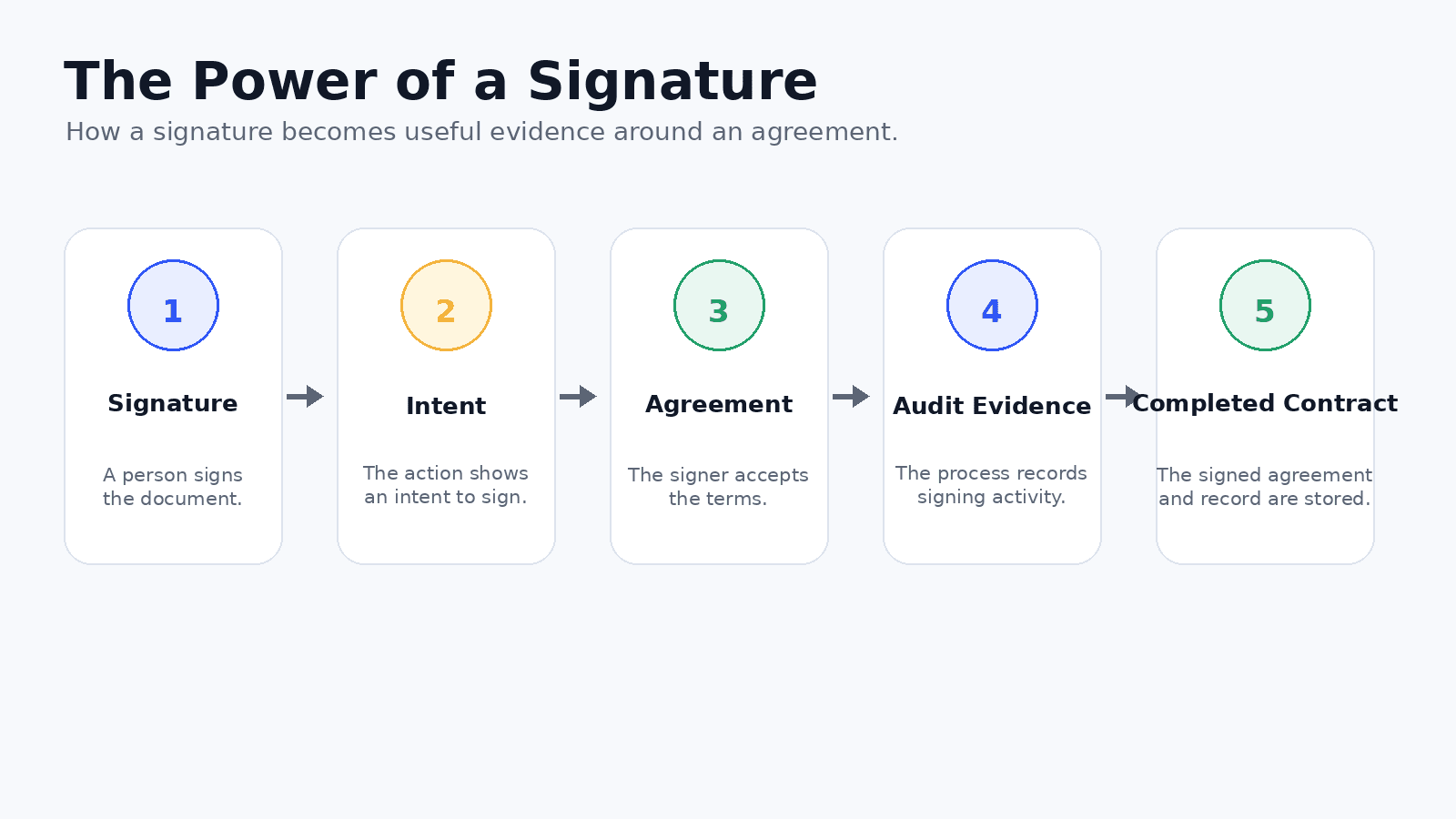
The value is not just the visual signature.
It is also the evidence trail created around the transaction.
Diagram to add: Signature → Intent → Agreement → Audit Evidence → Completed Contract
[!tip]
Test the signing experience on both desktop and mobile before sending an important document.
How an E-Signature Workflow Works
A typical electronic signing workflow can be broken into seven steps.
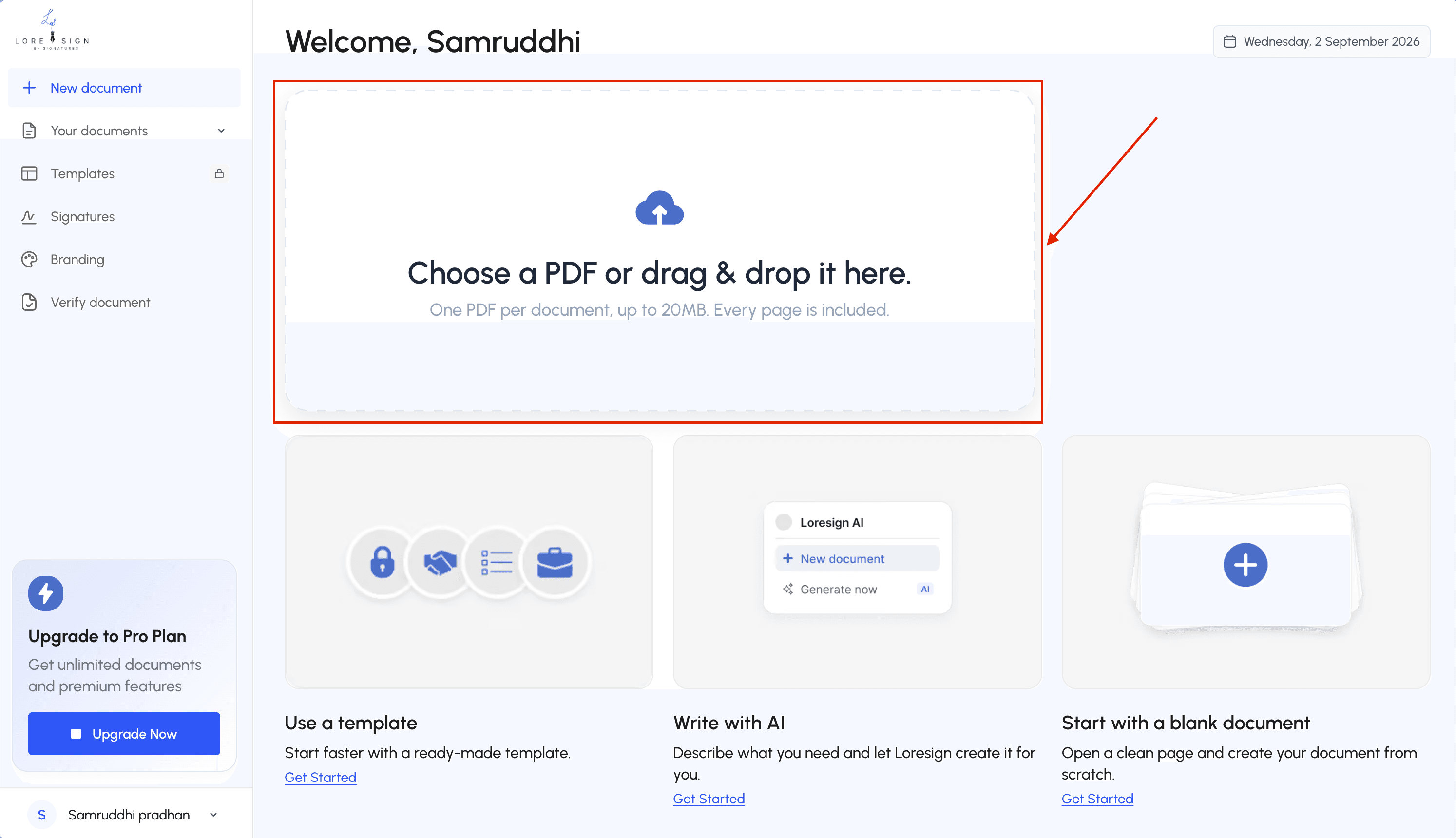
1. Prepare the document
Upload an existing PDF or create the agreement inside your signing platform.
2. Add signing fields
Place the fields each recipient needs to complete.
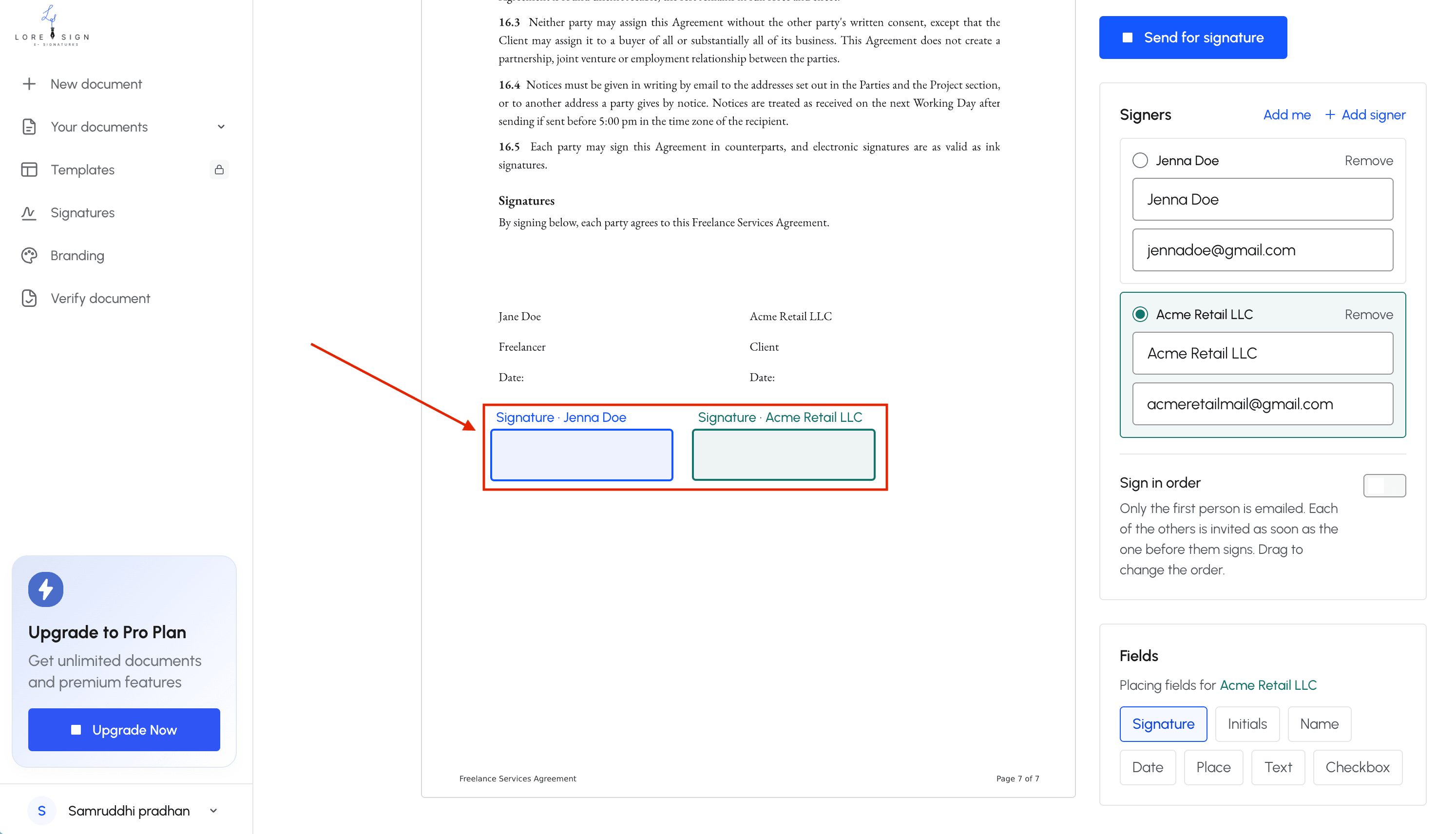
These might include:
- Signature
- Name
- Date
- Initials
- Text fields
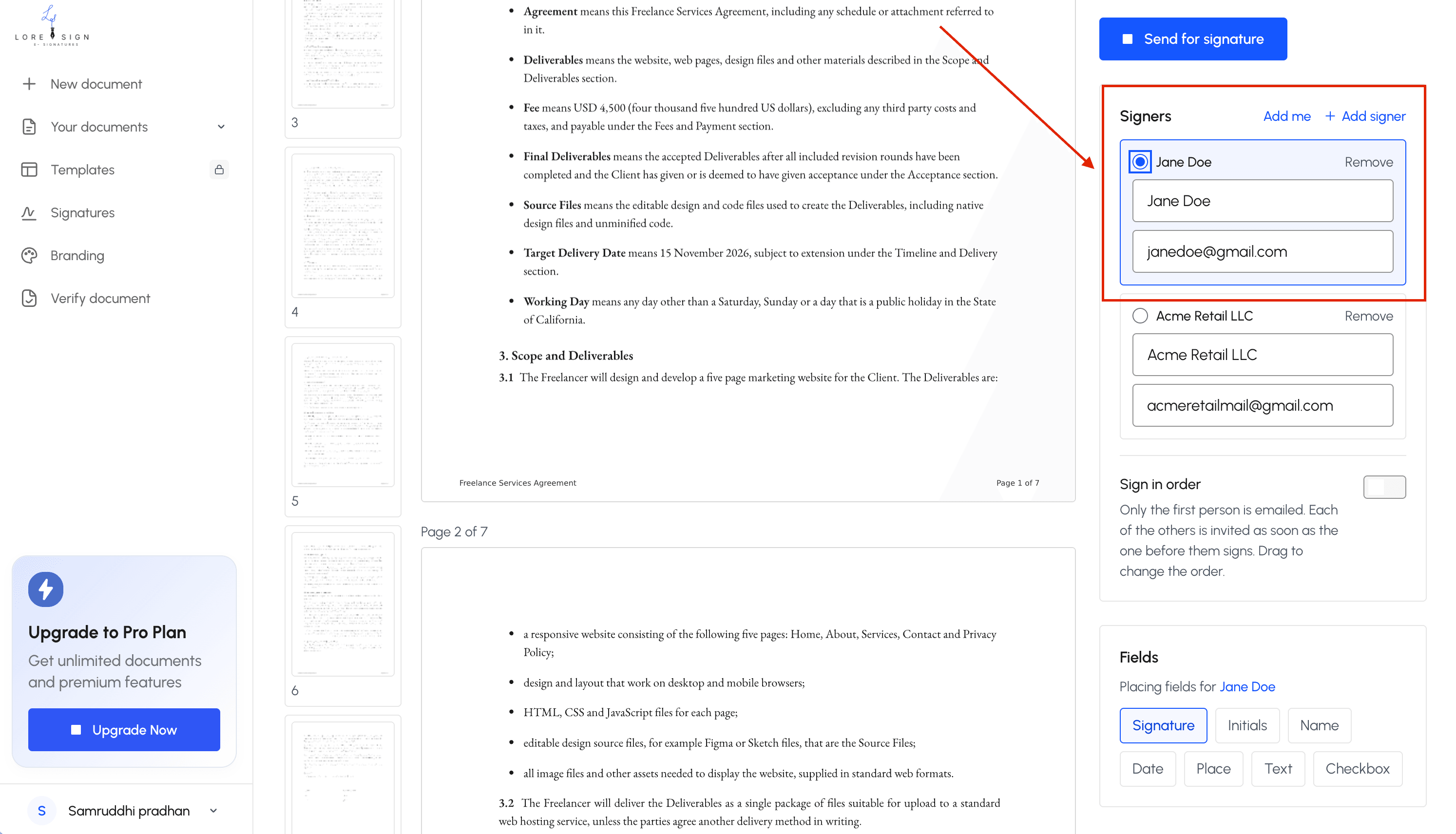
3. Add recipients
Enter each signer's details.
If people need to sign in a particular order, configure the sequence before sending.
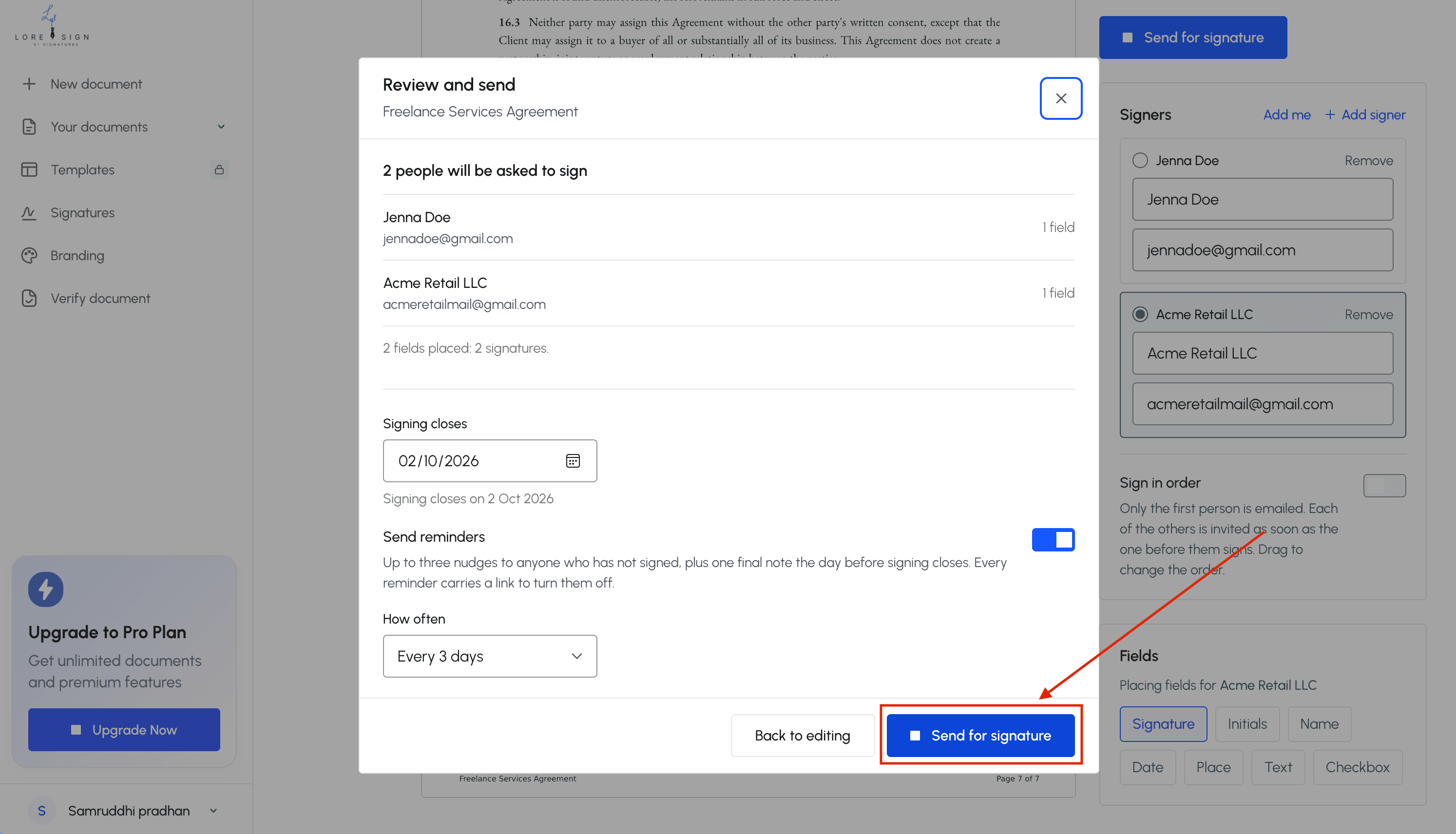
4. Send the document
Each recipient receives an email or signing link.
5. The recipient signs
The signer opens the document, reviews it, completes the required fields, and applies their signature.
6. Track outstanding signatures
The sender can typically see whether the document has been sent, opened, or completed.
Some platforms can also send reminders to recipients who have not signed.
7. Store the completed document
Once all required parties have signed, the completed agreement can be stored along with its completion or audit records.
Diagram to add: Upload → Add Fields → Add Signers → Send → Sign → Track → Completed Document
The E Signatures Value Proposition: What You Actually Get
The e signatures value proposition can be reduced to four main benefits:
| Value | What changes |
|---|---|
| Speed | Documents move between parties without physical delivery |
| Lower administrative effort | Less printing, scanning, mailing, filing, and chasing |
| Evidence | Digital signing activity can create a record around the transaction |
| Accessibility | People can sign from different locations and devices |
1. Time: Fewer Physical Handoffs
A traditional signing process might look like this:
Print → Sign → Scan → Email → Print → Sign → Scan → Return
Or:
Print → Package → Mail → Wait → Sign → Mail back
Electronic signing removes many of those steps.
For a freelancer waiting to start work or a business waiting for approval, a shorter signing process can reduce delays before the actual work begins.
2. Cost: Less Printing and Administration
One paper contract does not cost much.
But the costs begin to add up when the process is repeated across many agreements.
Paper-based signing can involve:
- Paper
- Ink
- Envelopes
- Postage
- Courier fees
- Physical storage
- Filing
- Staff time
Electronic signing does not eliminate every cost because some platforms charge subscription fees.
The value comes from reducing repeated administrative work.
3. Evidence: More Than a Signature Image
A handwritten signature gives you a signed document.
An electronic signing workflow can give you the document plus a record of the signing activity.
Depending on the platform, that record may include:
- Sender information
- Recipient information
- Timestamps
- Signing events
- IP information
- Document history
- Completion certificates
- Tamper detection
That does not prevent every dispute.
It can, however, provide more evidence about how the agreement was executed.
4. Accessibility: Sign From Almost Anywhere
Electronic signing removes the need for everyone to be in the same place.
A client can sign from home.
A contractor can sign from a job site.
A freelancer can send an agreement from a laptop.
A customer can complete it from a phone.
That flexibility is one of the clearest practical benefits of electronic signing.
Paper Signing vs. E-Signing Workflow
The difference becomes clearer when the workflows are compared side by side.
| Paper workflow | E-signature workflow |
|---|---|
| Prepare document | Prepare document |
| Print document | Upload document |
| Deliver or email PDF | Add signer fields |
| Sign by hand | Send signing link |
| Scan or mail back | Sign online |
| Check manually for missing fields | Required fields can be enforced |
| Store paper or scanned copy | Store completed digital copy |
| Follow up manually | Track status and send reminders |
For straightforward remote agreements, electronic signing removes several administrative steps without changing the purpose of the contract.
What E-Signatures Cannot Do
Electronic signatures are useful, but they are not a universal replacement for physical signatures.
There are several limitations worth understanding.
Some Documents Have Additional Requirements
Certain transactions can involve special formalities such as:
- Witnesses
- Notarization
- Specific identity verification
- Particular signing methods
- Physical originals
- Court or government procedures
Requirements vary depending on the document and jurisdiction.
For unusual or highly regulated transactions, check the applicable rules before assuming electronic signing is sufficient.
The Signer May Prefer Paper
Not every barrier is legal.
Some recipients may simply prefer physical documents.
Reasons can include:
- Limited comfort with technology
- Poor internet access
- Concern about phishing
- Preference for paper
- Internal company policies
In those situations, forcing an electronic process may create more friction instead of less.
Different Jurisdictions Have Different Rules
Electronic signatures are widely recognized, but the rules are not identical everywhere.
The United States has federal and state frameworks.
The European Union uses the eIDAS framework.
Other countries have their own electronic-transactions and digital-signature laws.
For ordinary domestic agreements, this may not cause much difficulty.
For cross-border or regulated transactions, check the rules that apply before relying on the same signing method everywhere.
Technology Can Still Fail
Electronic signing depends on software, browsers, internet access, and email delivery.
Common problems include:
- Signing emails going to spam
- Expired links
- Outdated browsers
- Poor mobile layouts
- Confusing fields
- Incorrect recipient email addresses
- Signers abandoning the process
- Signing-order mistakes
Most of these problems are manageable, but they are still part of the real signing experience.
Where E-Signatures Work Best
A quick decision table can help.
| Situation | E-signature usually makes sense? |
|---|---|
| Freelancer service agreement | Often |
| NDA | Often |
| Client proposal requiring acceptance | Often |
| Vendor agreement | Often |
| Contractor document | Often |
| Consent form | Often |
| Remote business agreement | Often |
| Document with special notarization requirements | Check requirements |
| Court-controlled filing | Check court rules |
| Estate-planning document | Check jurisdiction |
| Transaction requiring a physical original | Possibly not |
The better question is not simply:
"Are e-signatures legal?"
Instead, ask:
"Can this specific document be signed electronically under the rules that apply to it?"
Are E-Signatures Legally Binding?
Electronic signatures are broadly recognized for many transactions in the United States.
The federal Electronic Signatures in Global and National Commerce Act, commonly called the ESIGN Act, was enacted in 2000.
A core principle of the law is that a signature or contract generally should not lose legal effect simply because it is electronic.
States also have their own electronic-transactions laws governing electronic records and signatures.
What Makes an E-Signature More Defensible?
Rather than focusing only on the appearance of the signature, look at the evidence surrounding the transaction.
A stronger signing process can help demonstrate:
- Intent: Did the person deliberately take a signing action?
- Consent: Did the parties agree to use an electronic process?
- Attribution: Can the signature reasonably be connected to the signer?
- Integrity: Can you identify the document version that was signed?
- Retention: Can the signed document be stored and reproduced?
Quick Legal Checklist
Before relying on an electronic signature for an important agreement, ask:
- Can this document legally be signed electronically?
- Do the parties agree to the electronic process?
- Can the signing action be connected to the signer?
- Is there a record of the signing activity?
- Can the completed document be retained?
- Are there witnessing, notarization, or other formal requirements?
For high-value, regulated, or unusual transactions, professional legal advice may be appropriate.
What Does the Signer Actually Experience?
The sender's workflow is only half of the process.
If signing is confusing, recipients may abandon the document or ask for something they can print.
From the Sender's Side
A typical sender:
- Uploads the document.
- Adds required fields.
- Assigns fields to recipients.
- Adds recipient email addresses.
- Sends the request.
- Tracks progress.
- Receives the completed document.
From the Signer's Side
A typical signer:
- Receives an email or link.
- Opens the document.
- Reviews the agreement.
- Completes the required fields.
- Adds their signature.
- Confirms or submits the document.
- Receives access to the final copy.
For simple documents, the experience should require very little explanation.
After Everyone Signs
Once all required recipients have completed the agreement, the workflow may provide:
- The final signed PDF
- Signing timestamps
- Recipient activity
- Completion records
- An audit trail
- A copy for each party
Diagram to add: Sender Experience ↔ Signer Experience ↔ Completed Document + Audit Trail
E-Signature vs. Wet Signature vs. Digital Signature: How to Choose
You do not need a complicated framework.
Start with three questions.
Question 1: Does a law or institution require a particular method?
If yes, follow that requirement.
Question 2: Is this a normal business agreement that can be completed electronically?
An e-signature workflow is often the simplest option.
Question 3: Does the transaction require certificate-based or higher-assurance verification?
A digital-signature workflow may be more appropriate.
Quick Decision Table
| If... | Consider... |
|---|---|
| Everyone is remote | E-signature |
| The document is a normal business agreement | E-signature |
| A physical original is explicitly required | Wet signature |
| A recipient insists on paper | Wet signature |
| Certificate-based authentication is required | Digital signature |
| You are unsure about a regulated document | Check the requirements first |
Free vs. Paid E-Signature Tools
The important question is not simply whether the tool is free.
It is whether the tool fits the way you actually send documents.
A Free Plan May Be Enough When...
You:
- Send documents occasionally
- Only need basic signature fields
- Work alone
- Do not need custom branding
- Do not require advanced workflows
Paid Plans Become More Useful When...
You need:
- More document sends
- Reusable templates
- Multiple recipients
- Signing order
- Automated reminders
- Branding
- Team access
- Integrations
- More detailed tracking
Free vs. Paid at a Glance
| Need | Free plan may be enough | Paid plan may be more useful |
|---|---|---|
| Occasional documents | ✓ | |
| Basic signing | ✓ | |
| Regular client contracts | ✓ | |
| Reusable templates | Sometimes | ✓ |
| Custom branding | ✓ | |
| Team workflows | ✓ | |
| Higher send volume | ✓ | |
| Integrations | ✓ |
Do not pay for features you do not use.
But if document signing is part of your regular business workflow, a paid plan can make sense when it removes repetitive manual work.
Frequently Asked Questions
What is the main purpose of a digital signature?
A digital signature uses cryptographic technology to help verify authenticity and detect changes to signed data or documents.
It is different from the broader concept of an e-signature, which focuses on a person's electronic act of signing or agreeing.
Is an e-signature legally binding?
Electronic signatures are legally recognized for many contracts and transactions in the United States.
However, whether a particular document can be signed electronically depends on the transaction, jurisdiction, signing process, and any special legal requirements that apply.
What are the disadvantages of electronic signatures?
Potential disadvantages include:
- Some documents have special signing requirements.
- Signers need access to the electronic workflow.
- Some people prefer paper.
- Identity verification varies by platform.
- Technical problems can interrupt signing.
- Cross-border transactions may involve different rules.
Why are signatures important?
A signature helps provide evidence that someone intended to agree to a document.
The surrounding evidence, such as the document version, signing process, timestamps, and identity information, can also matter if the agreement is later disputed.
Can I use a free e-signature tool for business contracts?
For occasional documents, a free plan may be enough.
Businesses that send contracts regularly may benefit from paid features such as reusable templates, higher document limits, automated reminders, branding, team access, or integrations.
How do I create an electronic signature?
Most e-signature platforms let you create a signature by:
- Typing your name.
- Drawing it with a mouse or touchscreen.
- Uploading an image of your handwritten signature.
The platform then applies that signature to the assigned field as part of the signing process.
What happens if someone refuses to sign electronically?
Use another acceptable signing method.
If the document can be signed on paper, you can provide a print-and-sign option instead of forcing someone through an electronic workflow they do not trust or understand.
About LoreSign
LoreSign helps people and businesses prepare documents, send them for signature, track signer progress, and keep the completed agreement and signing record together.
The goal is simple: make getting a document signed easier without turning the process into another complicated piece of software.