Create E Signatures and Sign PDFs Online: The Honest, Practical Guide
If you need to create e signatures and sign PDFs online, the basic process only takes a few minutes.
Upload your PDF, create or add your signature, place it on the document, and download the signed copy.
That is enough when you only need to sign something yourself. But the process changes when you need to send a contract to someone else, collect several signatures, track who has signed, or keep proof of the signing process.
This guide explains how to sign PDFs online, what free tools can and cannot do, when more advanced signing features become useful, and what to check before sending an important document.
At a Glance
| Question | Quick answer |
|---|---|
| How long does signing a PDF take? | Usually only a few minutes |
| Do I need to install software? | Usually not. Most tools work in a browser |
| Can I sign a PDF for free? | Yes, although free tools may have limits |
| Can another person sign my PDF? | Yes, if the tool supports sending documents |
| Can several people sign? | Yes, with multi-signer workflows |
| How do I keep proof of signing? | Use an audit trail and completion records |
| Does e-signing replace notarization? | No |
| Are e-signatures generally accepted? | Many ordinary business agreements can be signed electronically, subject to applicable law and document requirements |
How to Create E Signatures and Sign PDFs Online
For a basic PDF, the process usually comes down to four steps.
Step 1: Upload Your PDF
Open your e-signature tool and upload the document you want to sign.
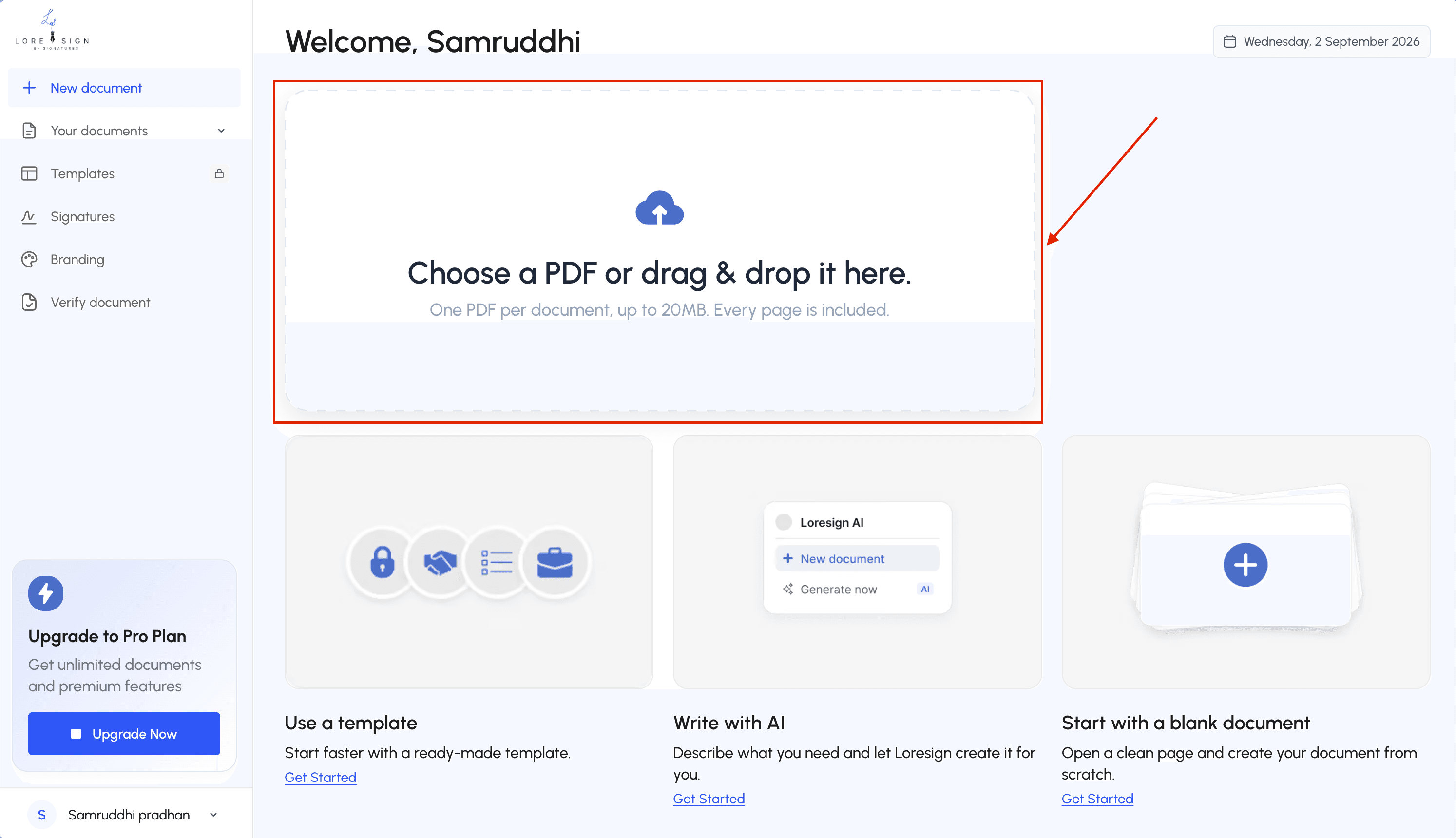
Most browser-based tools let you drag and drop the PDF or select it from your computer.
You usually do not need to convert the file first. A standard PDF downloaded from your email, browser, scanner, or document editor should work as-is.
Before uploading, check that you are using the final version.
Quick document check
- Correct document version
- Correct names
- Correct dates
- No missing pages
- No unresolved placeholders
- All required information is included
Step 2: Create Your Signature
Most online signing tools provide several ways to create a signature.
| Signature method | Best for | Trade-off |
|---|---|---|
| Draw | Making it resemble your handwritten signature | Can be difficult with a mouse |
| Type | Signing quickly | Looks less like a handwritten signature |
| Upload | Reusing an existing signature image | Requires a prepared image |
Draw
Use a mouse, trackpad, stylus, or touchscreen to draw your signature.
This is useful when you want the result to look more like the way you normally sign on paper.
Type
Enter your name and choose an available signature style.
This is usually the fastest method.
Upload
You can also upload an image of your signature.
For example:
- Sign a blank piece of paper.
- Take a clear photo or scan it.
- Crop the image.
- Upload it to the signing tool.
The appearance of the signature is only one part of the signing process. For important documents, records showing who signed and when may matter just as much.
Step 3: Place the Signature on the Document
Select your signature and place it in the required area.
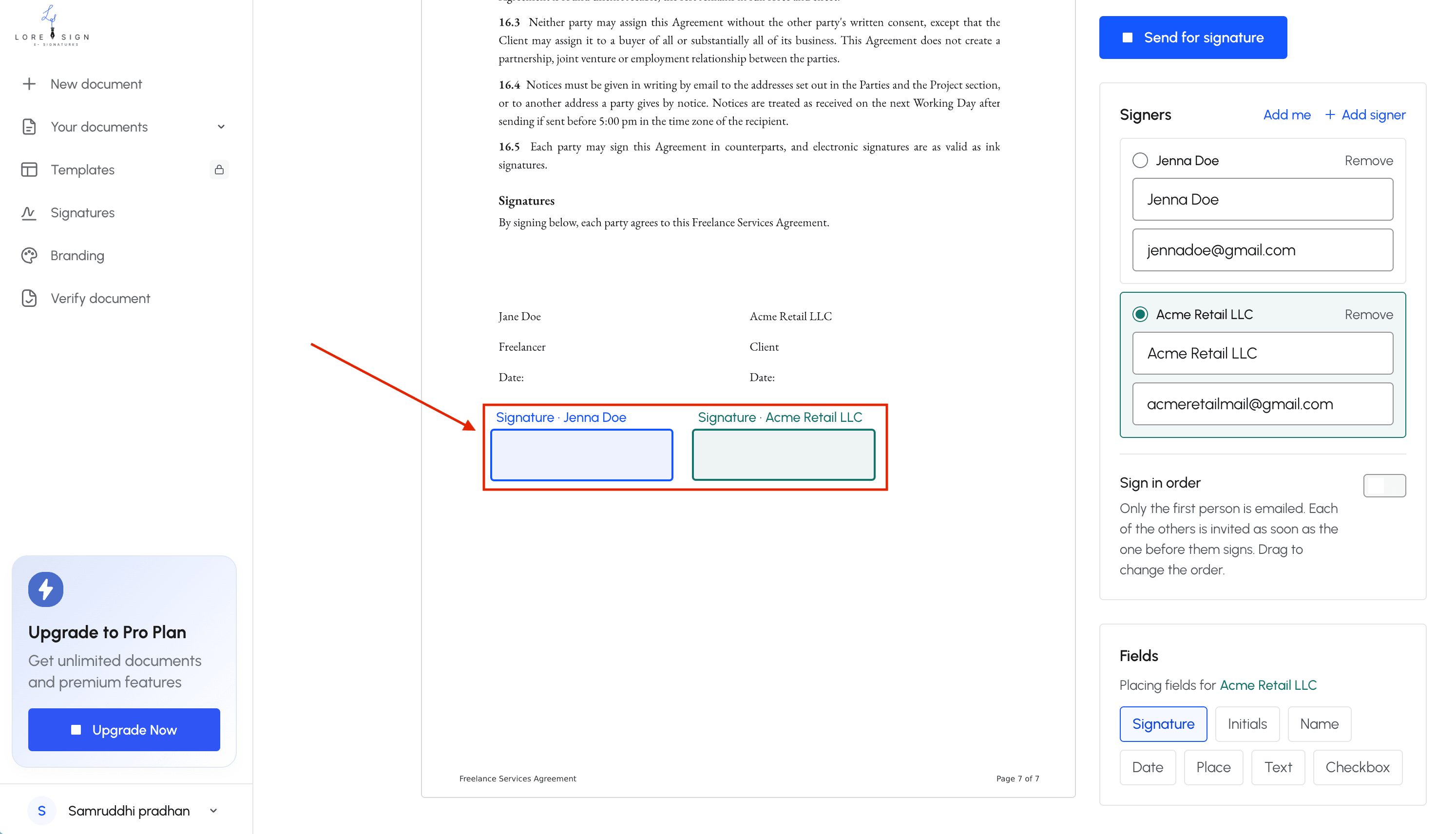
Depending on the document, you may also need to add:
- initials;
- your full name;
- the signing date;
- company name;
- job title;
- checkboxes;
- or other text fields.
If you are preparing the document for someone else, assign each field to the correct recipient.
Before you send
| Check | Complete? |
|---|---|
| Every signer has been added | □ |
| Required signature fields are placed | □ |
| Date and name fields are correct | □ |
| Fields do not cover document text | □ |
| Every field belongs to the correct signer | □ |
| Signing order is correct | □ |
Tip: If you regularly send the same agreement, turn it into a reusable template. Keep the signing fields in place and update only the recipient details next time.
Step 4: Finish and Download the Signed PDF
Once the required fields are complete, finish the signing process and download the final PDF.
Save the signed copy somewhere you control.
That might be:
- your computer;
- your company's cloud drive;
- document management software;
- or a secure shared workspace.
Do not rely on a temporary download link as your only copy.
A clear naming system also helps.
Instead of:
contract-final-final-signed2.pdf
use something like:
Acme-Service-Agreement-2026-09-22-Signed.pdf
Signing Yourself vs Sending a Document for Signature
Signing your own PDF and sending a document to somebody else are related, but they are not the same workflow.
| Signing a PDF yourself | Sending a document for signature |
|---|---|
| Upload the PDF | Upload the PDF |
| Add your own signature | Add fields for recipients |
| Complete it yourself | Send a signing link |
| Download the file | Track recipient progress |
| Usually no routing required | May require signing order |
| A basic tool may be enough | Tracking and audit records become more important |
If you sign one document every few months, a simple signing tool may be enough.
If you send agreements to clients, employees, contractors, or vendors every week, the workflow around the signature becomes much more important.
What Happens After You Send a Document?
A signature is only one stage of a complete signing process.
A typical workflow looks like this:
Free vs Paid E-Signature Tools
Free e-signature tools can be perfectly useful.
The main question is not whether a tool is free. It is whether the features match what you are trying to do.
When a Free Tool May Be Enough
A basic or free option may work when you need to:
- sign your own PDF;
- fill a small number of fields;
- add a typed or drawn signature;
- download the completed document;
- or handle documents only occasionally.
When More Advanced Features Become Useful
More advanced plans usually become valuable when you need:
- reusable templates;
- several recipients;
- ordered signing;
- automated reminders;
- document tracking;
- higher sending limits;
- branding;
- team access;
- audit trails;
- completion certificates.
Free vs Paid at a Glance
| Feature | Basic/free workflow | Advanced workflow |
|---|---|---|
| Sign your own PDF | ✓ | ✓ |
| Draw or type a signature | ✓ | ✓ |
| Send to another signer | Sometimes | ✓ |
| Multiple recipients | Limited | ✓ |
| Automated reminders | Usually limited | ✓ |
| Signing order | Usually limited | ✓ |
| Reusable templates | Limited | ✓ |
| Audit trail | Varies | Common |
| Completion certificate | Varies | Common |
| Custom branding | Rare | Common |
| Team workflows | Rare | Common |
Which One Should You Choose?
Use this quick decision process.
Are you only signing your own PDF?
→ A basic tool may be enough.
Are you sending documents to clients or customers?
→ Look for recipient signing and document tracking.
Do you need evidence showing who signed and when?
→ Prioritize an audit trail and completion records.
Do you send the same type of document repeatedly?
→ Look for reusable templates.
Do several people need to sign?
→ Look for multi-signer routing and signing order.
What E-Signatures Can and Cannot Do
Electronic signature software helps people prepare, send, sign, and manage documents electronically.
It does not automatically solve every legal, identity, or document requirement.
| Requirement | Standard e-signature tool |
|---|---|
| Add a signature | ✓ |
| Add initials and dates | ✓ |
| Send to another signer | Usually |
| Track signing activity | Depends on the tool |
| Generate an audit trail | Depends on the tool or plan |
| Provide legal advice | ✕ |
| Automatically determine enforceability | ✕ |
| Automatically replace notarization | ✕ |
| Guarantee every document can be e-signed | ✕ |
E-Signature Software Does Not Provide Legal Advice
A signing platform can help execute an agreement.
It cannot automatically determine whether the agreement itself is legally sound.
For example, a tool may let you sign:
- an NDA;
- contractor agreement;
- employment document;
- lease;
- sales agreement;
- or vendor contract.
But the signing tool does not automatically tell you whether:
- a clause is enforceable;
- a disclosure is missing;
- the agreement meets local requirements;
- or a special form of execution is required.
If a document carries serious legal or financial consequences, professional legal review may still be appropriate.
An E-Signature Does Not Automatically Replace Notarization
Signing and notarizing are different processes.
An electronic signature records a person's intent to sign electronically.
Notarization generally involves additional identity checks and formalities performed by a notary.
Note: A normal electronic signature does not automatically satisfy a requirement for notarization, witnesses, or another special signing form. Check the rules that apply to the specific document.
Some jurisdictions support remote online notarization, but that is a separate process with separate requirements.
A Signature and Proof of Signing Are Different Things
Consider these two files.
File A
A PDF with a signature image at the bottom.
File B
A signed PDF plus records showing:
- who received it;
- when it was sent;
- when it was opened;
- when it was signed;
- the signing activity;
- and when the process was completed.
The second gives you much more information if the signing event is ever questioned.
That is why audit trails and completion records matter.
Product screenshot: LoreSign audit trail or certificate of completion.
Highlight items such as:
- Sent
- Opened
- Viewed
- Signed
- IP information
- Timestamp
When Are E-Signatures Generally Accepted?
In the United States, electronic signatures are broadly recognized under federal and state electronic-transactions laws.
The federal Electronic Signatures in Global and National Commerce Act, commonly called the ESIGN Act, provides a federal framework for electronic records and signatures.
Many states also use versions of the Uniform Electronic Transactions Act (UETA) or other state electronic-signature laws.
For important agreements, the safest approach is to check the applicable law and the requirements for that particular document.
Authority sources to check
For U.S. transactions, useful primary or official sources include:
- the federal ESIGN Act;
- your state's electronic-transactions statute;
- the Uniform Law Commission's UETA materials;
- and any agency or court rules that apply to the document.
This is especially important when the document has unusual execution requirements.
Documents Commonly Signed Electronically
Electronic signatures are commonly used for ordinary business documents such as:
| Common e-signature use cases |
|---|
| NDAs |
| Contractor agreements |
| Employment documents |
| Offer letters |
| Sales agreements |
| Vendor agreements |
| Client contracts |
| Service agreements |
| Internal approvals |
Documents That May Require Extra Attention
Some documents may have additional requirements depending on the jurisdiction.
Examples can include:
- wills and testamentary documents;
- certain trusts;
- some court filings;
- certain real estate instruments;
- documents requiring witnesses;
- notarized documents;
- and certain government forms.
The fact that a file can technically be uploaded to an e-signature platform does not mean every jurisdiction allows that document to be executed electronically in the same way.
What Makes an Electronic Signing Process Stronger?
A reliable signing process involves more than placing an image on a PDF.
Think of it as several layers.
1. Intent
The person takes an action showing that they intend to sign.
2. Consent
Where required, the person agrees to use electronic records or signatures.
3. Access
The document reaches the intended recipient through the signing workflow.
4. Signature
The recipient completes the assigned signature fields.
5. Record
The completed document and related information can be retained.
6. Integrity
The system can help preserve or verify the completed record.
Diagram opportunity:
Intent → Consent → Access → Signature → Record → Integrity
This is more useful than thinking only about what the handwritten-looking mark looks like.
Choosing an Online E-Signature Tool
Almost every e-signature platform can put a signature onto a PDF.
That is not enough to compare them properly.
Look at the workflow surrounding the signature.
| Feature | Why it matters | Most useful for |
|---|---|---|
| Browser signing | No software installation | Everyone |
| No-account recipient signing | Reduces signer friction | Client-facing workflows |
| Multiple recipients | Several people can sign | Teams and contracts |
| Signing order | Controls who signs first | Sequential approvals |
| Templates | Avoids rebuilding documents | Repeated agreements |
| Automatic reminders | Reduces manual chasing | Regular senders |
| Audit trail | Keeps signing activity | Important agreements |
| Completion certificate | Keeps proof with the document | Record keeping |
| Document verification | Helps verify completed files | Higher-trust workflows |
| Branding | Keeps documents consistent | Businesses and agencies |
| Mobile support | Enables signing anywhere | Remote recipients |
| Tracking | Shows who has completed the document | Frequent senders |
Example: One Contract Every Month vs Five Every Week
Imagine you are a freelancer sending a service agreement to one new client.
You can probably:
- find the contract;
- update the client's details;
- upload it;
- place the signature fields;
- send it;
- and follow up yourself.
That works.
Now imagine you do the same thing five times every week.
Suddenly, the repetitive work becomes noticeable.
Without a template
For every client, you:
- Find the previous document.
- Make a copy.
- Replace the client details.
- Upload it again.
- Add the fields again.
- Enter the recipient information.
- Send it.
- Follow up manually.
With a reusable template
You:
- Open the prepared template.
- Update the client details.
- Add the recipient.
- Send it.
The signature itself has not changed.
The workflow around it has.
That is where advanced e-signature features usually save the most time.
Common Mistakes When Signing PDFs Online
Most signing problems are procedural rather than technical.
| Mistake | Why it matters | Better approach |
|---|---|---|
| Signing the wrong document version | Different parties may hold different copies | Confirm the final version |
| Missing required fields | Agreement may be incomplete | Review fields before sending |
| Wrong recipient assignment | Someone may complete another person's field | Check field ownership |
| Not saving the final PDF | Your records become harder to recover | Download and store it |
| Keeping no signing evidence | Disputes become harder to review | Keep audit records |
| Recreating repeated documents | Wastes time and increases errors | Use templates |
| Forgetting follow-ups | Slows completion | Use reminders |
| Assuming every file can be e-signed | Some documents have special rules | Check the applicable requirements |
Mistake 1: Keeping Only the Signature
For an important agreement, keep more than the visible signed PDF where appropriate.
Useful records can include:
- the completed PDF;
- completion certificate;
- audit trail;
- and relevant supporting communication.
Mistake 2: Sending the Wrong Version
Before sending, run a final check.
Final document checklist
- Correct recipient name
- Correct company name
- Correct pricing
- Correct dates
- Correct scope
- Correct attachments
- No
[CLIENT NAME]placeholders- Signature fields are assigned correctly
Mistake 3: Not Saving the Completed Document
Once everyone has signed, download the final document.
Keep the actual PDF, not only a link to it.
Store it somewhere your business controls.
Signing One PDF vs Managing a Signing Workflow
The simplest way to choose features is to look at what you actually do.
| If you are doing this… | You mainly need… |
|---|---|
| Signing one PDF yourself | Basic signature tool |
| Signing from your phone | Mobile-friendly signing |
| Sending a client contract | Recipient signing |
| Sending the same contract repeatedly | Templates |
| Waiting on several signers | Reminders and tracking |
| Managing multi-party agreements | Signing order |
| Handling important contracts | Audit trail and completion records |
| Sending client-facing documents | Branding |
You do not need every advanced feature from day one.
Use the simplest workflow that still gives you the records and controls you need.
Frequently Asked Questions
Are e-signatures legally binding?
Electronic signatures are recognized for many transactions and ordinary business agreements.
However, the requirements can vary based on the document, jurisdiction, and signing process. Some documents may require additional steps such as witnesses or notarization.
For important documents, check the law that applies to your specific situation.
Can I create e signatures and sign PDFs online for free?
Yes.
Many tools allow you to upload a PDF, create a signature, place it on the document, and download the result for free.
Free plans may limit document volume, templates, reminders, tracking, or advanced signing records.
Do I need to install software to sign a PDF?
Usually not.
Most modern e-signature platforms work directly in a web browser.
Recipients can often open the signing link on a desktop computer, tablet, or phone without installing separate software.
Can someone sign a document without creating an account?
Some signing platforms allow recipients to open a secure link and sign without creating an account.
This can reduce friction because the recipient does not need to register before completing the document.
What is the difference between an electronic signature and a digital signature?
An electronic signature is an electronic action or mark used to show intent to sign.
A digital signature generally uses certificate-based cryptographic technology to help authenticate a signer or document and detect later changes.
The terms are related, but they do not mean exactly the same thing.
How do I prove somebody signed electronically?
Use a signing platform that keeps supporting records.
Depending on the service, those records may include:
- recipient information;
- timestamps;
- IP information;
- document events;
- audit trails;
- and completion certificates.
Keep those records with the final signed PDF when the agreement matters.
Can I sign a PDF on my phone?
Yes.
A mobile-friendly e-signature platform lets you open the document, draw or type your signature, fill the required fields, and complete the process from your phone.
A touchscreen can also make drawing a signature easier than using a mouse.
Before You Send: 30-Second Checklist
Document
- Final version
- Correct names
- Correct dates
- Correct pricing
- All pages included
Signers
- Correct email addresses
- Every recipient added
- Signing order confirmed
Fields
- Signature fields
- Initial fields
- Date fields
- Required text fields
- Correct signer assignments
Records
- Tracking enabled where needed
- Audit trail available where needed
- Completed PDF will be stored
The Bottom Line
If you only need to sign one PDF, keep the process simple.
Upload the document, create your signature, place it in the correct field, and save the completed copy.
If you send agreements regularly, look beyond the signature itself. Templates, recipient routing, reminders, audit trails, completion records, and document tracking can make the process much easier to manage.
Whether you are signing a one-off document or handling regular client agreements, the right workflow makes it easier to create e signatures and sign PDFs online without turning every signature request into another manual task.
About LoreSign
LoreSign
LoreSign helps individuals and businesses create, send, sign, and track documents in one place.
Upload a PDF or create an agreement, add the required signing fields, send it to recipients, and keep the completed document and signing record together.
For repeated workflows, reusable templates help you avoid rebuilding the same document every time.