E-Signature Certificate of Completion: The Practical Checklist
An e-signature certificate of completion confuses most business professionals the first time one lands in their inbox. You signed a contract, the platform emailed you a PDF, and now you're staring at a page of timestamps, hashes, and signer details wondering what any of it actually proves. That confusion is fair. The certificate looks official, but its legal weight depends entirely on what's inside it and whether you verify it correctly. This guide comes from LoreSign, a lightweight e-signature tool, but the checklist works for any platform: DocuSign, Adobe Sign, or whatever your vendor sent you. The honest answer is that most people skip verification entirely, and that's a mistake. You'll learn exactly what a certificate contains, how to check each field, what it cannot do, and how to store it so it actually holds up later.
| At a glance | Details |
|---|---|
| What it is | A record of the signing event, not the document itself. |
| Key contents | Signer identity, timestamps, IP, and audit trail. |
| Legal weight | Strong evidence under e-sign laws. |
| Verification | Check signer list, timestamps, and certificate ID. |
| Limitation | Does not prove content accuracy or signer intent. |
| Retention | Store with the signed PDF for compliance. |
In This Guide
- What Is an E-Signature Certificate of Completion?
- Certificate of Completion vs. Audit Trail: What's the Difference?
- The Core Elements of a Valid Certificate
- E-Signature Certificate Of Completion: A Step-by-Step Guide
- The E-Signature Certificate of Completion Checklist
- How to Obtain a Certificate of Completion onLoreSign
- What a Certificate of Completion Cannot Do
- How to Create a Certificate for Digital Signature
- Example of a Certificate of Completion
- Common Mistakes When Verifying an E-Signature Certificate
- Final Thoughts on E-Signature Certificates of Completion
What Is an E-Signature Certificate of Completion?
An e-signature certificate of completion is a record generated by an e-signature platform that documents who signed a document, when they signed it, and how their identity was verified.
It attaches to the signed PDF as evidence of the signing event.
You'll see one after every signing session on DocuSign, Adobe Sign, LoreSign, and most other platforms. It's not the signature itself. It's the receipt for the signature.
What a certificate of completion typically includes
Most certificates follow a similar structure. You'll find a document summary (file name, page count, a unique document ID), a list of signers with their email addresses, and a timestamp for each signature event. Many also record the IP address used and the authentication method, such as email link, SMS code, or knowledge-based questions.
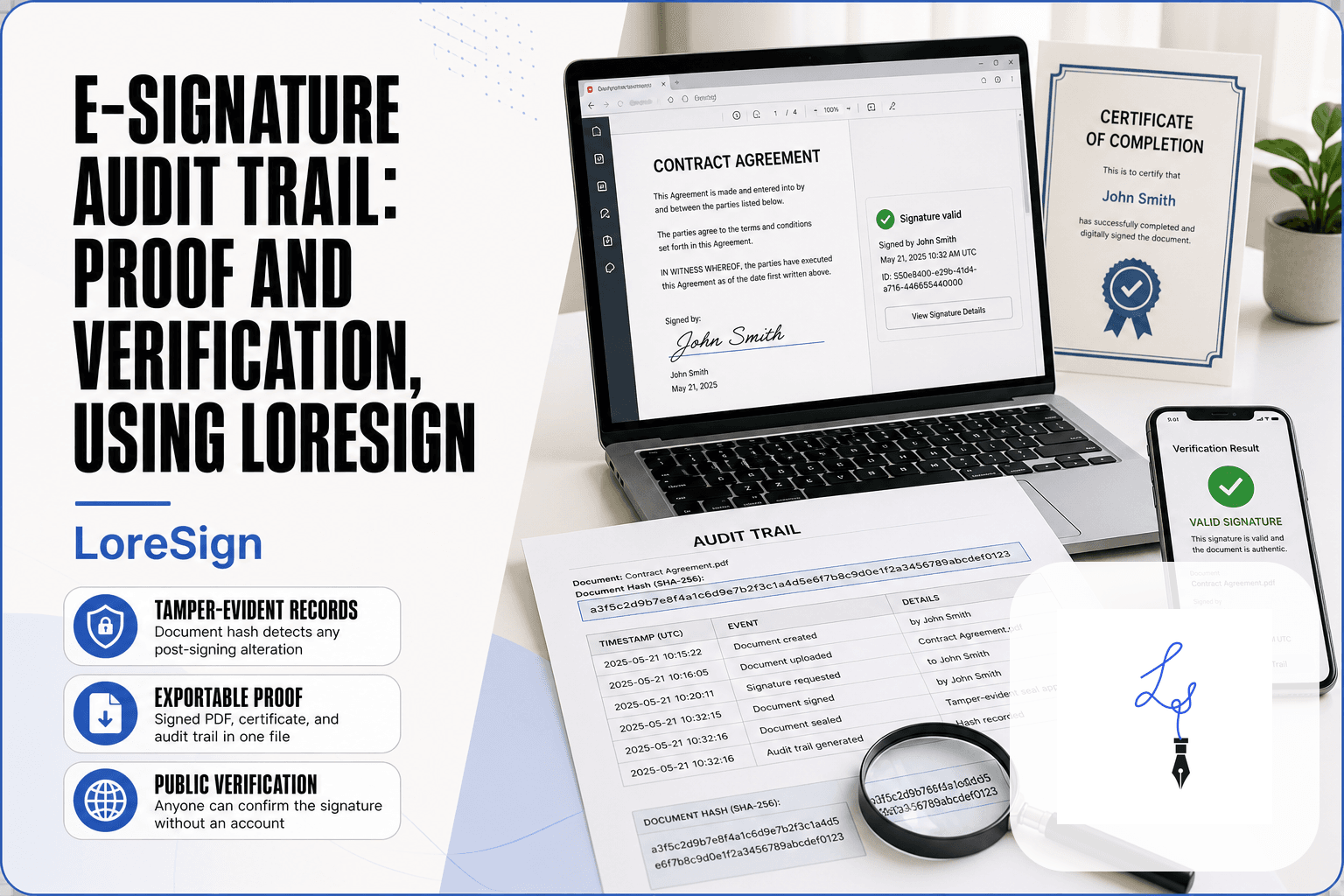
Some platforms add a document hash. That's a string of characters generated from the file's contents. If the document changes after signing, the hash won't match, and you'll know something was altered.
Why platforms generate these certificates automatically
The certificate exists because a signature alone doesn't tell you much. You need context: who, when, and under what conditions. Platforms generate the certificate automatically at the moment the last signer completes the document, so there's no separate step for you to remember.
That automatic generation is the point. A manually created certificate is only as trustworthy as the person who made it. An auto-generated one ties the record to the platform's system logs, which gives you something to point to later if a signature is challenged.
A certificate of completion is not a copy of the signed document. It is a separate record that summarizes the signing event, including who signed, when, and from where.
Certificate of Completion vs. Audit Trail: What's the Difference?
| Factor | Certificate of Completion | Audit Trail |
|---|---|---|
| Purpose | Summarizes the signing event | Provides detailed chronological log |
| Contents | Signer names, timestamps, IPs | Every action, including views and clicks |
| Typical format | One-page PDF summary | Multi-page detailed report |
| Use case | Proof of signature for records | Deep forensic investigation |
| Availability | Auto-generated by most platforms | Often in advanced settings |
The Core Elements of a Valid Certificate
A certificate of completion is only as useful as the data it records. Four elements matter most: the document summary, signer identity, document history, and the digital signature itself. Each one answers a different question.
Document summary and hash
The document summary tells you what was signed. You'll see the file name, page count, and a unique document ID assigned by the platform. The hash is the part that does real work. It's a fixed-length string generated from the file's contents. Change one character in the PDF and the hash changes completely.
That's your tamper check. If the hash on the certificate doesn't match the hash of the document you're holding, the file was altered after signing. No match, no trust.
Signer identity and authentication method
Names and email addresses identify who signed. The authentication method tells you how much confidence to put in that identity.
Email link is the weakest: anyone with access to the inbox could have clicked. SMS codes add a second factor. Knowledge-based questions pull from credit history and are harder to fake. The certificate should list the method for each signer, not just lump them together.
Document history and timestamps
The history section is a chronological log. It shows when the document was sent, when each signer opened it, and when each signature was applied. Timestamps should include the time zone. A signature at 3:14 PM without a time zone is ambiguous. With "UTC-5" attached, it's a fixed point.
This section also records events like declined signatures or voided documents. Those matter. A voided document with a certificate still attached tells a different story than a clean completion.
Certified digital signatures
The digital signature is the cryptographic layer. The platform uses its certificate authority to sign the document, which binds the hash to the signer's identity at the moment of signing. When you open the PDF in a reader like Adobe Acrobat, it validates the signature against the platform's certificate.
A valid signature means the document hasn't changed since signing and the signer's identity was verified by the platform. A broken or invalid signature means something went wrong. Don't ignore it.
For compliance, always download and archive the certificate of completion at the same time you save the signed PDF. Some platforms, like LoreSign, automatically deliver both together, but if you're using a manual process, set a reminder to grab the certificate before the signing session expires.
E-Signature Certificate Of Completion: A Step-by-Step Guide
- Open the certificate PDF and confirm the document name matches the signed file.
- Check that every expected signer appears in the signer list with a timestamp.
- Verify each signature's timestamp is within the expected signing window.
- Look for the certificate ID or unique identifier and note it for your records.
- Cross-check the IP addresses or device info against known signer locations.
- Confirm the certificate includes the audit trail or a link to it.
- Save the certificate alongside the signed PDF in your document management system.
The E-Signature Certificate of Completion Checklist
You've got the certificate in front of you. Now what? Work through these six checks in order. Each one takes under a minute. Skip one and you're trusting a document you haven't actually verified.
Verify the document name and hash match the signed document
Open the signed PDF you received. Check the file name against the document name on the certificate. They should match exactly.
Then check the hash. Most certificates list a document ID or hash string. If your platform lets you generate a hash from the PDF you're holding, do it and compare. They must be identical. A mismatch means the file was altered after signing or you're looking at the wrong version.
Confirm signer names and email addresses are correct
Read every signer entry. The name should match the person you expected to sign. The email address should be the one you sent the document to.
Typos matter here. A signer listed as "Jon Smith" when you sent it to "John Smith" is a red flag. It could mean the wrong person signed, or the platform recorded the identity incorrectly. Either way, don't file it until you've confirmed.
Check the timestamp and time zone
Find the completion timestamp. Note the time zone attached to it.
A signature at 4:30 PM UTC-5 is not the same as 4:30 PM UTC+8. If you're verifying a deadline or a compliance window, the time zone is the difference between on-time and late. If the certificate doesn't show a time zone, treat the timestamp as approximate.
Confirm the authentication method for each signer
Look at what the certificate says about how each signer was verified. Email link is the baseline. SMS code is stronger. Knowledge-based questions are stronger still.
If a signer used only an email link and the document is high-value, that's a weaker certificate. You can't change what happened, but you should know what you're holding.
Verify the digital signature is valid and unbroken
Open the signed PDF in a reader that validates digital signatures. Adobe Acrobat does this. So do most modern PDF viewers.
Look for a signature panel or validation message. It should say the signature is valid and the document hasn't been modified since signing. If it says invalid, unknown, or broken, stop. The document's integrity is in question.
Download and store the certificate with the signed document
Don't leave the certificate in the platform's dashboard. Download it as a PDF.
Store it in the same folder as the signed document. Name them so they're obviously linked: "Contract_Signed.pdf" and "Contract_Certificate.pdf". If you ever need to prove what happened, you'll need both. A certificate without the document proves nothing. A document without the certificate is harder to defend.
How to Obtain a Certificate of Completion on LoreSign
The certificate exists. You just need to pull it out of the platform. Here's where to look on the three tools you're most likely using. LoreSign generates a certificate of completion automatically for every signed document. When all signers have completed the document, you receive the signed PDF with the certificate attached as the final pages. You can also access it from your LoreSign dashboard. Open the completed document, and you'll find the certificate available for download alongside the signed file.
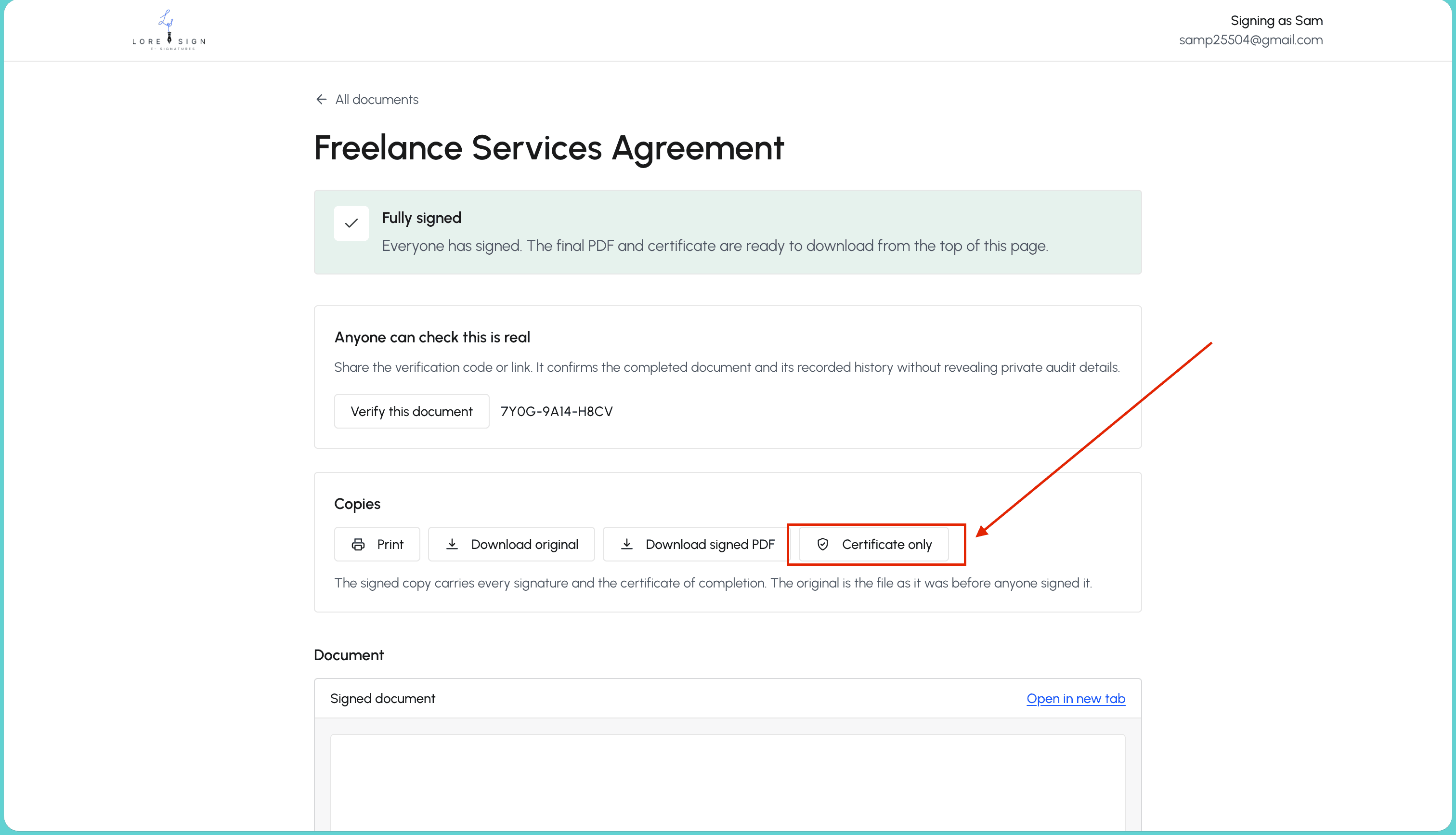
The certificate includes the document hash, signer identities, timestamps, and a public verification page link. Anyone with that link can confirm the document's signing record without a LoreSign account.
What a Certificate of Completion Cannot Do
A certificate of completion is a record. It tells you who signed, when they signed, and how they signed. It does not tell you the document is legally binding. Those are different questions, and the certificate answers only the first one.
It does not prove legal validity on its own
The certificate shows that a signing event happened on a platform. It does not show that the underlying contract is enforceable. A contract can be signed perfectly and still fail in court because the terms are vague, the signer lacked authority, or the agreement violates a law. The certificate is evidence of the signature process, not a judgment on the document itself.
It is not a digital signature certificate
People confuse these two constantly. A digital signature certificate is a cryptographic credential issued by a certificate authority. It binds a public key to a verified identity. A certificate of completion is a report generated by an e-signature platform after the fact. It may reference digital signatures, but it is not one. You cannot use a certificate of completion to sign anything else.
It does not guarantee enforceability
The honest answer is that enforceability depends on the jurisdiction, the type of document, and whether the signing process met the local standard. A certificate of completion can support your case. It cannot win it for you. Courts look at consent, capacity, and the full context. The certificate is one piece of that picture.
It is not legal advice
No certificate tells you whether your document does what you think it does. If you need to know whether a contract will hold up, ask a lawyer. The certificate won't answer that question, and no e-signature platform should claim otherwise.
How to Create a Certificate for Digital Signature
You don't create a certificate for digital signature. The platform does. What you can create is a certificate of completion template for documents that don't go through an e-signature tool. That's a different thing, and it's worth being clear about the distinction before you start.
When you might need a manual certificate
You need a manual certificate when the signing happened outside a platform: paper signatures, a scanned PDF, or a document signed in person. In those cases, no automated record exists, so you build one yourself. The certificate then serves as your own record of who signed and when. It carries no cryptographic weight, but it documents the event.
Free templates and Word formats
Word and Google Docs both ship with certificate templates. Search "certificate of completion" in the template gallery and you'll find fillable layouts. You can also build one from scratch: a title, the document name, signer names, dates, and a signature line. Export to PDF when done. That's the whole process.
Limitations of DIY certificates
A self-made certificate proves nothing on its own. It has no hash, no timestamp from a trusted source, and no audit trail. Anyone can edit a Word document after the fact. If you need a certificate that holds up to scrutiny, use an e-signature platform that generates one automatically. The manual version is a placeholder, not a record.
Example of a Certificate of Completion
A certificate of completion is a text document. No graphics, no seals, no logos. Just fields stacked in order. Here's what a typical one looks like, line by line.
Annotated field-by-field example
Certificate of Completion
Envelope ID: 8F3A2C1B9D4E7F6A5B3C2D1E0F9A8B7C
Status: Completed
Document Name: Service Agreement 2025.pdf
Pages: 4
Signer 1: Jane Smith
Email: [email protected]
Signature ID: 7D2E1F0A9B8C7D6E5F4A3B2C1D0E9F8A
Authentication: Email
Signed: 2025-01-15 14:32:07 UTC
The envelope ID is the platform's internal tracking number. The document name should match the file you sent. The signature ID is unique to that signer's action, not the document.
How to read the document history section
Below the signer block sits a table of events. Each row has a timestamp, an action, and an actor. You'll see entries like "Sent", "Viewed", "Signed", and "Completed". The order matters: a signer can't sign before the document was sent, and the completion timestamp should be the last entry.
Check that every signer appears in the history with their own row. A missing row means the certificate and the audit trail disagree. That's a red flag.
Common Mistakes When Verifying an E-Signature Certificate
Most people glance at the certificate, see "Completed", and file it away. That's the first mistake. The certificate is only as useful as the attention you give it.
Ignoring time zones and timestamps
A timestamp without a time zone is a guess. 14:32 UTC and 14:32 EST are five hours apart. If you're tracking a deadline, that gap matters. Check the offset before you rely on the time.
Assuming the certificate proves legal validity
It doesn't. The certificate records what the platform saw. Whether the signature holds up in court depends on the law, the contract, and the circumstances. The certificate is evidence, not a verdict.
Failing to store the certificate with the document
A certificate floating in your downloads folder is useless. Store it beside the signed PDF, same folder, same backup. If you ever need to prove who signed and when, you'll need both.
Final Thoughts on E-Signature Certificates of Completion
The checklist comes down to five checks: match the hash, confirm the signers, read the timestamp, verify the authentication method, and store the certificate with the signed document. Skip any one of them and you're trusting a piece of paper you haven't actually read.
An e-signature certificate of completion is evidence, not proof. It records what the platform saw. It doesn't decide whether the signature holds up in court, and it doesn't replace the signed document itself.
If you want a lightweight tool that generates clear, verifiable certificates without the enterprise overhead, LoreSign does exactly that. You upload the PDF, place the signing fields, and the certificate arrives with the completed document automatically.
Frequently Asked Questions
What is a certificate of completion for an e-signature?
A certificate of completion is a digital record generated by e-signature platforms that summarizes the signing event. It typically includes the document name, signer names, timestamps, IP addresses, and a unique certificate ID. It serves as evidence that the signing process occurred as recorded.
What does a certificate of completion not prove?
A certificate of completion does not prove that the content of the document is accurate, that the signer read the document, or that the signature was made with intent. It only records that the signing event occurred as per the platform's logs. For disputes about content, you need the signed document itself.
How long should I keep a certificate of completion?
You should keep the certificate of completion for as long as you retain the signed document, which is often several years for contracts and legal records. Check your industry's retention regulations, but a general rule is to store it with the signed PDF in a secure, accessible archive.
Are certificates of completion legally valid in court?
Yes, certificates of completion are generally admissible as evidence in court, as they are generated by e-signature platforms that comply with e-signature laws like the ESIGN Act and UETA. They provide a reliable record of the signing event, but their weight depends on the platform's security and the specific facts of the case.
About LoreSign
LoreSign helps For people looking to get documents and contracts signed. get this right. Track every signer and receive the completed document automatically. Whether you are working through E-Signature Certificate of Completion: Checklist By LoreSign or something adjacent, we publish what we have actually tested, including where it falls short.