Contract E-Signatures: A Practical Guide to Signing Documents Online
Contract e signatures used to mean printing a rental lease, signing it, scanning it back, and hoping the other side could read your handwriting. For freelancers, renters, and anyone signing an NDA, that friction is gone. You can now sign a contract from your phone in under a minute. The anxiety doesn't go away as fast. Most people's first question isn't "how do I do this" but "is this even legal?" The honest answer is yes, in most cases. The ESIGN Act and UETA have made electronic signatures legally binding across the US since 2000, with a few real exceptions you should know about. What most top-ranking guides won't tell you is what contract e-signatures cannot do: certain notarized documents, wills, and some court filings still need ink on paper. LoreSign is one option built for individuals who want to upload a PDF, place a signature field, and send one secure link without enterprise complexity. This guide covers what e-signatures are, when they hold up in court, the limitations nobody mentions, a step-by-step signing walkthrough, and the mistakes that cost people real money.
| At a glance | Details |
|---|---|
| Legal status | Binding in most countries under e-signature laws |
| Common uses | Freelance agreements, leases, NDAs, consent forms |
| Typical limits | Wills, some notarized docs, certain court filings |
| What you need | A PDF, signer emails, and an e-sign tool |
| Time to sign | Usually minutes, not days |
| Proof it happened | Audit trail and certificate of completion |
In This Guide
- What Are Contract E-Signatures?
- E-Signature vs Wet-Ink Signature: What Actually Changes?
- Are Contract E-Signatures Legally Binding?
- Contract E Signatures: A Step-by-Step Guide
- What Contract E-Signatures Cannot Do
- How to Sign a Contract Electronically
- Common Mistakes to Avoid with Contract E-Signatures
- How to Choose an E-Signature Tool for Personal Contracts
- Final Thoughts on Contract E-Signatures
What Are Contract E-Signatures?
A contract e-signature is an electronic mark, typed name, or drawn signature that you apply to a digital contract to show your intent to agree to its terms. It replaces the pen-and-paper signature you'd put on a printed contract.
That's the whole idea. You don't print anything. You don't scan anything. You open the contract on your phone or laptop, apply your signature, and the signed copy goes back to the sender automatically.
Electronic signature vs. digital signature
People use these terms interchangeably. They aren't the same thing.
An electronic signature is the legal concept. It's any electronic sound, symbol, or process attached to a contract that shows you intend to sign it. A typed name counts. A drawn signature counts. Even clicking an "I agree" button can count in some cases.
A digital signature is a technical mechanism underneath. It uses encryption to lock the document so anyone can tell if it was changed after you signed it. Think of it as the tamper-evident seal on the envelope.
Here's the practical takeaway: you don't need to understand digital signatures to use them. The e-signature tool handles the encryption behind the scenes. You just apply your signature.
How contract e-signatures work in practice
You receive an email with a link. You click it, review the contract, and tap where it says "Sign here." The tool records the time, your email address, and your IP address. That record is the audit trail.
Once you sign, the tool locks the document. If anyone tries to edit it afterward, the digital signature breaks. The completed PDF gets sent to you and the sender automatically.
That's it. No printer. No scanner. No fax machine.
Electronic signatures are legally binding for most contracts under laws like the ESIGN Act in the US and eIDAS in the EU, but they are not a universal replacement for wet-ink signatures. Wills, certain notarized documents, and some court filings still require traditional signing or additional verification steps.
E-Signature vs Wet-Ink Signature: What Actually Changes?
| Factor | E-Signature | Wet-Ink Signature |
|---|---|---|
| Legal validity | Binding under e-signature laws for most contracts | Binding, but physical delivery required |
| Speed | Minutes to hours, remote signing | Days to weeks if mailing is involved |
| Evidence | Audit trail, timestamps, certificate of completion | Paper copy, possibly no digital record |
| Best for | Freelance contracts, leases, NDAs, routine agreements | Wills, some notarized documents, specific court filings |
| Cost of delivery | No printing, postage, or scanning | Printing, postage, and scanning costs |
Are Contract E-Signatures Legally Binding?
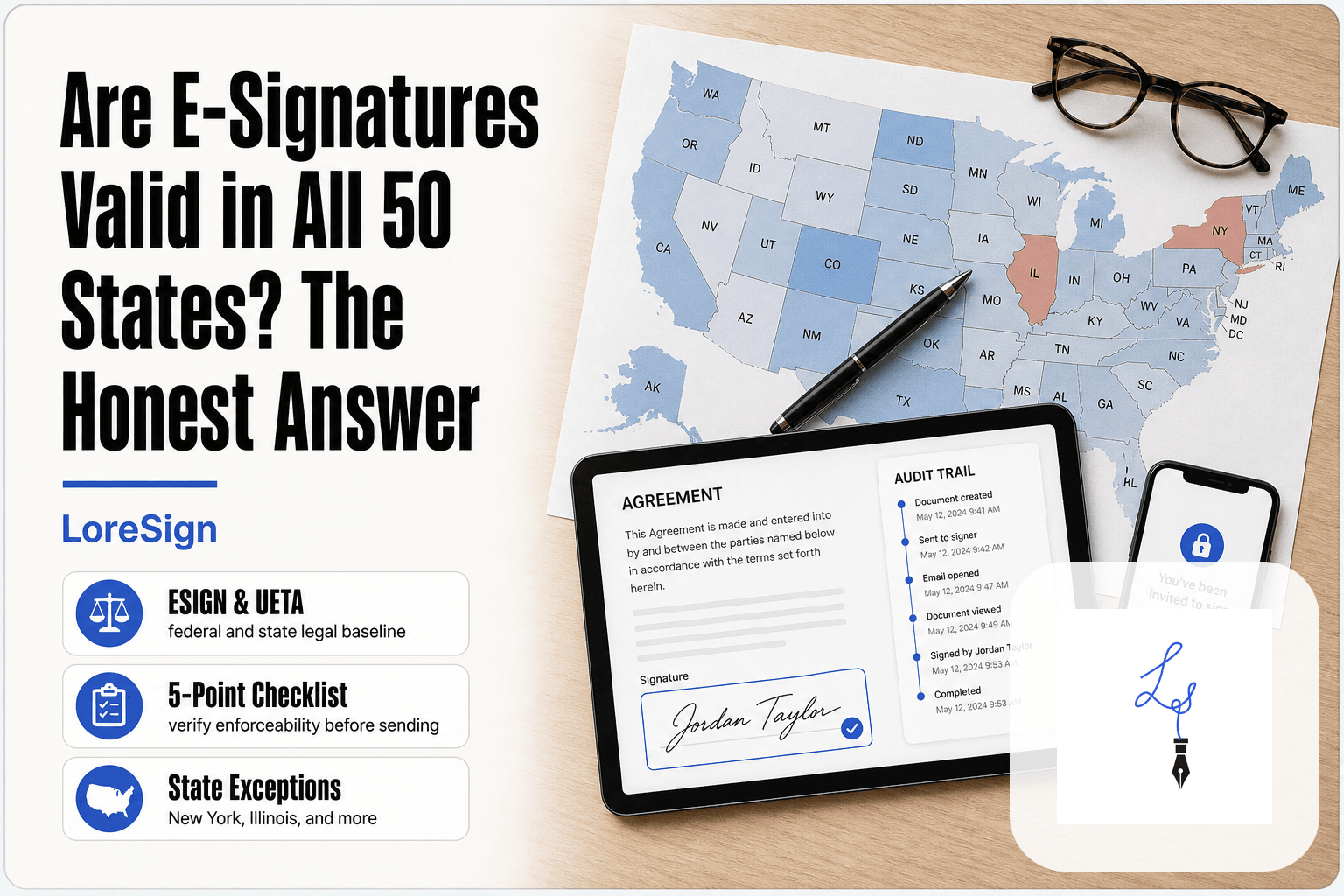
Yes. In the US, an electronic signature carries the same legal weight as a wet signature on most contracts. The ESIGN Act (2000) and UETA give e-signatures legal force in all 50 states, as long as both parties agree to sign electronically.
That agreement matters. If one party insists on paper, you can't force an e-signature. But when both sides consent, the contract is enforceable.
The ESIGN Act and UETA explained simply
The ESIGN Act is a federal law. It says no contract can be denied legal effect just because it was signed electronically. UETA is the state-level version, adopted by 49 states. New York has its own equivalent law.
Together they establish one rule: an electronic signature is valid if it shows intent to sign. That's the whole test. You don't need a specific technology or a fancy certificate.
What makes an e-signature legally valid
Four things matter. You must show clear intent to sign. You must consent to doing business electronically. The signature must be attached to the document it's signing. And the tool must keep a record of the process.
The audit trail does the heavy lifting here. It logs your email, IP address, and the exact time you signed. If the contract is ever challenged, that record shows you actually signed it.
Contracts where e-signatures may not work
Some documents still need a wet signature. Wills, trusts, and adoption papers are common examples. Court filings vary by jurisdiction. Notarized documents sometimes require an in-person notary, though remote online notarization is growing.
The honest answer is: check the specific document. Most everyday contracts, like freelance agreements, NDAs, and rental leases, are fine to sign electronically. But if a document involves family law, estate planning, or a court, ask first.
If you're a freelancer signing your first client contract, use a tool that automatically delivers the completed, signed PDF to both parties and keeps an audit trail so you never have to chase a client for a countersigned copy. LoreSign's free tier lets you test this workflow before you commit.
Contract E Signatures: A Step-by-Step Guide using LoreSign
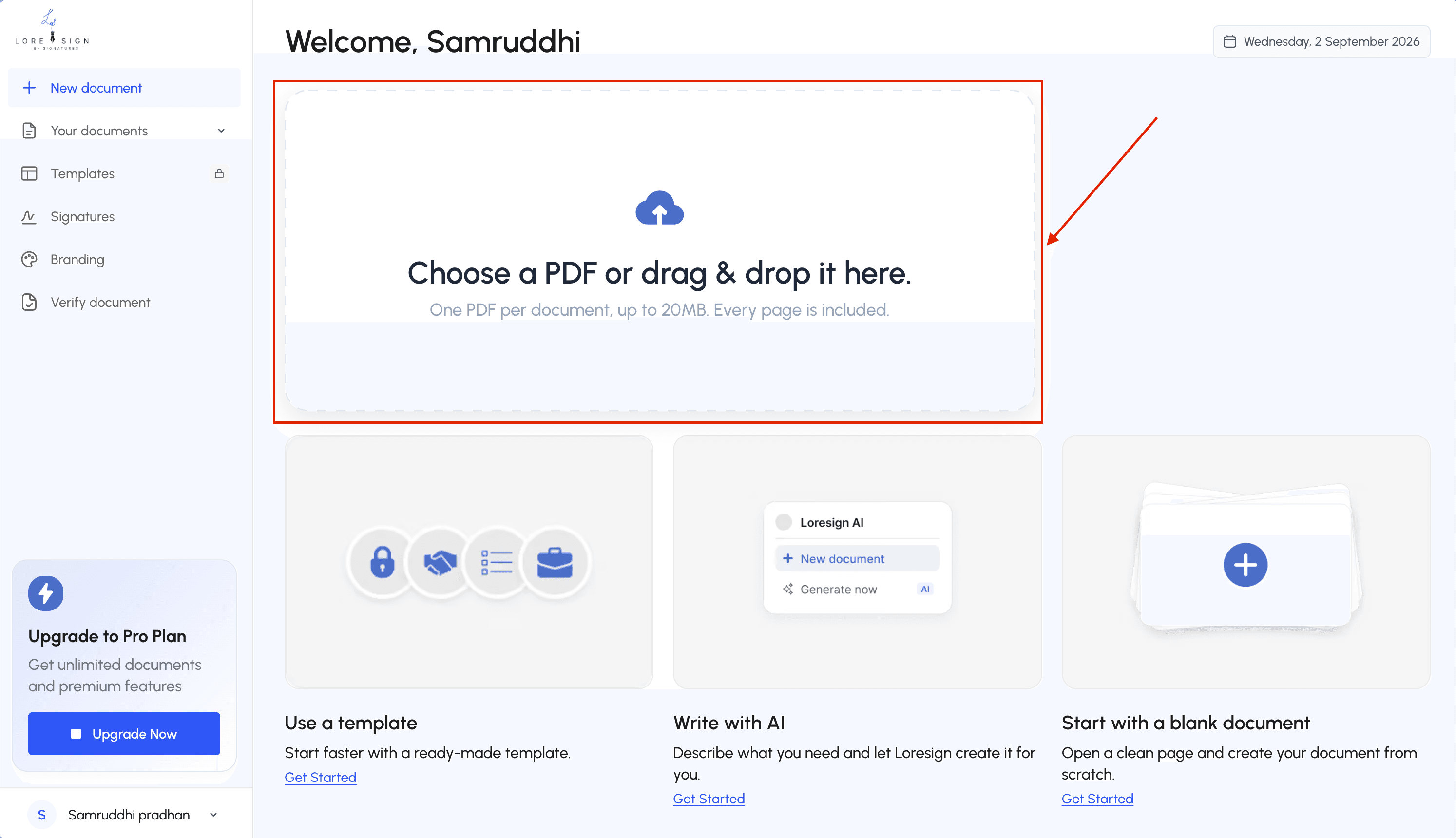
Step 1: Confirm the contract type is allowed to be signed electronically (check the limits list). Step 2: Upload the contract PDF to LoreSign.
Step 3: Add each signer's email and set the signing order if more than one person must sign.
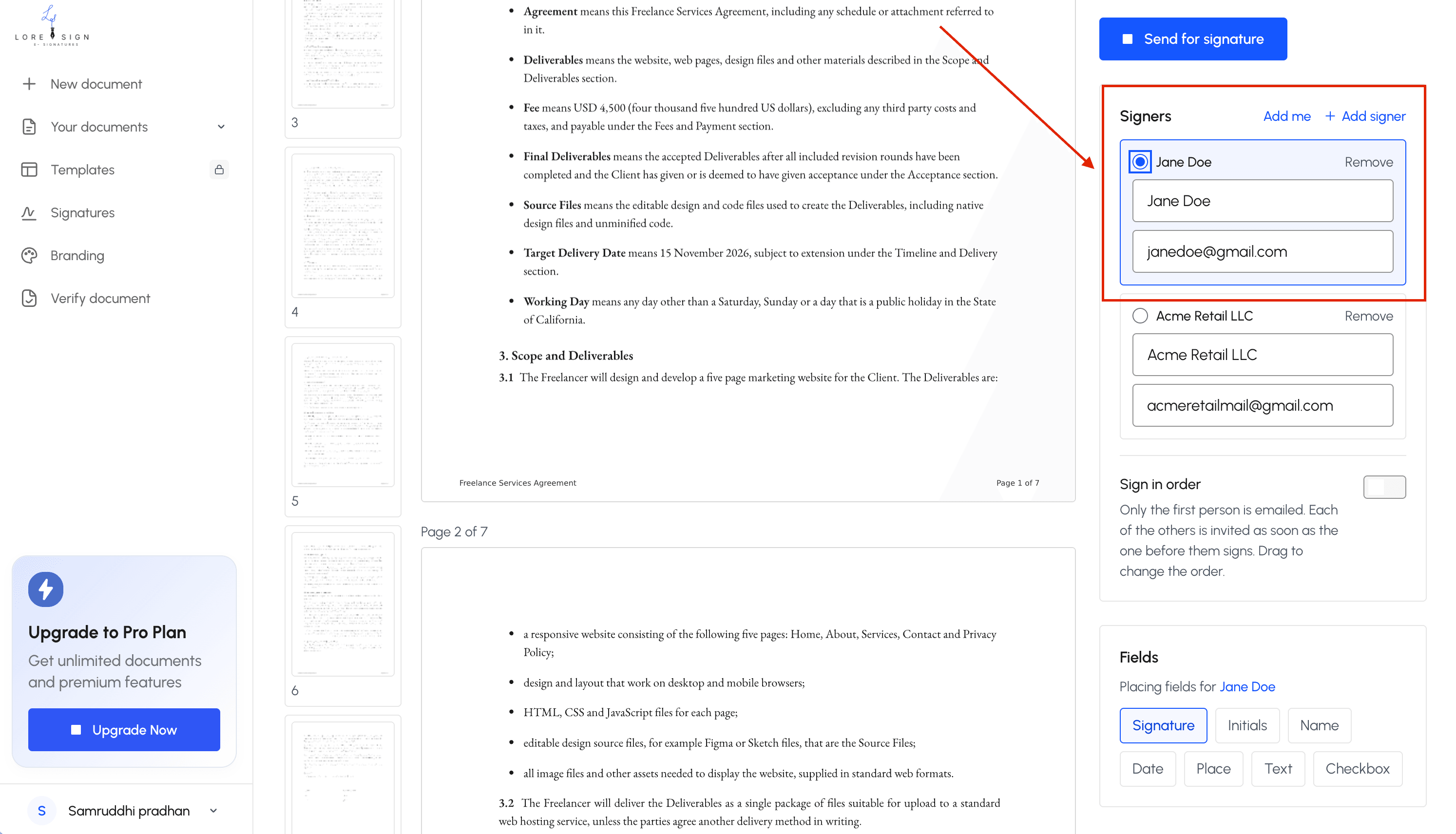
Step 4: Place the signing fields: signature, date, initials, and any required text boxes.
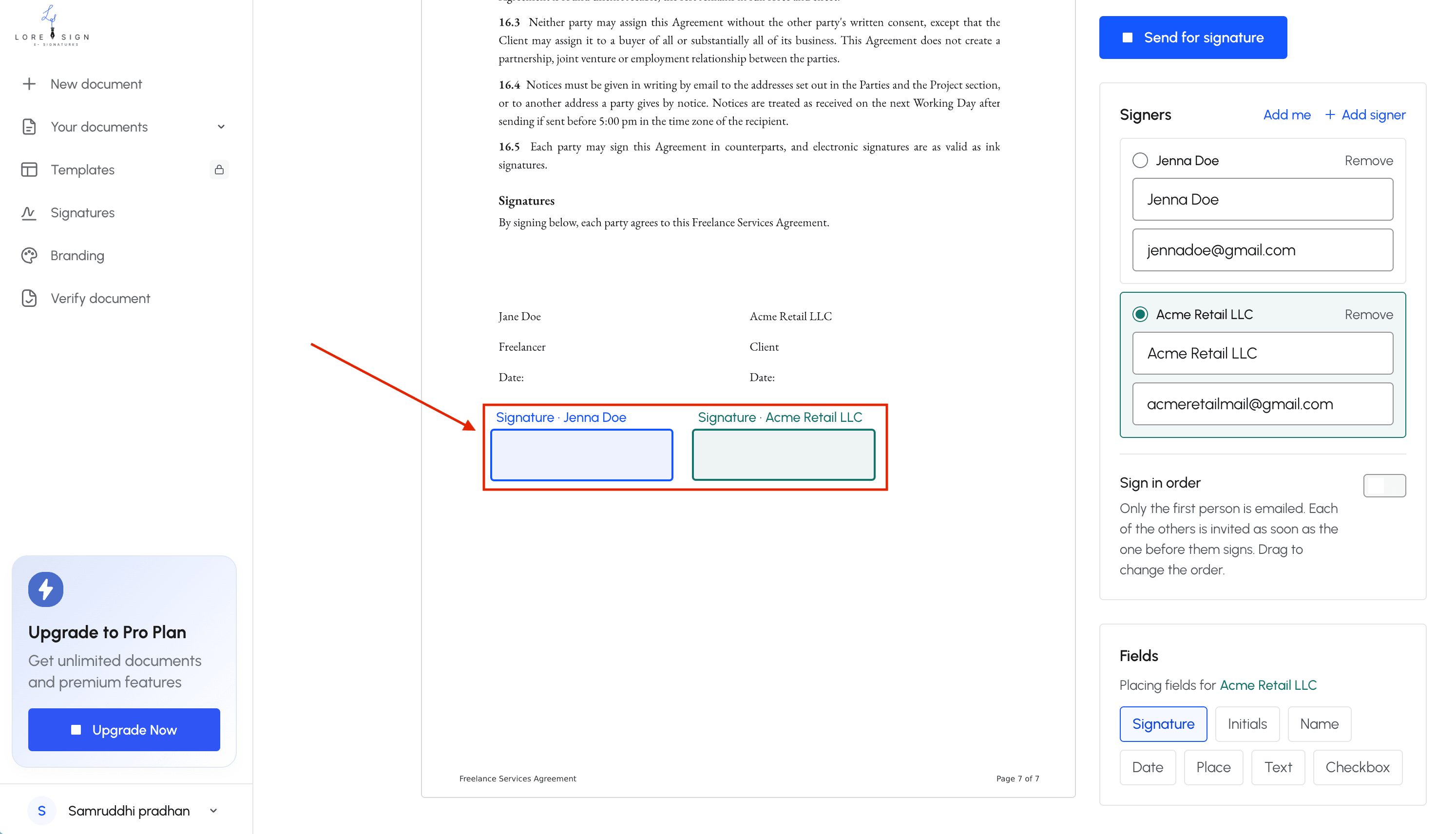 Step 5: Send one secure link to each signer and let automated reminders handle follow-ups.
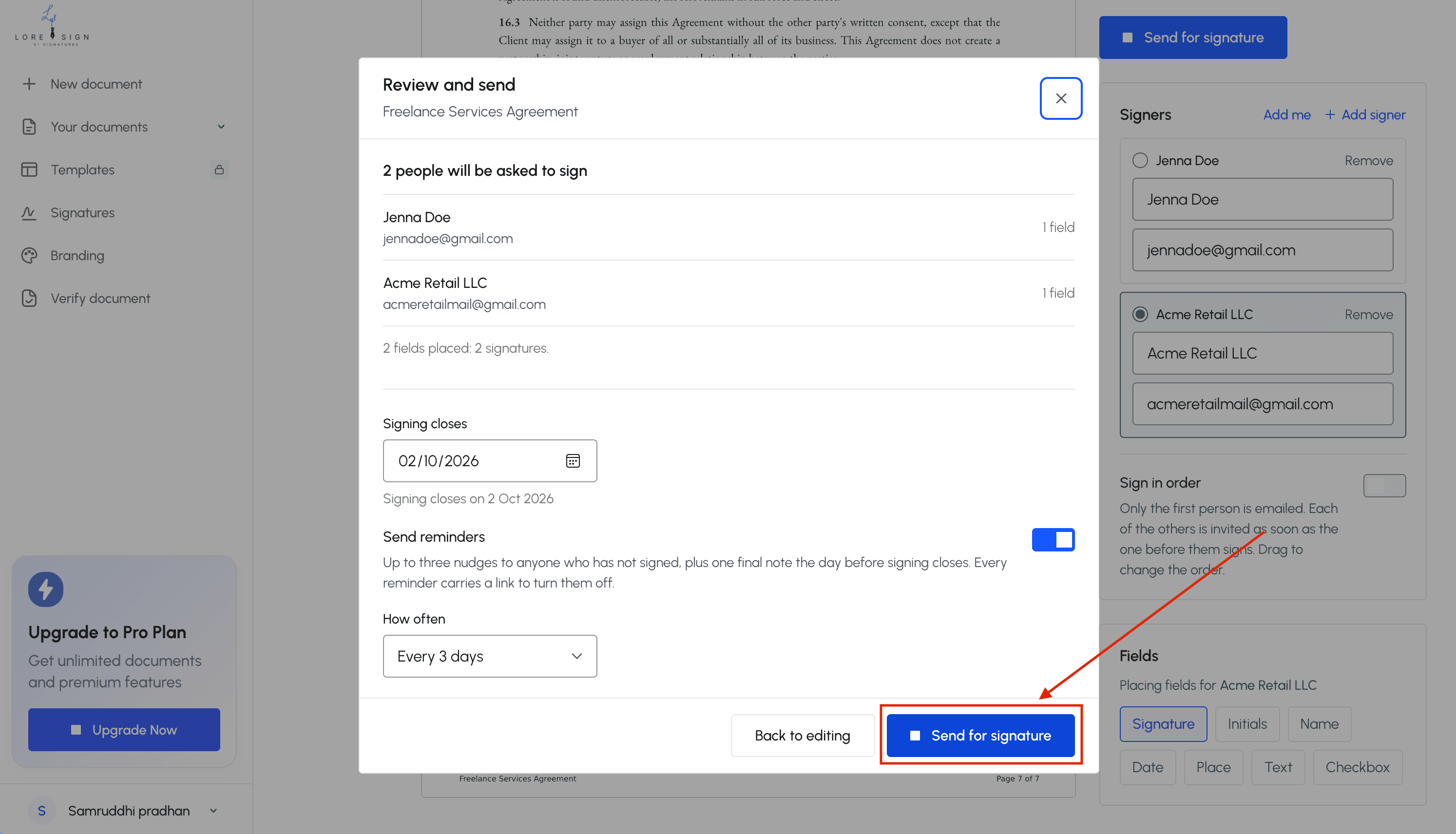
Step 6: Sign when it's your turn, then download the completed PDF once everyone has signed. Step 7: Save the certificate of completion and audit trail alongside the signed contract.
What Contract E-Signatures Cannot Do
E-signatures solve a real problem, but they're not a universal replacement for pen on paper. Some documents still demand a wet signature, and some people will refuse to accept anything else. Knowing the limits before you sign saves you from a voided contract or a wasted afternoon.
Documents that still require wet signatures
Wills and trusts are the big ones. Most states require a physical signature with witnesses present, and an e-signature won't hold up in probate court. Adoption papers, divorce decrees, and some family law filings fall into the same category.
Notarized documents are trickier. Some states now allow remote online notarization, where a notary watches you sign over video. But many still require an in-person notary with a physical stamp. If your document says "must be notarized," check your state's rules before assuming an e-signature works.
Court filings vary by jurisdiction. Federal courts accept e-signatures on many documents. Some state and local courts don't. The clerk's office is the only reliable source here.
The pattern is simple: documents tied to courts, estates, or family law often need paper. Everyday contracts don't.
When a counterparty may refuse an e-signature
Consent is a two-way street. The ESIGN Act only applies when both parties agree to sign electronically. If the other side insists on paper, you don't have a legal argument to force their hand.
This happens more with older landlords, small law firms, and government agencies. Some simply prefer paper out of habit. Others have internal policies that haven't caught up.
The fix is straightforward: ask before you sign. If they refuse, print the document, sign it, and scan it back. It's slower, but it's not a dead end.
How to Sign a Contract Electronically
The actual signing takes about two minutes. The prep work, reading the document and checking who sent it, takes longer. That's the right ratio.
Step 1: Receive the signature request
You'll get an email from the sender's e-signature platform. It contains a secure link, not the document itself. Click it and the document opens in your browser. No account needed on most platforms. No software to install.
Step 2: Verify the sender and document
Check the email address. Does it match the person or company you've been dealing with? A landlord asking for a deposit should email from a domain you recognize. If anything feels off, call them before clicking.
Then read the contract. All of it. The e-signature platform will show you exactly where to sign, but it won't tell you if the terms are fair. That's on you.
Step 3: Apply your signature
Most platforms let you type your name and convert it to a script font, draw with your mouse or finger, or upload an image of your handwritten signature. All three are legally equivalent. Pick whichever is fastest.
Click the signature field, apply your signature, and confirm. If there are initials fields or checkboxes, complete those too. The platform records the time, IP address, and email for each action.
Step 4: Download and store the signed copy
Once everyone signs, the platform emails you the completed PDF. Download it immediately. Save it somewhere you'll find it: a contracts folder, cloud storage, or your email archive.
The audit trail matters as much as the signature. Keep both files together. If a dispute comes up a year later, you'll want proof of who signed, when, and from where.
Common Mistakes to Avoid with Contract E-Signatures
Most e-signature failures aren't technical. They're human. You click, you sign, you move on. Then a problem surfaces months later and you can't prove what happened.
Signing without verifying the document
The signature request lands in your inbox and you click through on autopilot. That's the mistake. E-signature platforms make signing so smooth that the friction that used to force you to read, the printing, the page-turning, is gone.
Read the contract before you sign. Check the parties, the dates, the payment terms, the termination clause. If the sender uploaded the wrong version, your signature binds you to whatever is on the screen. No platform will catch that for you.
Ignoring the audit trail
The signed PDF is not your only evidence. The audit trail, the log showing who signed, when, and from which IP address, is what holds up if the contract is disputed.
Download it. Store it with the signed document. If you only save the signature page and the other party claims they never agreed, you've lost the argument before it starts.
Using tools without proper authentication
A free tool that lets anyone type a name into a PDF is not an e-signature platform. It produces an image, not a record.
Use a tool that verifies the signer's email, timestamps each action, and generates a certificate of completion. Without those, you have a picture of a signature and nothing else. That's not legally worthless, but it's far weaker than a proper audit trail when someone challenges the contract.
How to Choose an E-Signature Tool for Personal Contracts
You don't need enterprise features. You need a tool that gets a contract signed without making you learn a workflow first. Four things matter: security, ease of use, pricing, and legal compliance. Evaluate any tool against those four and you'll make the right call.
Security and authentication
Check how the tool verifies who's signing. Email-based authentication is the baseline: the signer gets a unique link tied to their inbox. Better tools add SMS codes or government ID checks for high-value contracts. For a rental lease or freelance agreement, email verification plus a timestamped audit trail is enough. For anything involving large sums, look for two-factor authentication on the signing link.
Ease of use for non-technical users
The test is simple: can you upload a PDF, place a signature field, and send it in under two minutes? If the interface asks you to configure a workflow or assign roles before you can send a single document, it's built for teams, not you. LoreSign keeps this simple: upload any PDF, place the signing fields, and send one secure link. That's the whole flow.
Pricing transparency
Free tiers are common, but read what "free" includes. Some tools limit you to three documents per month. Others watermark your PDFs or hide the audit trail behind a paid plan. The honest question is what you'll pay for the features you actually need: unlimited signing, a certificate of completion, and no watermarks. If a tool won't show you its pricing page without a sales call, move on.
Legal compliance and audit trails
The tool should generate a certificate of completion and a public verification page for every signed document. That's what makes the signature defensible if the contract is challenged. Check that the platform complies with the ESIGN Act and UETA in the US, or eIDAS if you're signing across the EU. Most reputable tools do. The differentiator is whether they give you the audit trail automatically or charge extra for it.
Final Thoughts on Contract E-Signatures
Contract e-signatures are legal, practical, and safe when you understand their limits. The ESIGN Act and UETA give them the same standing as wet signatures for most agreements. The catch is knowing which documents fall outside that protection.
Don't overthink the tool. For a freelance agreement, rental lease, or NDA, you need three things: a secure signing link, an audit trail, and a signed PDF you can download. Everything else is noise.
If you're ready to sign your first contract, LoreSign covers the basics without the enterprise clutter. Upload any PDF, place the signing fields, and send one secure link. You get the completed document automatically once everyone's signed, plus a certificate of completion and a public verification page. That's enough for most personal contracts.
The honest answer is that e-signatures won't replace every signature you'll ever make. But for the contracts most people sign most often, they're the faster, safer option.
Frequently Asked Questions
Are electronic signatures acceptable on contracts?
Yes, for most contracts. Electronic signatures are legally binding under laws such as the ESIGN Act in the US and eIDAS in the EU, provided the signer intends to sign and the record is retained. Exceptions include wills, certain notarized documents, and some court filings.
How do I create an eSignature?
You can create one by typing your name in a script font, drawing it with a mouse or finger, or uploading an image of your signature. Most e-signature tools let you choose the method when you place a signature field on the document.
How to send a contract for an eSignature?
Upload the contract to an e-signature tool, place the signing fields, and enter each signer's email address. The tool sends a secure link; once everyone signs, you receive the completed PDF automatically.
What are the rules for electronic signatures?
The main rules are that the signer must intend to sign, the signature must be linked to the record, and the record must be retainable and reproducible. Specific requirements vary by country and document type, so check local laws for high-stakes agreements.
Can I sign a rental lease electronically?
In most cases, yes. Residential leases are commonly signed electronically, and landlords often prefer it because it's faster. Check your local tenancy rules if the lease includes special clauses or requires notarization.
Is an e-signature as legally binding as a handwritten one?
For contracts covered by e-signature laws, yes—courts generally treat them as equivalent to handwritten signatures. The key is that the signing process creates a clear record of who signed and when.
What documents cannot be signed electronically?
Common exclusions include wills and testamentary documents, certain family law agreements, some court filings, and documents that require notarization or witnesses. Always verify the rules for your specific document and jurisdiction.
About LoreSign
LoreSign helps For people looking to get documents and contracts signed. get this right. Track every signer and receive the completed document automatically. Whether you are working through contract e signatures or something adjacent, we publish what we have actually tested, including where it falls short.