E-Signatures and Law Society Guidance: A Plain-Language Guide for Getting Documents Signed
E signatures law society pages are where US small business owners go to get confused. You search for guidance on whether your client contract will hold up in court, and you land on dense UK and Ireland law society text written for solicitors, not for someone trying to get a freelance agreement signed by Friday. The honest answer is that in the United States, e-signatures are legally valid for most documents under the ESIGN Act and UETA. Not all documents, though. Some still require a wet signature, and skipping the consent step can sink an otherwise valid contract. Tools like LoreSign make compliant e-signing straightforward, but the rules matter more than the software. This guide covers what makes an e-signature legally binding in the US, which documents you cannot sign electronically, and a step-by-step walkthrough for executing one today.
| At a glance | Details |
|---|---|
| US legal basis | ESIGN Act and UETA govern enforceability |
| Core requirement | Intent to sign plus a record of consent |
| Signer tracking | Audit trail and certificate of completion |
| Wet signature needed | Wills, court filings, some family law documents |
| Law society pages | Mostly UK and Ireland guidance, not US law |
| Verification | Public verification page on every plan |
In This Guide
- What Is an E-Signature? A Plain-Language Definition
- E-Signature vs Wet Signature: When Does Each Apply?
- Legal Requirements for E-Signatures in the United States
- E Signatures Law Society: A Step-by-Step Guide
- Are E-Signatures Legally Enforceable? What Law Society Guidance Says
- How to Sign a Document Electronically: A Step-by-Step Walkthrough
- Common Mistakes When Using E-Signatures
- E-Signature Tools: What to Look For
- Final Thoughts: E-Signatures Are Safe — When You Know the Rules
What Is an E-Signature? A Plain-Language Definition
An e-signature is any electronic mark, sound, or process attached to a document that shows your intent to sign it. Typing your name, clicking an "I agree" button, or drawing your signature on a screen all count.
E-signature vs. digital signature: what's the difference?
An e-signature is a legal concept. A digital signature is a technical one: the encryption underneath that proves a document hasn't changed. You don't need to understand digital signatures to sign legally. The law cares about intent, not cryptography.
What counts as an e-signature under US law?
Under the ESIGN Act and UETA, an e-signature is valid if it's associated with the record and made with intent to sign. A typed name works. A scanned wet signature works. A checkbox works, if the process shows you meant to agree.
The Law Society of England and Wales, the Law Society of Ireland, and similar bodies publish guidance for their own jurisdictions. Their e-signature commentary does not govern contracts signed under US law, which is covered by the ESIGN Act and UETA.
E-Signature vs Wet Signature: When Does Each Apply?
| Factor | E-Signature | Wet Signature |
|---|---|---|
| Legal basis in the US | ESIGN Act and UETA | Common law and state-specific rules |
| Typical documents | Contracts, NDAs, leases, invoices | Wills, court filings, some family law forms |
| Proof of signing | Audit trail, certificate of completion | Physical ink on paper |
| Speed of execution | Minutes, remote signers | Days, often in person |
| Acceptance risk | Rarely rejected if consent is documented | Universally accepted |
Legal Requirements for E-Signatures in the United States
Here's what makes an e-signature stick.
The ESIGN Act and UETA: the two laws that matter
Two laws govern e-signatures in the US. The ESIGN Act (2000) applies at the federal level. UETA, adopted by 49 states, governs state-level transactions. New York has its own version. Both laws say the same core thing: a signature can't be denied legal effect just because it's electronic.
Four requirements for a valid e-signature
Intent to sign. You meant to sign. Clicking a button labeled "Sign" shows intent. Typing your name in a field labeled "Signature" shows intent.
Consent. Both parties agreed to do business electronically. More on this below.
Attribution. The signature can be linked to the person who made it. An audit trail showing the signer's email, IP address, and timestamp does this.
Record retention. The signed document must be stored in a form both parties can access and reproduce. A PDF works. A screenshot of a signature doesn't.
What "consent to do business electronically" actually means
Consent isn't a legal formality. It's a practical one. The other party has to agree to receive and sign documents electronically. If they insist on paper, you can't force an e-signature on them. Most e-signature platforms handle this by sending a link the signer must click to open the document. Clicking that link is the consent.
The honest catch: consent can be withdrawn. If someone signs electronically, then later claims they never agreed to e-signatures, the audit trail is your defense. That's why attribution and consent are separate requirements.
If the other party is nervous about e-signatures, send them the certificate of completion and audit trail alongside the signed PDF. Seeing the timestamped record of who signed and when usually resolves the objection faster than any legal citation.
Are E-Signatures Legally Enforceable? What Law Society Guidance Says
Yes, with a caveat. US law is clear: ESIGN and UETA give e-signatures the same legal weight as wet signatures. The caveat is consent. If a party didn't agree to sign electronically, enforceability gets shaky.
What UK and Ireland law societies get right about consent
Law Society Ireland's guidance stresses that all parties must consent to e-signatures. They're right. Consent isn't a US-only rule. It's the same requirement under ESIGN and UETA. The difference is that US law spells out what happens when consent is missing: the signature can be challenged.
Why US enforceability is clearer than the SERP suggests
UK and Ireland pages lean on judicial uncertainty because their case law is thinner. The US has two decades of ESIGN and UETA precedent. Courts routinely enforce e-signed contracts, leases, and employment agreements. The statutory backing is explicit. That's the gap between what law society pages imply and what US law actually says.
The one risk factor that still applies: judicial interpretation
No statute covers every edge case. A judge can still weigh whether consent was genuine, whether attribution holds up, or whether the document type falls outside ESIGN's scope. The law is clear. Its application isn't always.
Documents You Cannot Sign Electronically
E-signatures cover most contracts, but not everything. A handful of document types still require wet signatures or special handling. The reason is usually statutory: a specific law demands a physical signature, a notary, or a court's own filing system.
Wills and trusts: why wet signatures still rule
Most states require wills to be signed in the physical presence of witnesses. ESIGN and UETA don't override state probate law. A fully electronic will is valid in only a few states, and even then the rules are strict. Trusts are less uniform, but many estate planners still insist on wet signatures to avoid a challenge later.
Court filings and notarized documents
Some courts accept e-filed documents with e-signatures. Others don't. It depends on the specific court's local rules. Notarized documents are the bigger issue: remote online notarization is legal in many states, but not all. If a document needs a notary, check your state's rules before assuming an e-signature will work.
Documents where the other party refuses e-signatures
This is the practical catch. Even if the law allows an e-signature, the other party can refuse to accept one. No statute forces a counterparty to sign electronically. If they demand a wet signature, you either comply or you don't have a deal.
How to Sign a Document Electronically: A Step-by-Step Walkthrough with LoreSign
You don't need a lawyer or any technical background. You need a platform, a document, and the other party's consent. Here's the whole process.
Step 1: Choose an e-signature platform
Pick one that captures consent and keeps an audit trail. Free tiers exist, but they often skip the audit trail or watermark your PDF. Paid plans remove the watermark and add reminders. LoreSign's free tier includes the audit trail and a public verification page on every plan.
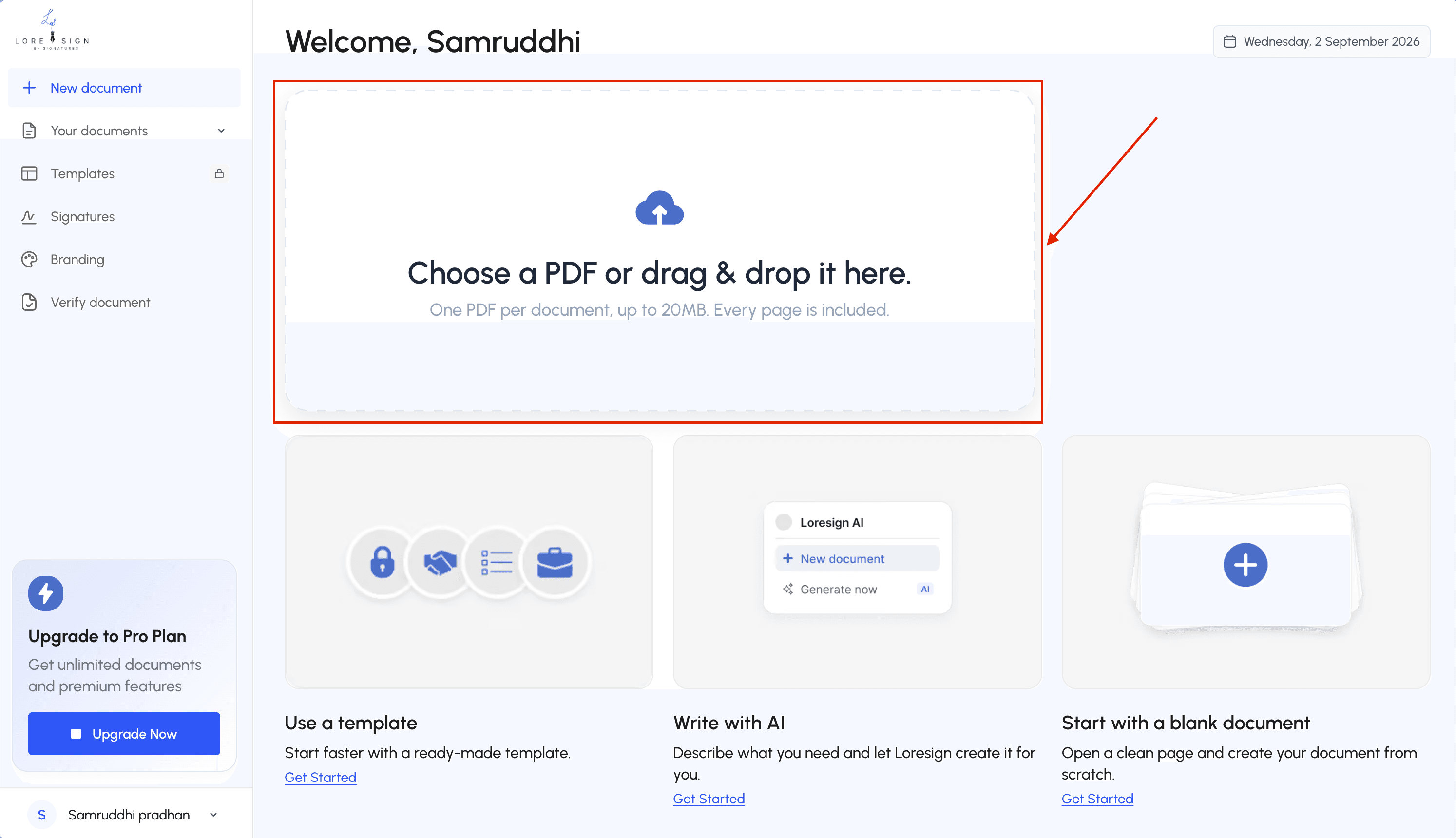
Step 2: Upload your document
Upload a PDF. Most platforms accept Word files and convert them. Place the signature fields where each signer needs to sign. You can add date fields, initials, and checkboxes.
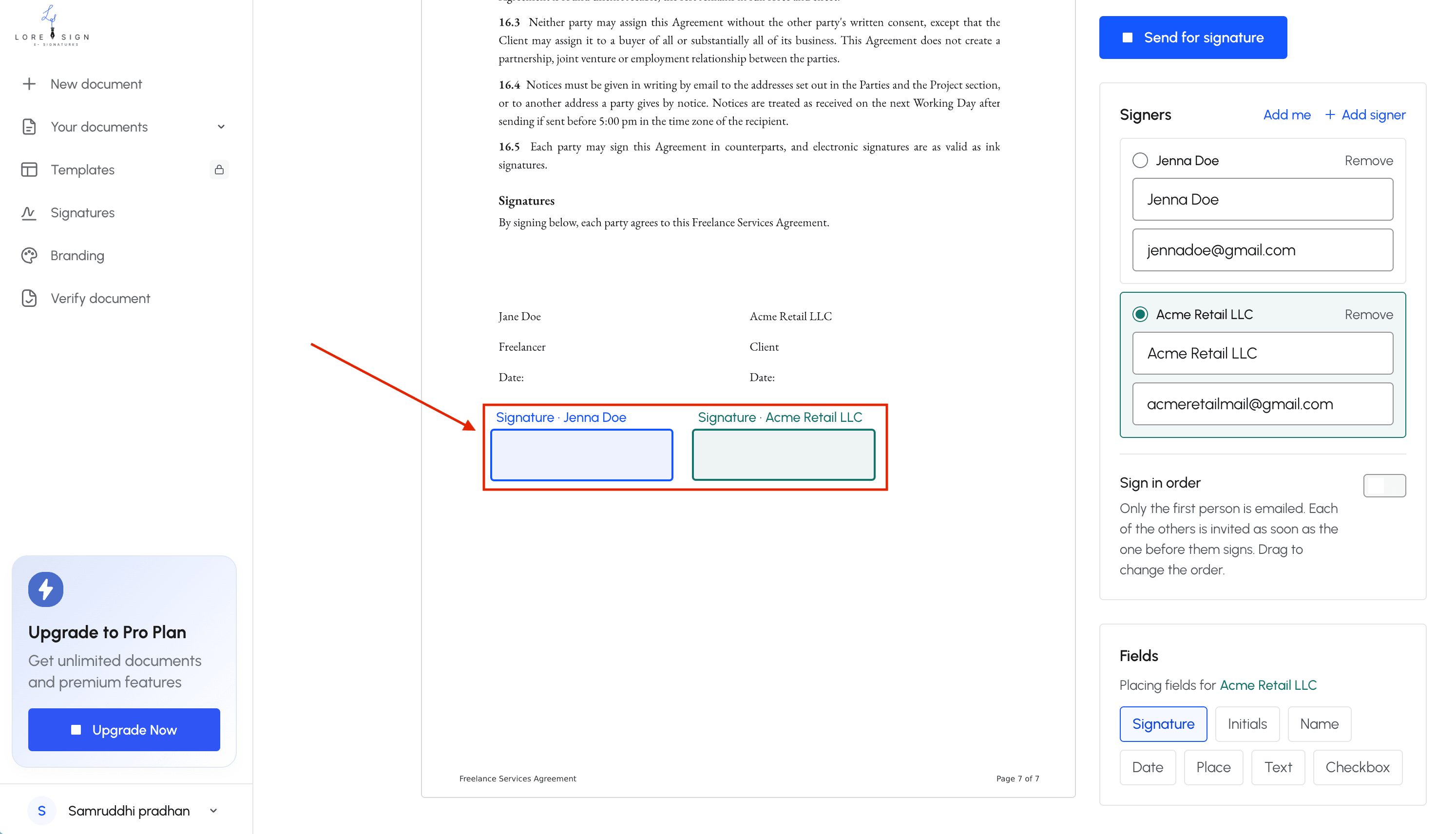
Step 3: Add signers and signature fields
Enter each signer's name and email. Set the signing order if one person must sign before another. Assign each field to the right person so the platform routes it correctly.
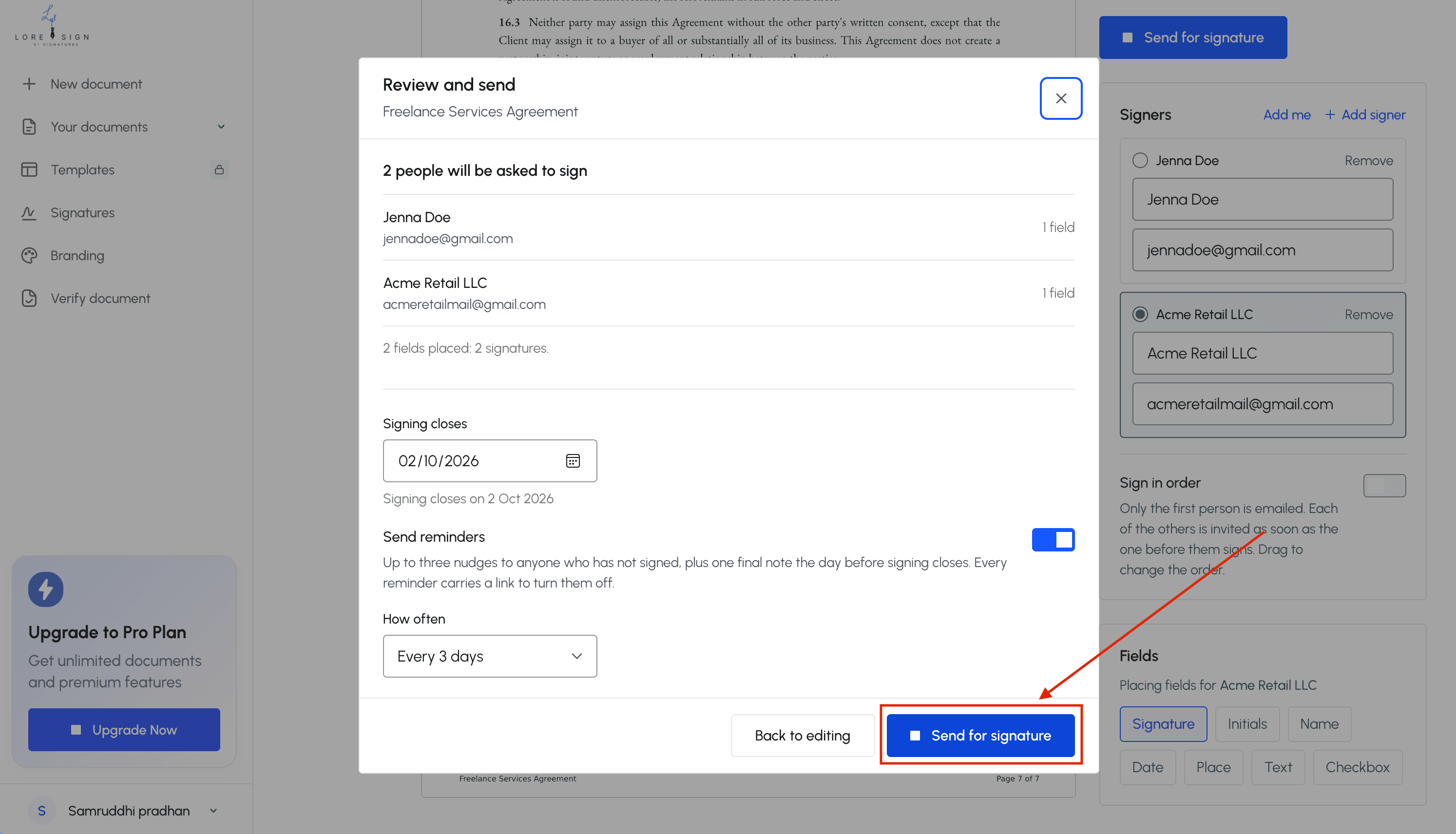
Step 4: Send and confirm consent
The platform emails each signer a secure link. The signer clicks through, reviews the document, and signs by typing their name, drawing a signature, or uploading an image. That click is the consent step. Don't skip it.
Step 5: Execute and store the signed document
Once everyone signs, the platform emails the completed PDF to all parties automatically. Download a copy and keep it somewhere you can find it later. The audit trail stays attached to the document, not in a separate file you might lose.
Common Mistakes When Using E-Signatures
Most disputes don't come from the law. They come from how the signature was collected.
Skipping the consent step
You can't assume the other party is fine with an e-signature. If they never clicked a box or agreed in writing, they can argue they never consented to do business electronically. That's the fastest way to lose enforceability. Get the click. Keep the record.
Using the wrong signer identity
The person who signs must be the person named in the document. If an assistant signs on behalf of a manager without authorization, the signature may not bind the company. Check the signer's email matches the person you intended. Don't forward a signing link to someone else.
Failing to retain the audit trail
The signed PDF is not enough. You need the timestamp, IP address, and consent record that shows who signed and when. If you only save the final document, you lose the evidence that makes it enforceable. Store both together.
E-Signature Tools: What to Look For
The platform matters less than the evidence it captures. A valid e-signature needs four things: intent, consent, attribution, and a retained record. Any tool that skips one of those leaves you exposed.
Audit trails and consent capture
Look for a tool that timestamps every action and records how consent was given. The audit trail should show who opened the document, when they signed, and from what IP address. If the platform doesn't capture consent as a separate step, walk away. LoreSign includes this on every plan, including the free tier.
Authentication options
Email-based signing is the baseline. Better tools add SMS codes or government ID checks for higher-risk documents. Match the authentication to the stakes: a simple NDA needs less than a six-figure contract.
Pricing: free vs. paid e-signature tools
Free tiers work for occasional signing. Paid plans unlock templates, reminders, and branding. The catch: some free tools watermark your PDFs or cap signers per month. Check what you're actually getting before you send.
Final Thoughts: E-Signatures Are Safe — When You Know the Rules
The rules are short. Under ESIGN and UETA, e-signatures carry the same legal weight as wet ink for most US documents. Consent and attribution are the two things you can't skip. A handful of documents, like wills and some court filings, still need a pen.
Law society guidance on e signatures tends to focus on UK and Ireland practice, but the underlying principle travels: everyone must agree to sign electronically, and you need a record that proves who signed and when. Get those right and the signature holds.
If you're ready to send a document, LoreSign handles consent capture, audit trails, and automatic delivery of the completed PDF on every plan. Start with one contract. You'll see the process works.
Frequently Asked Questions
What are the legal requirements for electronic signatures?
In the US, an electronic signature is valid when the signer shows a clear intent to sign and consents to do business electronically, and when the record can be retained and reproduced later. The ESIGN Act sets the federal baseline and UETA covers most states. A proper audit trail and certificate of completion document those requirements.
What legal documents cannot be signed electronically?
Wills, codicils, and certain trusts typically require wet signatures under state law. Court filings, some family law documents such as divorce decrees, and a handful of other records also fall outside e-signature rules. When in doubt about a specific document, check your state statute or ask a licensed attorney.
Are electronic signatures legally enforceable in the United States?
Yes. The ESIGN Act of 2000 and the Uniform Electronic Transactions Act give electronic signatures the same legal weight as wet signatures for most contracts and agreements. Courts have consistently upheld them when intent and consent are documented.
Can e-signatures be used for legal documents?
Yes, for most legal documents including contracts, NDAs, leases, engagement letters, and vendor agreements. The main exceptions are wills, certain court filings, and a small set of documents that state law still requires to be signed on paper.
Does Law Society guidance apply to US contracts?
No. Law society guidance from the UK, Ireland, and similar bodies applies to practice in those jurisdictions. US contracts are governed by the ESIGN Act and UETA, plus any state-specific rules that apply to the document type.
What makes an e-signature legally defensible if challenged?
A clear record of signer intent, documented consent to electronic signing, and a tamper-evident audit trail showing who signed and when. A certificate of completion that bundles this information is the strongest single artifact to keep on file.
Do I need a digital certificate for an e-signature to be valid?
No. A digital certificate is one way to strengthen identity verification, but it is not required for legal validity under ESIGN or UETA. What matters is intent, consent, and a reliable record of the signing event.
About LoreSign
LoreSign helps individuals and businesses create, send, sign, and track documents in one place. You can upload a PDF or create an agreement, add the required signing fields, send it to recipients, and automatically receive the completed document once everyone has signed.