E-Signatures for Healthcare: A Practical Guide to HIPAA-Compliant Signing
E signatures for healthcare sit in an awkward spot for most practice managers and solo practitioners in the US. You have a stack of paper consent forms on the front desk, a patient who wants to sign from their phone, and a compliance officer who keeps saying the word "HIPAA" like it ends the conversation. The honest answer is that HIPAA does not prohibit e-signatures. Not even close. What it does is set conditions, and most of the confusion online comes from vendors who skip those conditions and regulators who never state them plainly.
This guide tells you what those conditions are, what you cannot do, and how to start without wasting money. LoreSign is one of the tools that meets the requirements, but you will get the full picture here: the five HIPAA conditions, the workflow for patient intake, the wet-signature exceptions, and the free-versus-paid decision laid out by practice size.
| At a glance | Details |
|---|---|
| HIPAA & e-signatures | Permitted; HIPAA regulates privacy, not signature format |
| Governing law | ESIGN Act and state UETA |
| Core requirement | Signer identity, intent, and tamper-evident records |
| When wet ink needed | Some state-specific forms and certain federal programs |
| Vendor essentials | Signed BAA, encryption, access controls, audit trail |
| Record retention | Follow state and payer rules; often 6-10 years |
In This Guide
- What Are E-Signatures for Healthcare?
- Small Practice vs Large Health System: E-Signature Priorities
- Does HIPAA Allow Electronic Signatures?
- E Signatures For Healthcare: A Step-by-Step Guide
- HIPAA E-Signature Requirements: The 5 Conditions You Must Meet
- What E-Signatures for Healthcare Cannot Do
- Step-by-Step: How to Implement E-Signatures in Your Healthcare Practice
- Common Mistakes When Using E-Signatures for Healthcare
- Free vs Paid E-Signature Options for Healthcare
- Small Practices vs Large Hospitals: What Changes?
- Medicare and FDA E-Signature Requirements
- Can DocuSign Be HIPAA Compliant?
- Getting Started with E-Signatures for Healthcare
What Are E-Signatures for Healthcare?
An e-signature for healthcare is an electronic mark, typed name, or drawn signature that a patient or provider uses to sign a medical document, and it is legally valid only when the signing process meets HIPAA's security and authentication requirements.
A generic e-signature is just a way to say "I agree" without paper. In healthcare, that is not enough. The signature has to be tied to a specific person, attached to a document that cannot be quietly altered afterward, and stored in a way that protects the patient's information. Most consumer e-signature tools handle the first part. They do not all handle the second and third.
Electronic signature vs digital signature: what's the difference?
People use these terms interchangeably, but they are not the same thing. An electronic signature is the broad category: a typed name, a clicked "I agree" button, a finger-drawn signature on a tablet. It is the legal act of signing.
A digital signature is a specific technology underneath some electronic signatures. It uses encryption to lock the document so that any change after signing breaks the signature. Think of it as a tamper-evident seal. Not every electronic signature uses a digital signature, and HIPAA does not strictly require one. But if your e-signature tool cannot prove the document was not altered after signing, you have an integrity problem.
Why healthcare has stricter rules than other industries
A signed lease and a signed consent form are not the same thing. The lease contains your name and address. The consent form contains a diagnosis, a treatment plan, and a patient's medical history. That is protected health information, and HIPAA's Security Rule applies to it from the moment it is created until it is destroyed.
That means the e-signature vendor you use is handling PHI on your behalf. Under HIPAA, that vendor is a business associate, and you need a signed Business Associate Agreement with them before they touch a single patient document. A real estate agent does not need that. You do.
[!note] HIPAA does not mandate a specific signature technology; it requires that any electronic protected health information (ePHI) created or transmitted by the e-signature system be protected under the Security Rule. The ESIGN Act and state UETA laws give electronic signatures the same legal weight as wet signatures for most documents, but a few state-specific forms and certain federal programs still require ink.
Small Practice vs Large Health System: E-Signature Priorities
| Factor | Small Practice / Solo | Large Health System |
|---|---|---|
| Vendor selection | Turnkey HIPAA-ready tool with BAA | Enterprise platform with EHR/SSO integration |
| Workflow complexity | Simple intake and consent forms | Multi-department routing and ordered signers |
| Compliance oversight | Practice manager owns policy | Compliance and legal teams review annually |
| Budget approach | Per-seat or per-envelope pricing | Volume contracts and custom BAAs |
| Training | Brief staff walkthrough | Formal training and role-based access |
Does HIPAA Allow Electronic Signatures?
Yes. HIPAA does not prohibit electronic signatures. Nothing in the Privacy Rule or the Security Rule says a signature has to be wet ink on paper.
What HIPAA does is impose conditions. The Security Rule requires that any electronic process handling protected health information, including signing, protects the confidentiality, integrity, and availability of that information. An e-signature that meets those conditions is valid. One that does not puts you in violation.
The honest answer is that the question is not "can I use e-signatures" but "does my e-signature process meet the Security Rule." Most of the confusion online comes from people conflating the two. HIPAA never says no to e-signatures. It says yes, but only if you can prove who signed, that the document was not altered, and that the PHI stayed protected throughout.
[!tip] For small practices, start with a single high-volume form such as the patient intake packet. This limits scope, lets you test your BAA and audit trail, and gives you a quick win before expanding to contracts or referrals.
E Signatures For Healthcare: A Step-by-Step Guide
- Map your current paper forms and identify which truly require a wet signature.
- Select a HIPAA-compliant e-signature vendor and execute a Business Associate Agreement (BAA).
- Configure user roles, access controls, and audit logging in the platform.
- Build templates for your most common documents (consents, intake forms, contracts).
- Pilot the workflow with a small group of staff and patients to catch issues.
- Train all staff on sending, tracking, and storing signed documents.
- Roll out practice-wide and schedule periodic compliance reviews.
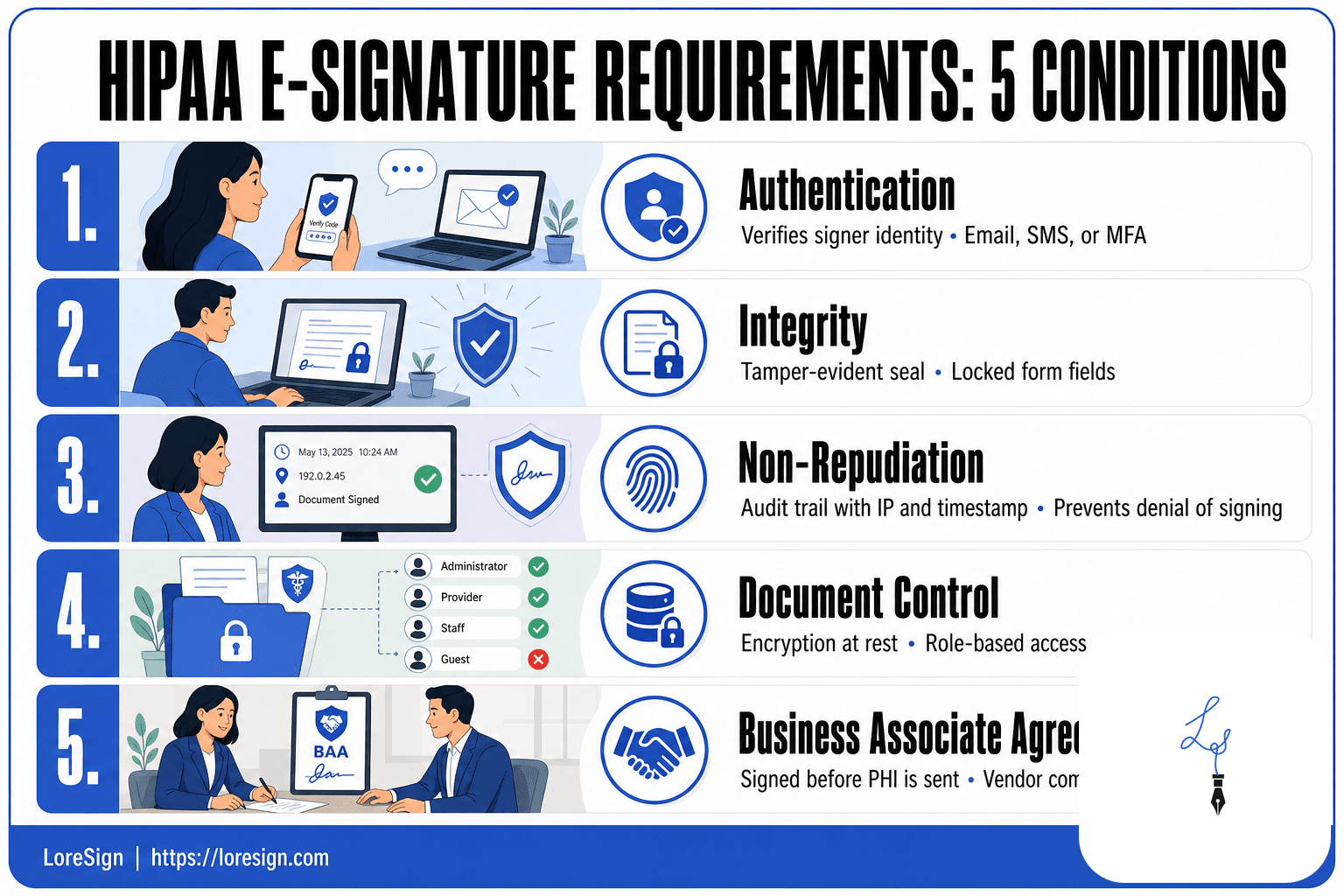
HIPAA E-Signature Requirements: The 5 Conditions You Must Meet
HIPAA doesn't spell out e-signature rules in a single paragraph. The requirements come from the Security Rule's broader mandate: protect electronic protected health information (ePHI) at every step, including when someone signs a document. In practice, that breaks into five conditions. Miss one and the signature may not hold up under audit.
Authentication: verifying the signer's identity
You need a way to confirm the person signing is who they claim to be. HIPAA doesn't mandate a specific method. Common approaches include email-based verification (a unique link sent to the signer's inbox), SMS codes, knowledge-based questions, or multi-factor authentication.
For patient consent forms, email verification is usually enough. For higher-risk documents like release of information authorizations, add a second factor. The key is that your process ties the signature to a specific person, not just a device or an open link.
Integrity: ensuring the document hasn't been altered
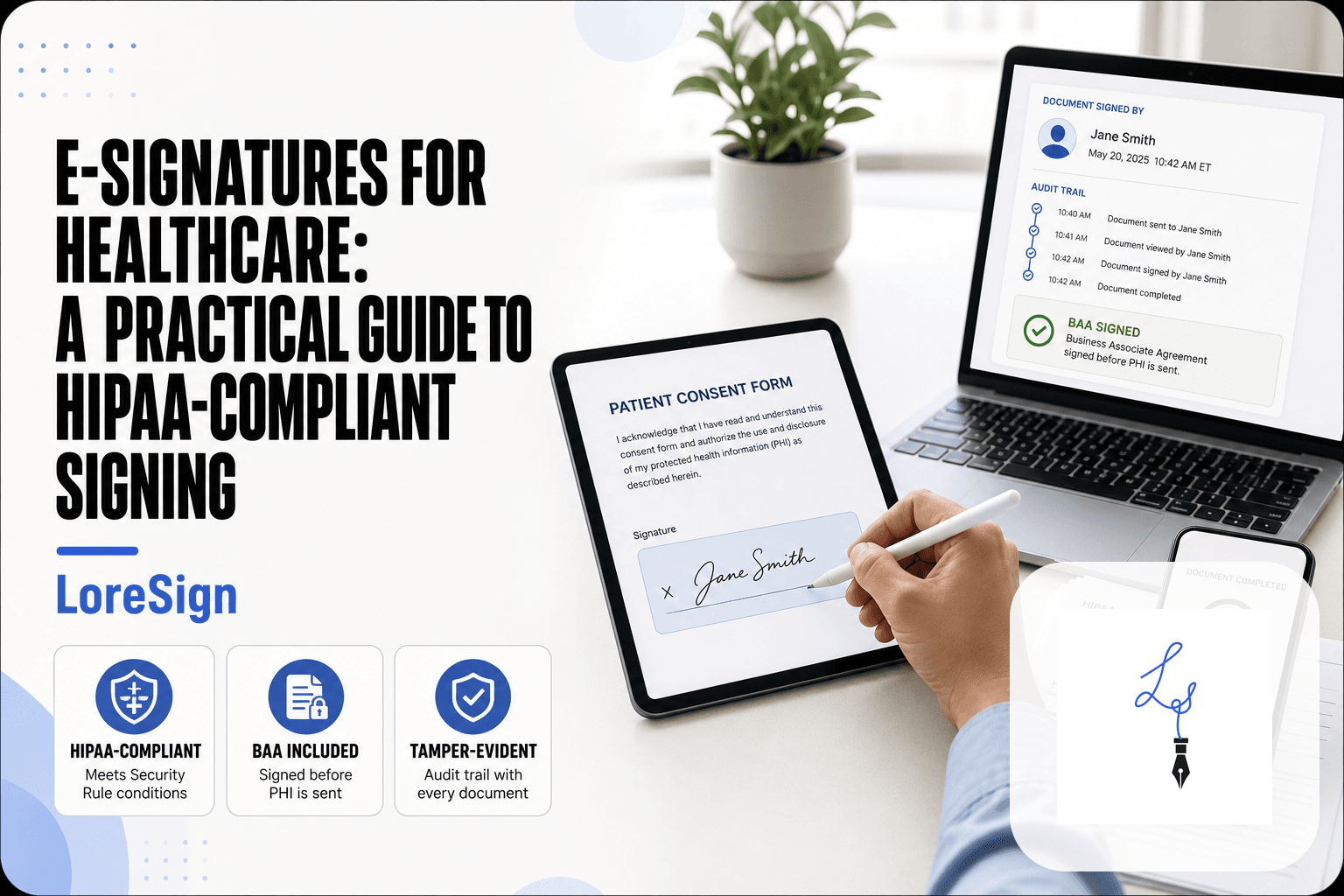
Once a document is signed, it must be tamper-evident. That means any change after signing should be detectable. Most e-signature platforms handle this by applying a digital seal or hash to the document at the moment of signing. If someone edits the PDF afterward, the seal breaks.
You also need to prevent changes before signing. Lock the form fields so signers can only fill in designated areas, not alter the text of the consent or authorization itself.
Non-repudiation: proving who signed
Non-repudiation means the signer cannot plausibly deny they signed. This requires an audit trail that records the signer's email address, IP address, timestamp, and the sequence of actions taken. Some platforms also capture a drawn signature or initials.
The audit trail is your evidence. Without it, you have a signature but no way to prove it in a dispute or an OCR investigation. Make sure your vendor exports a complete, timestamped log with every signed document.
Document control: retaining and accessing signed records
Signed documents containing PHI must be stored, accessed, and destroyed according to HIPAA retention and access rules. That means encryption at rest, role-based access controls, and the ability to retrieve a signed document when a patient requests it or when regulators ask.
You also need to control who can view, download, or forward signed documents. A signed consent form sitting in an unencrypted shared drive is a breach waiting to happen, regardless of how secure the signing process was.
Business Associate Agreement: your vendor's HIPAA commitment
Any e-signature vendor that touches your PHI is a business associate. You need a signed Business Associate Agreement (BAA) with them before you send a single patient document through their platform. No BAA, no PHI. That's non-negotiable.
A BAA is a legal contract where the vendor commits to HIPAA safeguards and breach notification duties. If a vendor won't sign one, they are not suitable for healthcare use, full stop. Check this before you compare features or pricing.
What E-Signatures for Healthcare Cannot Do
E-signatures solve a lot, but they don't solve everything. Some documents still need ink on paper, and some state agencies won't accept anything else. Knowing the limits up front saves you from a rejected filing or a compliance finding later.
When wet signatures are still required
A few situations still demand a physical signature. Some state vital records offices require wet signatures for birth certificate amendments or certain adoption paperwork. Some courts and probate matters still ask for original signed documents. And if a patient insists on signing on paper, you cannot force an electronic signature: consent must be voluntary, and that includes the method of signing.
The honest answer is that it depends on your state and the specific agency. Check with the receiving office before you go fully paperless. One rejected filing costs more time than a quick phone call.
Documents that may need special handling (advance directives, some state-specific forms)
Advance directives are the classic gray area. Many states now accept electronic advance directives, but the rules vary widely. Some require witnesses to be physically present. Others require notarization. A few still require wet signatures outright.
State-specific forms create the same problem. Medicaid applications, certain guardianship documents, and some mental health consent forms have state-level rules that override general e-signature law. The UETA and ESIGN Act set a federal baseline, but states can add requirements. Before you move a specific form to e-signature, confirm your state accepts it.
Common misconceptions about e-signature legality
The biggest misconception: that HIPAA prohibits e-signatures. It doesn't. HIPAA is silent on signature format. The Security Rule cares about how you protect the document and the signature, not whether the signature is electronic or wet.
Another misconception: that an e-signature is less legally binding than a wet one. Under UETA and ESIGN, an electronic signature carries the same legal weight as ink, provided the process meets authentication and consent requirements. The signature itself isn't weaker. Your process can be.
A third: that any e-signature tool works for healthcare. It doesn't. A generic tool without a BAA, without an audit trail, and without encryption at rest fails the conditions covered in the previous section. The signature might be legal in a vacuum. It won't be HIPAA compliant in your practice.
Step-by-Step: How to Implement E-Signatures in Your Healthcare Practice
Moving from paper to e-signatures is a process, not a purchase. You can't just sign up for a tool and start sending forms. Do the groundwork first, and the rollout takes a week instead of a quarter.
Step 1: Conduct a HIPAA risk assessment
Before you pick a vendor, map where PHI flows. List every document that requires a signature: intake forms, consent forms, release of information, treatment agreements, financial policies. For each one, note who sends it, who signs it, and where the signed copy lives now.
Then identify the risks. A signed consent form sitting in a shared drive is a breach waiting to happen. A fax machine in an unlocked hallway is another. Your risk assessment tells you what the e-signature tool must fix, not just what it must do. If you're a solo practitioner, this can be a one-page document. If you're a clinic with staff, involve your compliance officer or an outside consultant.
Step 2: Choose a HIPAA-compliant e-signature vendor
The vendor must sign a Business Associate Agreement before you send a single PHI-bearing document. No BAA, no deal. That rule eliminates most generic tools immediately.
Beyond the BAA, check for three things. First, encryption in transit and at rest. Second, an audit trail that records who signed, when, and from what IP address. Third, identity verification options: email authentication is the baseline, but SMS codes or knowledge-based questions add a layer for higher-risk documents. Ask the vendor whether they'll sign your BAA or insist on their own. Either works, but get it in writing before you upload patient data.
Step 3: Create an e-signature policy
Write down the rules before you train anyone. The policy should cover which documents may be signed electronically, which still require wet signatures, how signer identity gets verified, and how long signed records are retained. HIPAA requires six years for most documents, but your state may require longer.
Keep the policy short. Two pages is enough for a small practice. A 20-page policy nobody reads is worse than no policy, because it creates a false sense of compliance. Review it annually, or whenever you add a new document type.
Step 4: Train staff and test the workflow
Don't roll this out to patients before your staff has used it internally. Start with a non-PHI document: an internal policy acknowledgment or a staff handbook sign-off. Have each staff member sign it using the new tool. Watch where they get stuck.
Then run a pilot with a small group of patients. Pick a low-risk form, like a general consent or a privacy practice acknowledgment. Collect feedback on the patient experience. If patients can't complete the signature on a phone, fix that before you go wider.
Step 5: Roll out with patient intake and consent forms
Start with the highest-volume, lowest-risk documents. Intake forms and general consent forms are the obvious first candidates. They're standardized, they're signed constantly, and they don't usually carry the legal sensitivity of an advance directive or a guardianship form.
Send the form by email or text before the appointment, so patients sign at home instead of in the waiting room. That alone cuts front-desk time meaningfully. Once the workflow is stable, add more document types one at a time. Don't migrate everything at once. A phased rollout lets you catch problems while they're small.
Common Mistakes When Using E-Signatures for Healthcare
Most compliance failures don't come from a missing feature. They come from a skipped step. Here are the four mistakes I see practices make most often, and what each one costs you.
Using a generic e-signature tool without a BAA
This is the most common error, and the most expensive one to fix after the fact. A practice signs up for a consumer-grade tool because it's familiar, uploads patient intake forms, and starts collecting signatures. The vendor never signed a Business Associate Agreement. That means every PHI-bearing document sent through the tool is a potential HIPAA violation.
The fix is simple: before you upload a single patient document, get the BAA in writing. If the vendor won't sign one, walk away. No exceptions.
Skipping identity verification
Email authentication alone is weak. Anyone with access to the patient's inbox can click the link and sign. For low-risk forms, that might be acceptable. For treatment consents, financial agreements, or anything with legal weight, it isn't.
Add a second factor for higher-risk documents. SMS codes work. Knowledge-based questions work better. The point is that you can prove the person who signed is the person who was supposed to sign.
Failing to retain audit trails
A signed PDF without an audit trail is just a picture of a signature. If a patient disputes a consent form, you need to show who signed, when, from what IP address, and what they saw before signing. Generic tools often strip this metadata or don't capture it at all.
Your e-signature tool should retain the full audit trail with the document, not as a separate file that can get lost. Check this before you commit to a vendor.
Ignoring state-specific requirements
HIPAA sets a federal floor. Your state may set a higher bar. Some states require wet signatures for advance directives. Others have specific rules about electronic prescribing or mental health records. A tool that's compliant in California may not cover what Texas requires.
Check your state's medical board guidance before you migrate any document type. When in doubt, keep the wet signature.
Free vs Paid E-Signature Options for Healthcare
The honest answer is that free e-signature tools are rarely free for healthcare. You'll pay in risk, in missing audit trails, or in the time it takes to rebuild a workflow that a paid tool would have handled out of the box. Here's what actually separates the two tiers.
What free tools usually lack
Free e-signature plans are built for one-off documents, not patient records. The three things you'll most often miss:
- A signed BAA. Most free tiers don't offer one. Without it, you can't legally send PHI through the tool.
- A real audit trail. Free tools may log a timestamp. They rarely capture IP addresses, viewing history, or the full signing sequence a dispute requires.
- Identity verification beyond email. SMS codes, knowledge-based questions, and multi-factor signer checks are almost always paid features.
You also lose document control. Free plans typically can't route a document to multiple signers in a specific order, and they won't automatically deliver the completed PDF back to you.
When free is acceptable (and when it isn't)
Free tools work for internal, non-PHI documents. An employment offer for a non-clinical role, a vendor questionnaire, an office lease amendment. If the document never touches patient data, a free tier is fine.
The line is PHI. The moment a document contains a patient name, a diagnosis, a treatment plan, or a consent form, free is no longer an option. You need a BAA, an audit trail, and authentication. If the vendor won't provide all three, you're not saving money. You're deferring a compliance cost that will land later, usually during an audit or a dispute.
What to expect from paid HIPAA-compliant tools
Paid tools start around $15 to $30 per user per month for a single practitioner. What you're buying:
- A signed BAA before you upload anything.
- Audit trails that travel with the document, not as a separate file.
- Multi-factor signer authentication for higher-risk forms.
- Ordered routing, so a consent form goes to the patient, then the guardian, then the clinician, in that order.
- Automatic delivery of the completed, signed PDF once everyone has signed.
LoreSign sits in this tier. It covers the BAA, the audit trail, the verification page, and the ordered routing without the enterprise price tag. You don't need the most expensive plan to be compliant. You need the features that match your document types, and nothing more.
Small Practices vs Large Hospitals: What Changes?
Scale changes the job. A solo practitioner needs a working consent form by Friday. A hospital needs a signing workflow that survives an audit, integrates with Epic, and doesn't break when 40 clinicians touch the same document. The HIPAA conditions are identical. The implementation isn't.
Solo practitioners and small clinics
You're the compliance officer, the IT department, and the front desk. Budget is the constraint, not features. A single paid seat with a BAA, audit trail, and email authentication covers most solo workflows. Don't buy enterprise routing you'll never use. Do buy a tool that auto-delivers the completed PDF, because you won't have staff chasing signatures.
The main catch: you're the only one who knows the rules. If you skip the BAA or use a consumer tool, nobody catches it until an audit or a patient complaint.
Mid-size practices
You have a practice manager and maybe a part-time IT contractor. The shift is from "can I sign this" to "can I prove who signed this, in order, six months later." Ordered routing matters here. So does a policy document that names who can send documents and which forms require extra authentication.
Integration starts to matter. If your EHR has a native e-signature module, use it before adding a third-party tool. If not, pick a vendor that exports audit trails in a format your compliance file can hold.
Large hospitals and health systems
You're not choosing a tool. You're choosing a vendor that survives procurement, signs a BAA with your legal team, and integrates with your identity provider. Budget is rarely the blocker. The blockers are SSO, role-based access, and audit log retention that matches your record retention schedule.
Expect a pilot. One department, one document type, 90 days. Then expand. The failure mode at this scale isn't non-compliance. It's rolling out a tool nobody uses because it adds three clicks to a clinician's day.
Medicare and FDA E-Signature Requirements
HIPAA isn't the only rulebook. If you bill Medicare or work with FDA-regulated records, two more frameworks apply. They overlap with HIPAA but add their own conditions.
Medicare e-signature requirements
Medicare doesn't ban electronic signatures. But it does require that the signature be legible, dated, and attributable to the person who provided the service or ordered it. For medical records and orders, Medicare Administrative Contractors (MACs) accept electronic signatures when they meet the same standards as handwritten ones: the signer's identity is clear, the date is present, and the signature can't be repudiated.
The practical rule: your e-signature tool must capture who signed, when they signed, and what they signed. A typed name at the bottom of a document doesn't meet this bar. An audit trail with a timestamp and authentication step does.
Keep in mind that Medicare rules vary by MAC. What one contractor accepts, another may question. Check your regional MAC's signature guidelines before relying on e-signatures for orders, certifications, or medical necessity documentation.
FDA 21 CFR Part 11 for electronic signatures
If your practice handles FDA-regulated records, clinical trial documents, or certain lab data, 21 CFR Part 11 applies. This rule sets the standard for electronic records and signatures the FDA will accept.
Part 11 requires three things beyond basic e-signature functionality. First, the signature must be unique to one person and not reusable by anyone else. Second, the signer's identity must be verified at the time of signing, typically through a password plus a second factor. Third, the system must keep a secure, computer-generated audit trail that records every signature event, including the date, time, and signer's name.
The honest answer is that most HIPAA-compliant e-signature tools don't meet Part 11 out of the box. If FDA compliance matters to you, verify the vendor's Part 11 documentation before signing a contract. This is a narrower need than HIPAA, but the consequences of getting it wrong are heavier.
Can DocuSign Be HIPAA Compliant?
Yes, with conditions. DocuSign can be HIPAA compliant, but only if you sign a Business Associate Agreement (BAA) with them before sending any protected health information through the platform. Without a BAA, you're using a generic e-signature tool, and that's a violation.
DocuSign offers BAA-eligible plans, typically at the Business Pro tier or higher. The BAA commits DocuSign to the same HIPAA obligations you carry as a covered entity: safeguarding PHI, reporting breaches, and limiting how they use your data. You still own the compliance burden on your side. You must configure the account correctly, verify signer identity, and retain audit trails.
The main catch is cost. DocuSign's BAA isn't available on personal or standard plans, so small practices often pay more than they need to. Alternatives like LoreSign, Paubox, or Dropbox Sign offer BAAs at lower price points. The honest answer: DocuSign works, but it's rarely the cheapest compliant option.
Getting Started with E-Signatures for Healthcare
You've read the rules. Now do something with them. The gap between knowing HIPAA allows e-signatures and actually using them is smaller than most practice managers expect. Here's the week-one plan.
Start with the BAA. Before you upload a single patient form, confirm your vendor will sign a Business Associate Agreement. If they won't, stop. Move to the next tool. This one filter eliminates most free options and every generic e-signature platform.
Then pick one workflow. Don't try to convert every document at once. Choose patient intake forms or a simple consent form. Upload it, place the signature fields, and send a test to yourself. Check the audit trail. Check that the completed PDF comes back automatically. If those two things work, you're ready for real patients.
LoreSign handles this without the overhead: upload any PDF, place signing fields, send one secure link, and get the completed document back automatically. It includes a BAA, audit trails, and identity verification on paid plans. Not the only option, but it meets the requirements covered here without DocuSign-level pricing.
The primary keyword matters less than the habit. E-signatures for healthcare only work if you use them consistently. Start with one form this week.
Frequently Asked Questions
Does HIPAA allow electronic signatures?
Yes. HIPAA does not prohibit electronic signatures; it regulates how ePHI is protected. As long as the e-signature system safeguards ePHI under the Security Rule and you have a BAA with the vendor, electronic signatures are permitted.
What are the requirements for electronic signatures in Medicare?
Medicare generally accepts electronic signatures if they meet ESIGN Act standards and the provider can produce a compliant audit trail. Some Medicare Advantage or specific program forms may still require a wet signature, so check the current CMS guidance for the exact document.
What are the FDA guidelines for electronic signatures?
FDA 21 CFR Part 11 sets requirements for electronic records and signatures in FDA-regulated activities, such as clinical trials. It requires validated systems, secure audit trails, and signer identity verification. These rules apply to FDA-regulated submissions, not routine clinical consent.
Can DocuSign be HIPAA compliant?
Yes, DocuSign offers HIPAA-compliant configurations when you sign a BAA and use the appropriate features. However, compliance depends on how you configure and use the tool, not just the vendor name.
When is a wet signature still required in healthcare?
Wet signatures may still be required for certain state-specific forms, some Medicare and Medicaid documents, and a few federal programs. Always verify the current requirements for the specific document and jurisdiction.
What should I look for in a HIPAA-compliant e-signature vendor?
Look for a willingness to sign a BAA, encryption in transit and at rest, role-based access controls, a detailed audit trail, and automatic delivery of completed documents. Also confirm the vendor does not use patient data for other purposes.
How long should I retain electronically signed healthcare documents?
Retention periods vary by state and payer, but many healthcare records must be kept for at least 6 to 10 years. Check your state medical board and payer contracts for exact requirements, and ensure your e-signature system stores documents securely for that period.
About LoreSign
LoreSign helps For people looking to get documents and contracts signed. get this right. Track every signer and receive the completed document automatically. Whether you are working through e signatures for healthcare or something adjacent, we publish what we have actually tested, including where it falls short.