Legal contract management is everything that happens to a contract between "we need one" and "it's fully executed, filed, and either renewed or closed out." At a large firm, that's a legal-ops team's whole job. At a solo practice or a small firm, it's usually one person doing it between client calls which is exactly when contracts start living in three places at once: an email thread, a folder on the desktop, and whatever got printed and signed in person.
LoreSign covers most of that stretch in one place: draft the contract, send it for signature, and track it after without a legal-ops team or enterprise CLM software. This guide walks through how, and then covers the full contract management lifecycle so you know what a solo or small firm needs at every stage, whether or not LoreSign is handling that particular step.
What Is Legal Contract Management?
Legal contract management is the process of creating, negotiating, executing, storing, and tracking contracts from first draft through renewal or termination. For a law firm, that covers two kinds of contracts: the firm's own agreements (engagement letters, retainer agreements, vendor contracts) and, often, contracts the firm is drafting or reviewing on behalf of clients. Done well, it means you always know what contracts exist, what they require, when they're up for renewal, and where to find the signed original. Done badly, it means digging through email to find whether a retainer agreement actually got signed.
Manage Every Stage With LoreSign
For a solo attorney or small firm, LoreSign is the fastest way to cover contract management end to end — no legal-ops team, no CLM budget, no separate tool for each stage:
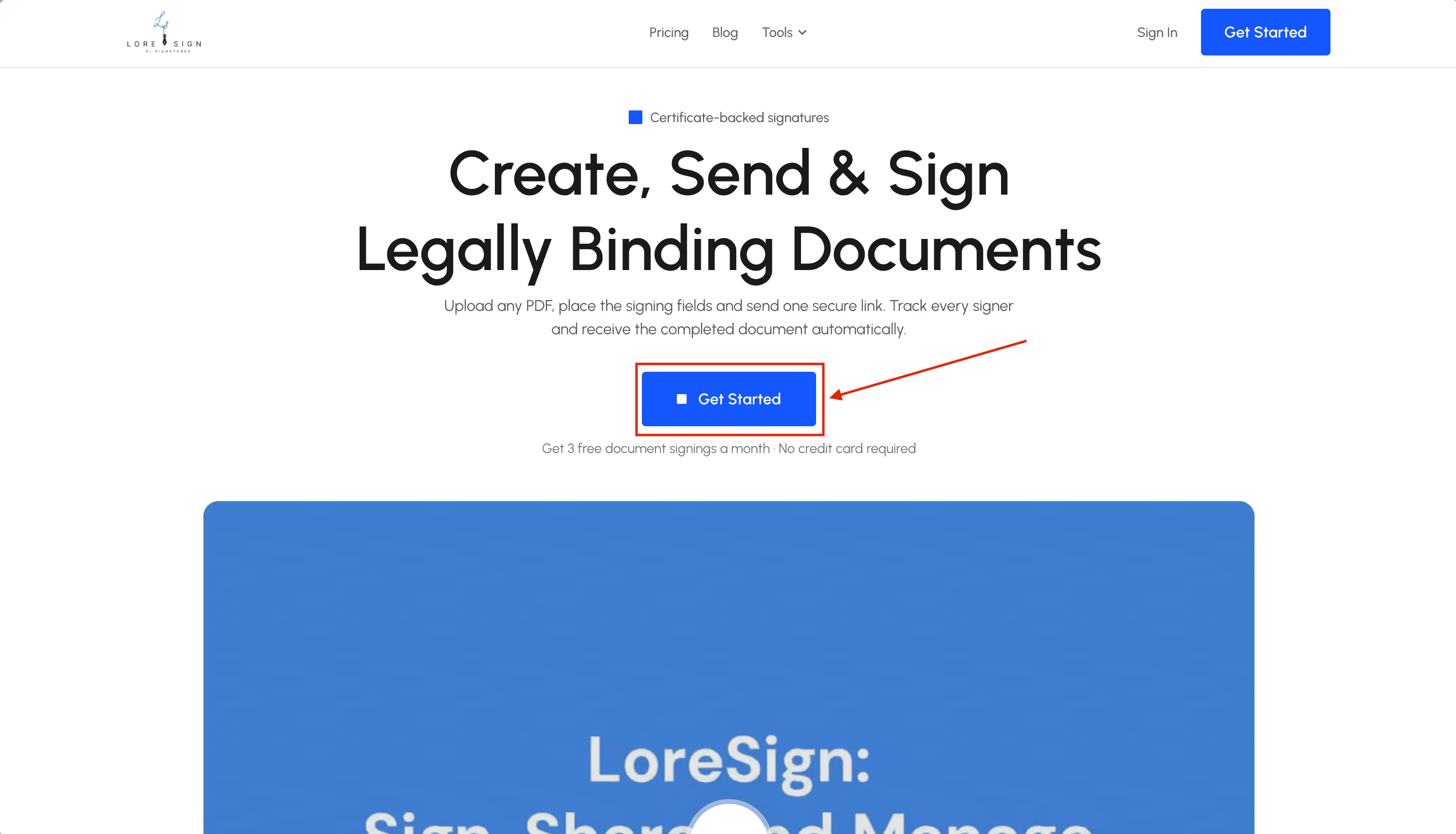
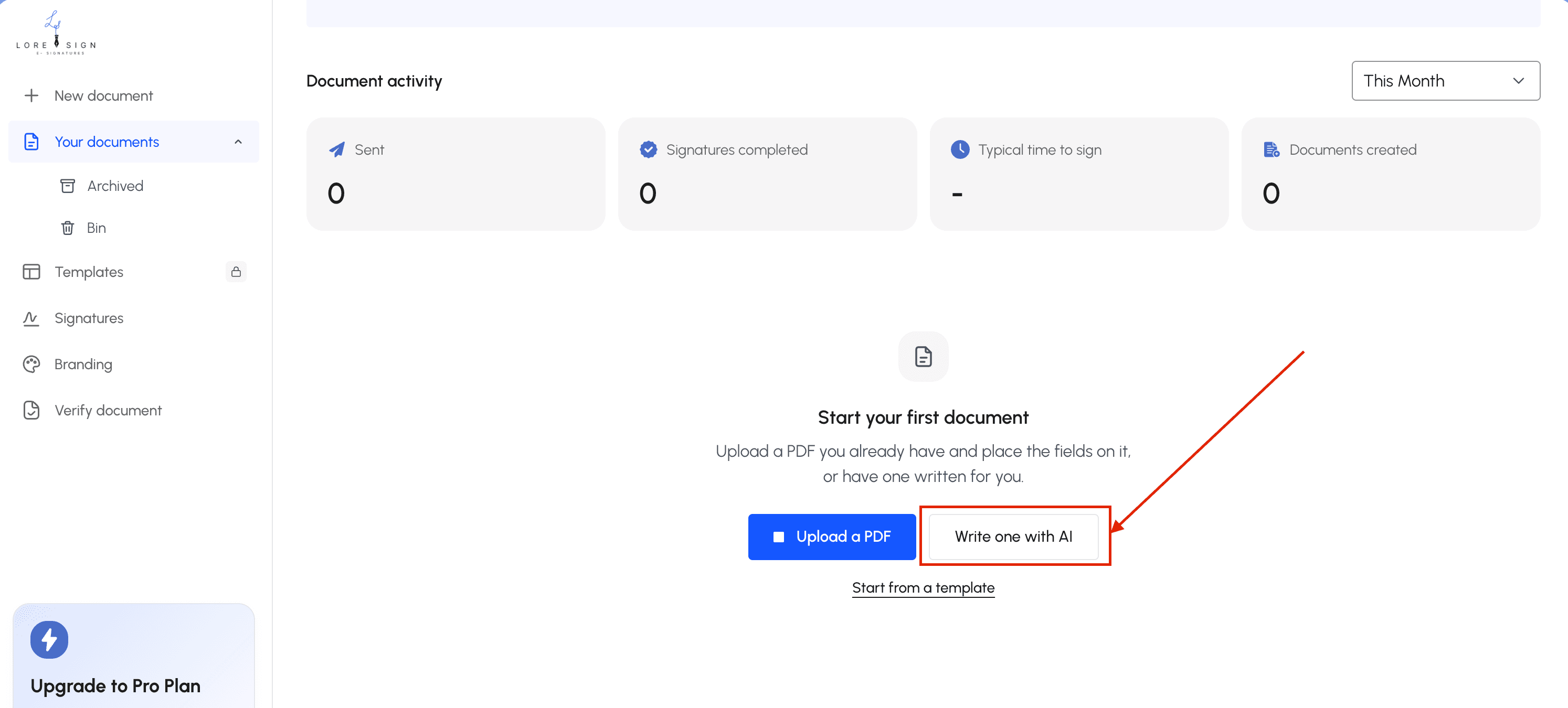
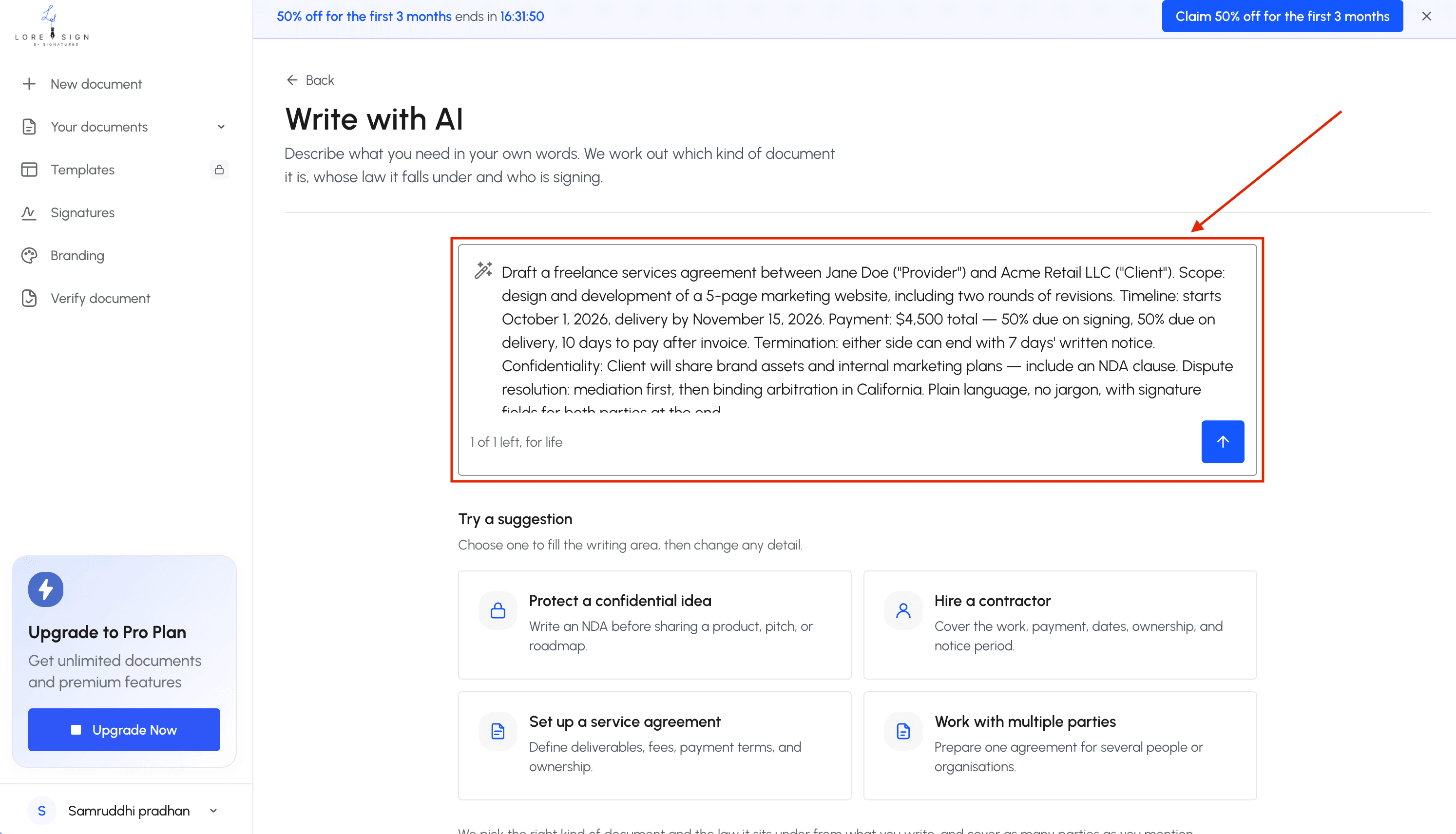
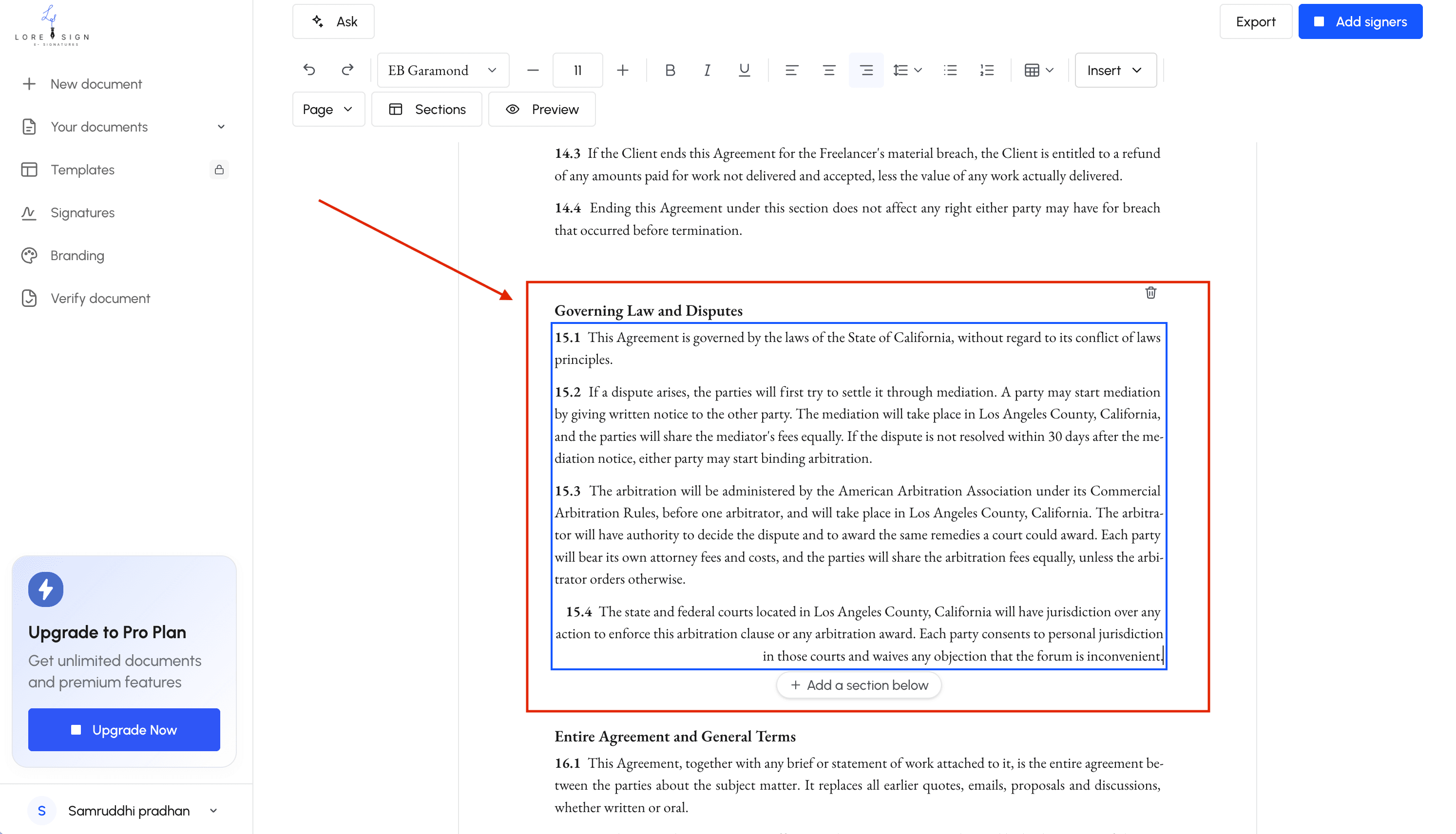
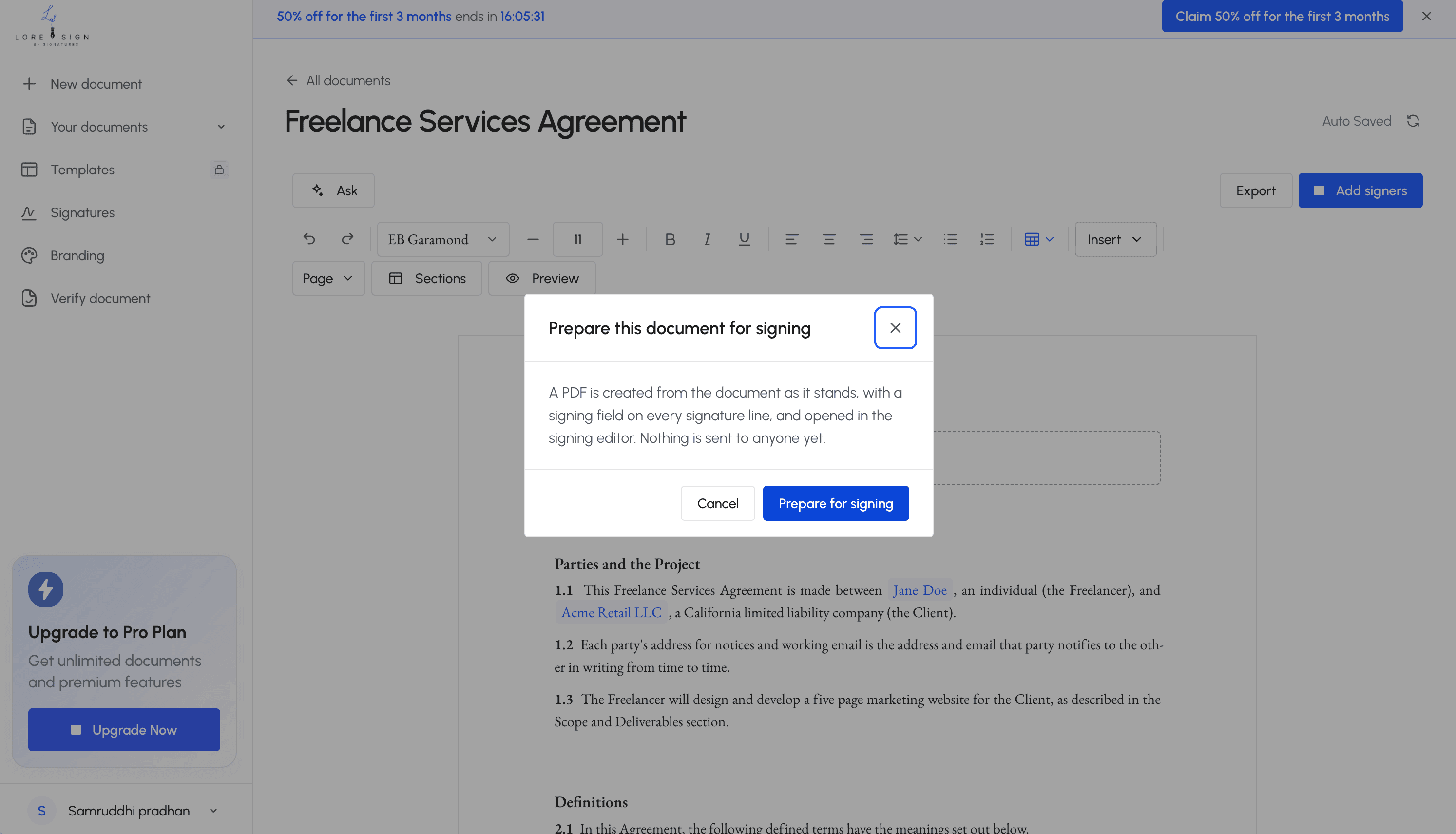
Step 1 : Draft Go to loresign.com and describe the agreement you need — LoreSign's AI generates a first draft with the standard sections already in place, or start from a saved template instead of a blank page. Pro and Business plans include unlimited templates.
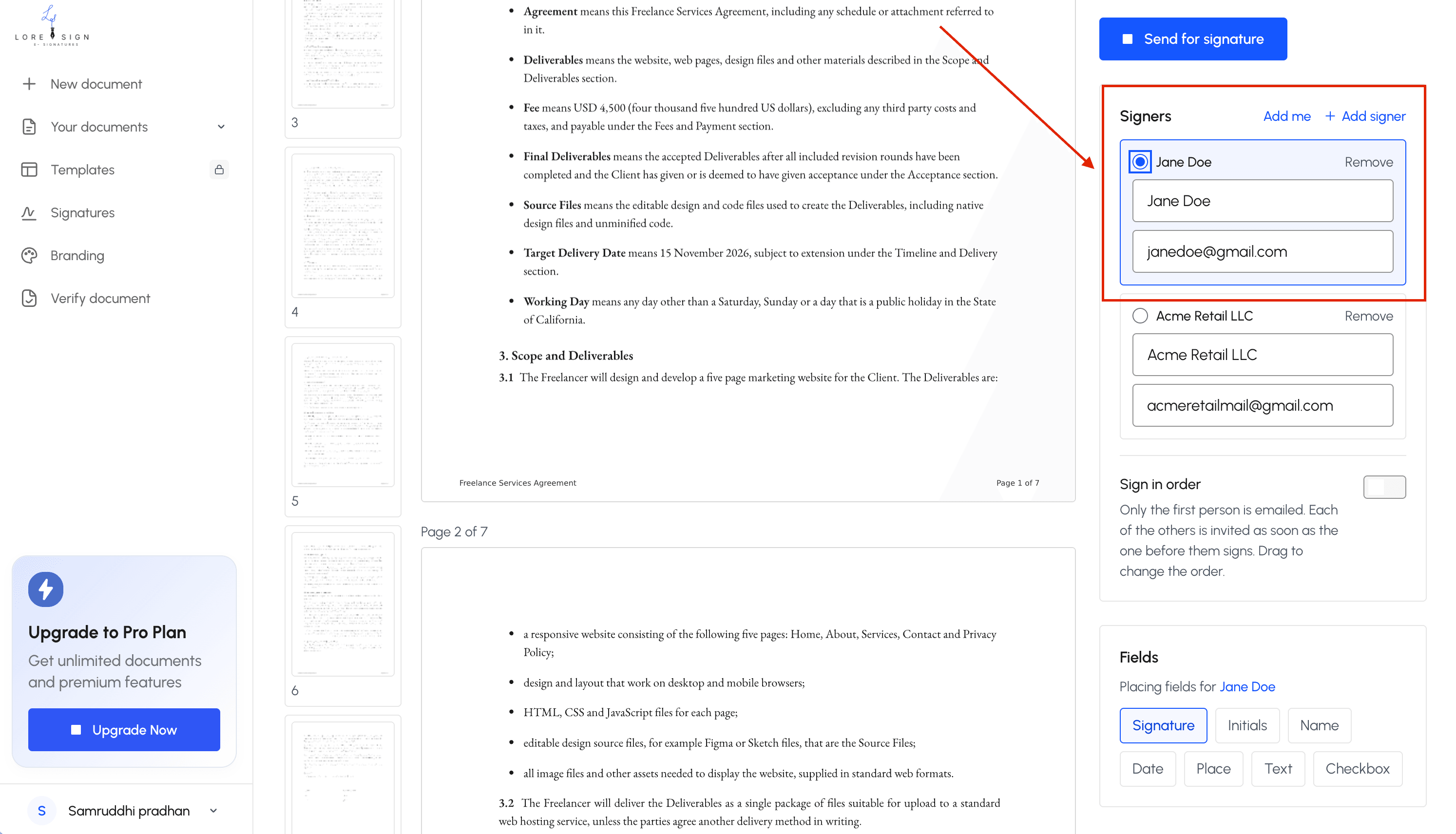
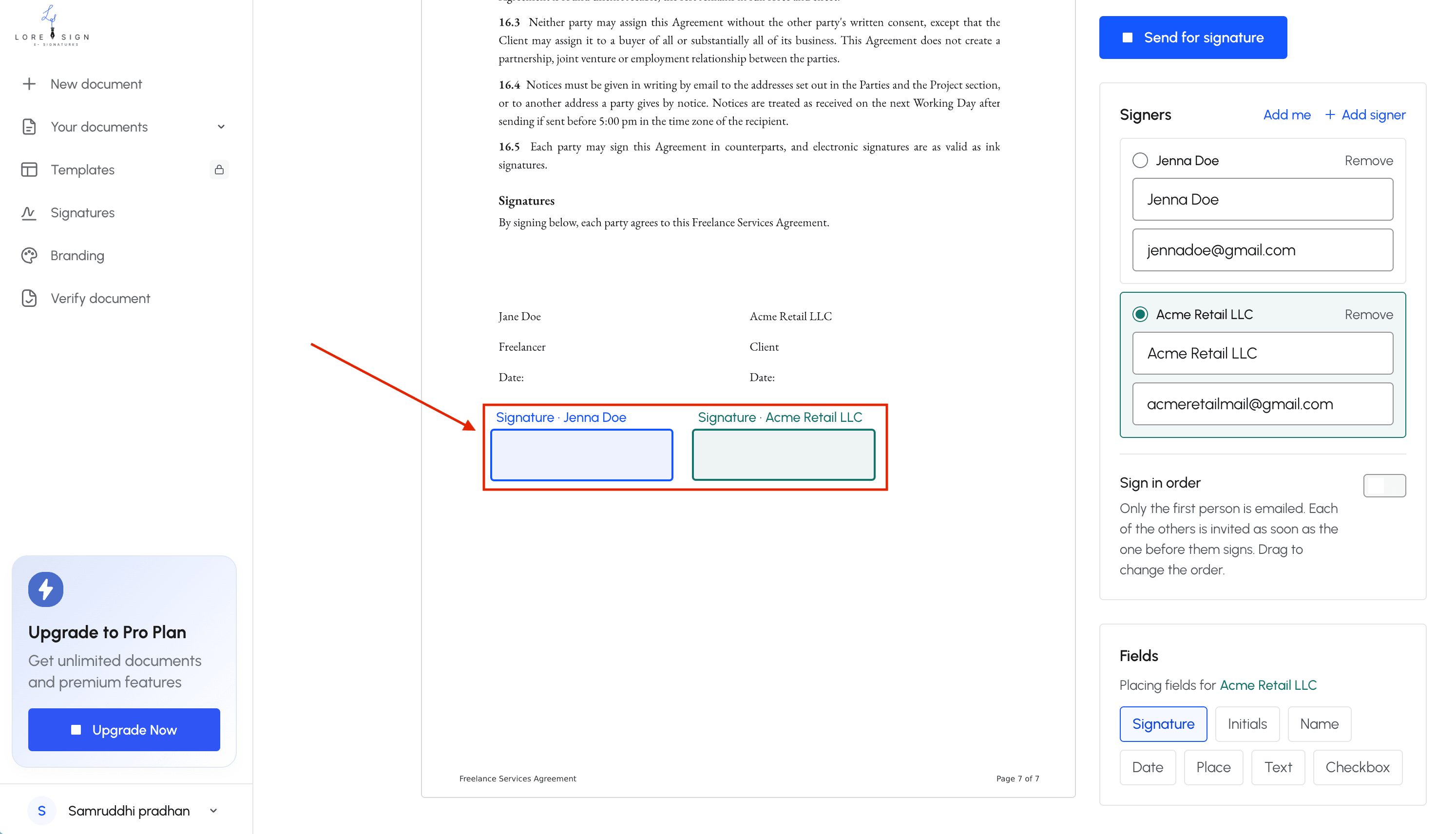
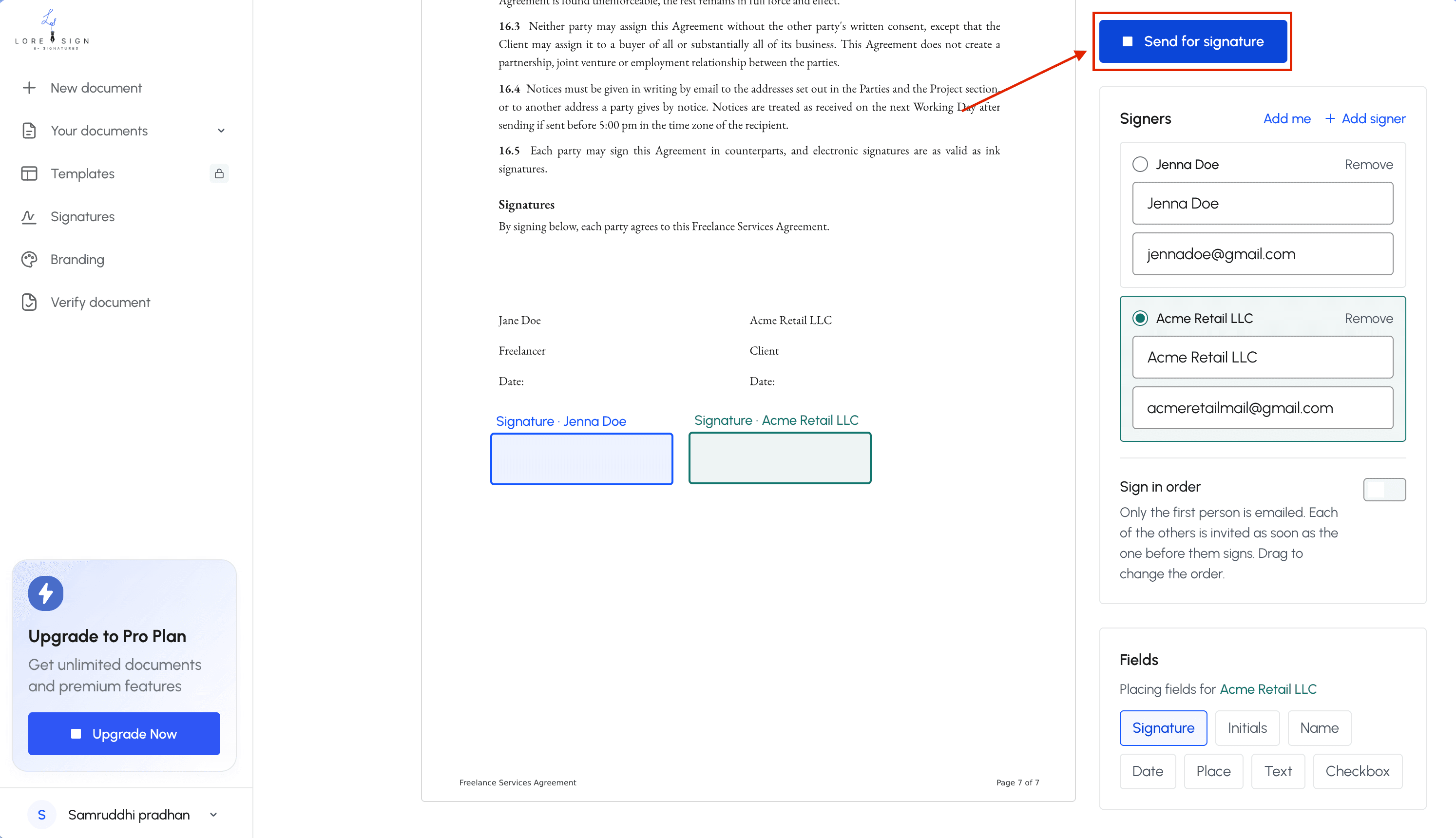
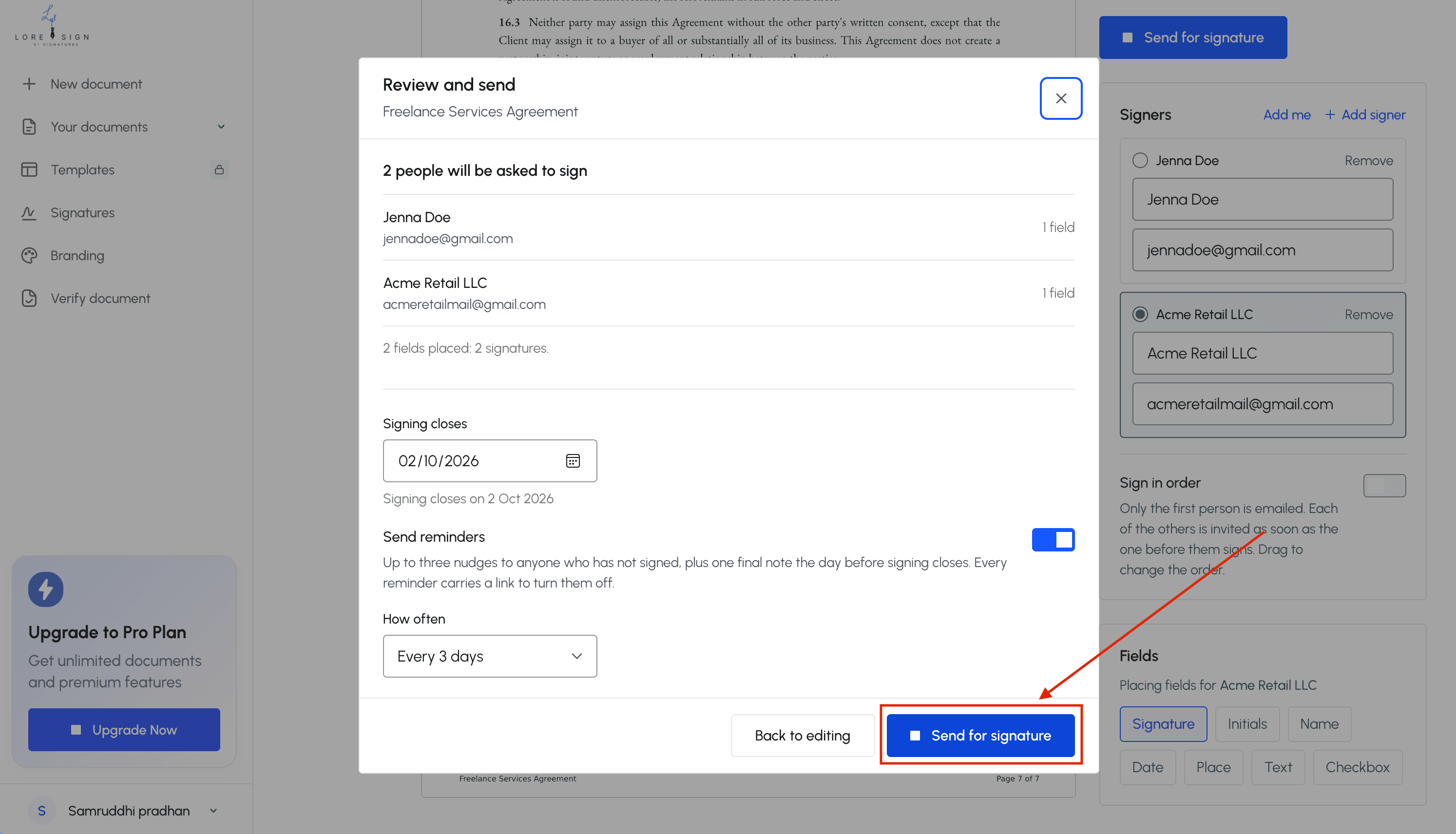
Step 2 : Send for signature Upload the contract (or the draft you just generated), place the signature fields, and send one secure link. Your client or the other party signs from that link — no account required on their end.
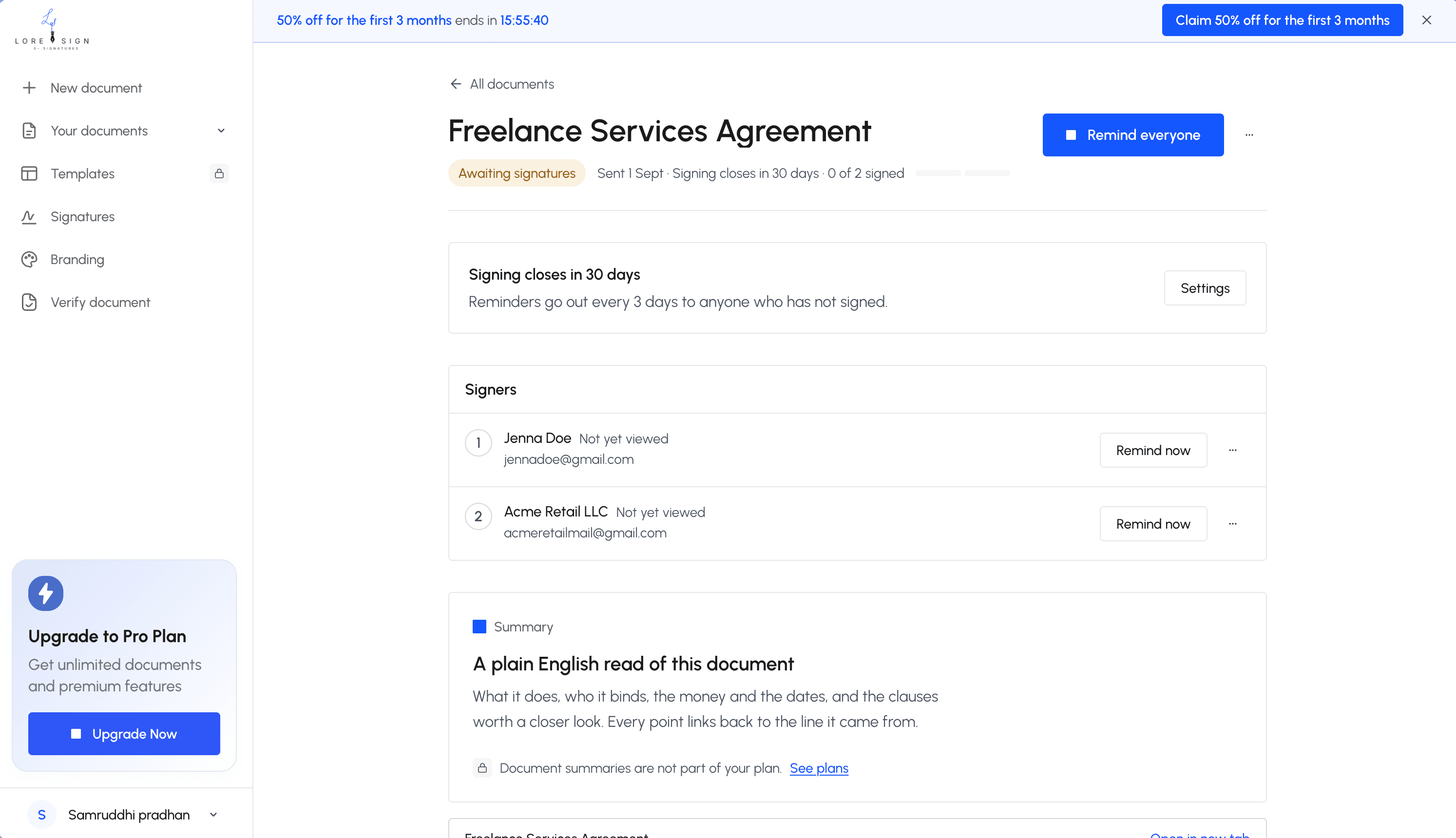
Step 3 :Track status Check any time whether a document has been sent, viewed, or signed, instead of emailing to ask. Automated reminders follow up so you don't have to.
Get proof automatically through the contract management process. Once everyone's signed, LoreSign delivers the completed PDF to everyone involved, along with a certificate of completion, a full audit trail, and a public verification page — on every plan, including Free.
Stay on top of renewals. Because every signed document and its status live in one place, you're not relying on memory, or a search through old emails, to know what's coming up for renewal or needs to be closed out. Start with the Free plan 3 documents a month, unlimited signers, no card required or Pro if you're drafting and sending contracts regularly with your legal team.
The rest of this guide walks through the full contract management lifecycle in more detail, including the parts LoreSign doesn't do for you like deciding what terms you actually need and reviewing what comes back in negotiation.
The Contract Management Lifecycle
Every contract moves through the same rough stages, whether it's a client engagement letter or a vendor agreement for the office lease:
1 . Planning and Intake:
Before drafting anything, know what the contract needs to cover: who's involved, what's being exchanged, what the budget or fee structure is, and what risk factors matter (liability limits, confidentiality, indemnification). Skipping this step is how you end up adding clauses back in during negotiation instead of getting them right the first time.
2 . Drafting:
Write the contract, or start from a template and edit it within the contract lifecycle. This is the stage that eats the most time when there's no system for it starting from a blank page for every new engagement letter or retainer agreement, instead of a template you've already vetted, or a first draft generated for you. (For the full breakdown of what a contract needs and how to draft one with or without LoreSign's AI drafting see our guide on how to write a contract.)
3 . Internal Review and Negotiation:
Before it goes out, review it yourself or with your in-house legal team who needs to sign off. Once it's with the other party, negotiation is normal expect redlines, and expect to go back and forth on terms like payment schedule, scope, and termination rights.
4 . Execution (Signing):
Once terms are final, every party signs. This is the stage most contract management content treats as a footnote, but it's where a lot of solo and small-firm time actually goes: printing, scanning, emailing a PDF and waiting, or chasing a client who hasn't opened the attachment yet. This is the step LoreSign's one-link signing flow replaces directly.
5 . Tracking and Compliance:
A signed contract isn't done it's active. That means knowing what it obligates you to do, tracking any deadlines or milestones inside it, and being able to find the signed copy without searching your inbox six months from now.
6 . Renewal or Termination:
Every contract ends one of two ways: it gets renewed, or it gets closed out. Both need a trigger — a calendar reminder before a renewal date, or a clear record of when and how a contract was terminated. This is the stage that gets skipped most often at small firms, usually because nothing flagged that the date was coming.
The Elements That Make a Contract Enforceable
Briefly, because this deserves its own explanation: a contract needs an offer, acceptance, consideration (something of value exchanged), capacity (everyone signing is legally able to), and a legal purpose. Missing any of these can make a contract unenforceable no matter how well it's written otherwise. For the full walkthrough plus the six sections every contract needs and the most common drafting mistakes see our guide on how to write a contract.
Common Contract Management Challenges for Solo and Small Firms
The problems that show up in enterprise contract management research no centralized platform, high contract volume, disconnected legal-ops workflows show up at solo and small firms too, just in a smaller, more personal form:
-
Contracts scattered across email, Drive, and paper. No single place to check what's active, what's expired, or what still needs a signature.
-
No template library. Every new engagement letter or retainer agreement starts closer to a blank page than it should in the contract process.
-
Missed renewal and follow-up dates. Without a reminder system, a renewal window closes quietly, or a client relationship lapses because nobody flagged it.
-
Chasing signatures by email. Sending a PDF and hoping the other side opens it, signs it, and sends it back — with no visibility to check status in between.
-
No proof if a signature is ever questioned. A typed name in an email thread is weak evidence of intent to sign compared to a proper e-signature with an audit trail.
None of these require enterprise contract management software to fix. They require a system templates, a place documents live, and a way to track status sized for one person or a small team, not a legal department.
Best Practices for Solo and Small-Firm Contract Management
Keep every contract in one place, not split across email, a shared drive, and paper. If you can't find a signed contract in under a minute, it isn't organized it's stored.
Build a small library of templates for the agreements you use repeatedly (engagement letters, retainer agreements, standard NDAs). Editing a vetted template is faster and safer than drafting from zero every time.
Track status, don't guess it. Know whether a contract has been sent, viewed, or signed without having to email and ask.
Set renewal and follow-up reminders when the contract is signed, not months later when you're trying to remember which contracts are coming up.
Use e-signatures with an audit trail, not a typed name over email, for anything you might need to prove was properly agreed to.
Assign one person as the point of contact for contract status, even if that person is you — ambiguity about who's tracking what is how things get missed.
Which Approach Should You Actually Use?
| Simple, one-off agreement, you know exactly what it needs to say | Free template, filled in yourself |
|---|---|
| You write contracts often enough that starting from scratch each time is a real time cost | AI-drafted first pass, then edit (LoreSign Pro) |
| A client or vendor also needs to sign it | LoreSign — one link, tracked automatically |
| Large dollar amount, equity, IP, or anything you don't fully understand in the context of a business contract. | A lawyer, before you sign anything |
| You want proof the signature is valid if it's ever questioned | LoreSign — certificate of completion, audit trail, public verification page |
Conclusion
Legal contract management, at a solo or small-firm scale, isn't about adopting an enterprise process it's about not losing track of contracts between drafting and renewal. LoreSign covers the drafting-to-signature stretch directly: AI drafting or templates instead of a blank page, one-link e-signature instead of chasing email, and status tracking instead of guessing what's outstanding all in one place, on a plan that starts free. Start free with LoreSign draft, send, and track contracts in one place.