E-Signatures in HubSpot: The Honest Guide to Signing Documents and Contracts
E signatures in HubSpot are a trap for anyone who assumes the CRM handles contracts the way it handles quotes. Sales teams search for "e signatures hubspot," find HubSpot's official pages, and walk away believing they can send an NDA or a services agreement for signature without leaving the CRM. They can't. HubSpot's native e-signature works on quotes only, and only if you're paying for Sales Hub Professional or Enterprise. Everything else, contracts, NDAs, proposals, onboarding paperwork, needs a third-party tool. That's where LoreSign fits: it connects to HubSpot and handles the non-quote documents HubSpot won't touch. This guide covers what HubSpot's native e-signature actually does, the exact quote workflow, which apps fill the gap, and the legal basics you need before you send anything for signature. By the end, you'll know whether to stick with HubSpot native or bolt on something else.
| At a glance | Details |
|---|---|
| Native scope | Quotes only, not contracts or NDAs |
| Where it lives | Inside the Quotes tool, not a standalone app |
| Best for | Sales quotes tied to HubSpot deals |
| Gap to fill | Contracts, NDAs, proposals, standalone PDFs |
| Compliance | ESIGN and UETA cover most business documents |
| Fix | Third-party e-signature integration for non-quote files |
In This Guide
- What HubSpot's Native E-Signature Actually Does (and Doesn't Do)
- HubSpot Native E-Signature vs Third-Party E-Signature Tools
- Step-by-Step: How to Use E-Signatures on HubSpot Quotes
- E Signatures Hubspot: A Step-by-Step Guide
- The Big Limitation: You Can't Sign Contracts or Non-Quote Documents in HubSpot
- How E-Signatures Work: A Quick Legal and Technical Primer
- Best E-Signature Apps for HubSpot: A Practical Comparison
- How to Choose the Right E-Signature Tool for Your HubSpot Workflow
- Common Mistakes When Using E-Signatures in HubSpot
- Can You Sign Contracts in HubSpot Without a Third-Party App?
- Is HubSpot's Native E-Signature Free?
- What's the Difference Between an E-Signature and a Digital Signature?
- Are E-Signatures Legally Binding in the United States?
- The Bottom Line on E Signatures HubSpot
What HubSpot's Native E-Signature Actually Does (and Doesn't Do)
HubSpot's native e-signature works only on quotes, and only on Sales Hub Professional or Enterprise plans. You can't sign contracts, NDAs, proposals, or standalone documents with it. If you need those signed, you'll need a third-party app.
That's the honest answer. HubSpot's own documentation buries this under a heading called "Understand e-signature limits," but the limit is the whole story: quotes are the only document type with a signature field. A community thread on the same topic confirms it. Users who search for "e signatures hubspot" expecting to send a contract for signature hit a wall fast.
What you can sign natively: quotes only
HubSpot's e-signature tool lives inside the quote builder. You create a quote, add line items, and then enable e-signature before sending. The buyer receives a link, signs, and the signed quote lands back in your HubSpot deal record. That's the entire scope.
What you cannot sign: contracts, NDAs, proposals, standalone documents
There's no workaround here. You can't upload a PDF contract and drop a signature field on it. You can't send an NDA through HubSpot's native tool. You can't attach a proposal document to a quote and have it signed as part of the same flow. The signature applies to the quote itself, not to any attached file.
Plan requirements: Sales Hub Professional or Enterprise
E-signature isn't available on free HubSpot accounts or on Starter. You need Sales Hub Professional (from $90 per user per month) or Enterprise (from $150 per user per month) to enable it. If you're on Marketing Hub or Service Hub alone, you don't have access at all. That's a real cost consideration before you commit to the native tool.
The quote e-signature workflow in 30 seconds
Create a quote from a deal, toggle e-signature on, add your own signature if you need to countersign, and send. The buyer signs through a browser. HubSpot tracks the status: draft, sent, viewed, signed. Once signed, the quote locks and the signature is stored on the quote record. It's clean for what it does. It just doesn't do much else.
HubSpot's native e-signature is built into the Quotes tool, so it is designed for quote approvals tied to deals rather than for contracts, NDAs, or standalone documents. For anything outside a quote, you need a separate e-signature tool, even if you keep HubSpot as your CRM.
HubSpot Native E-Signature vs Third-Party E-Signature Tools
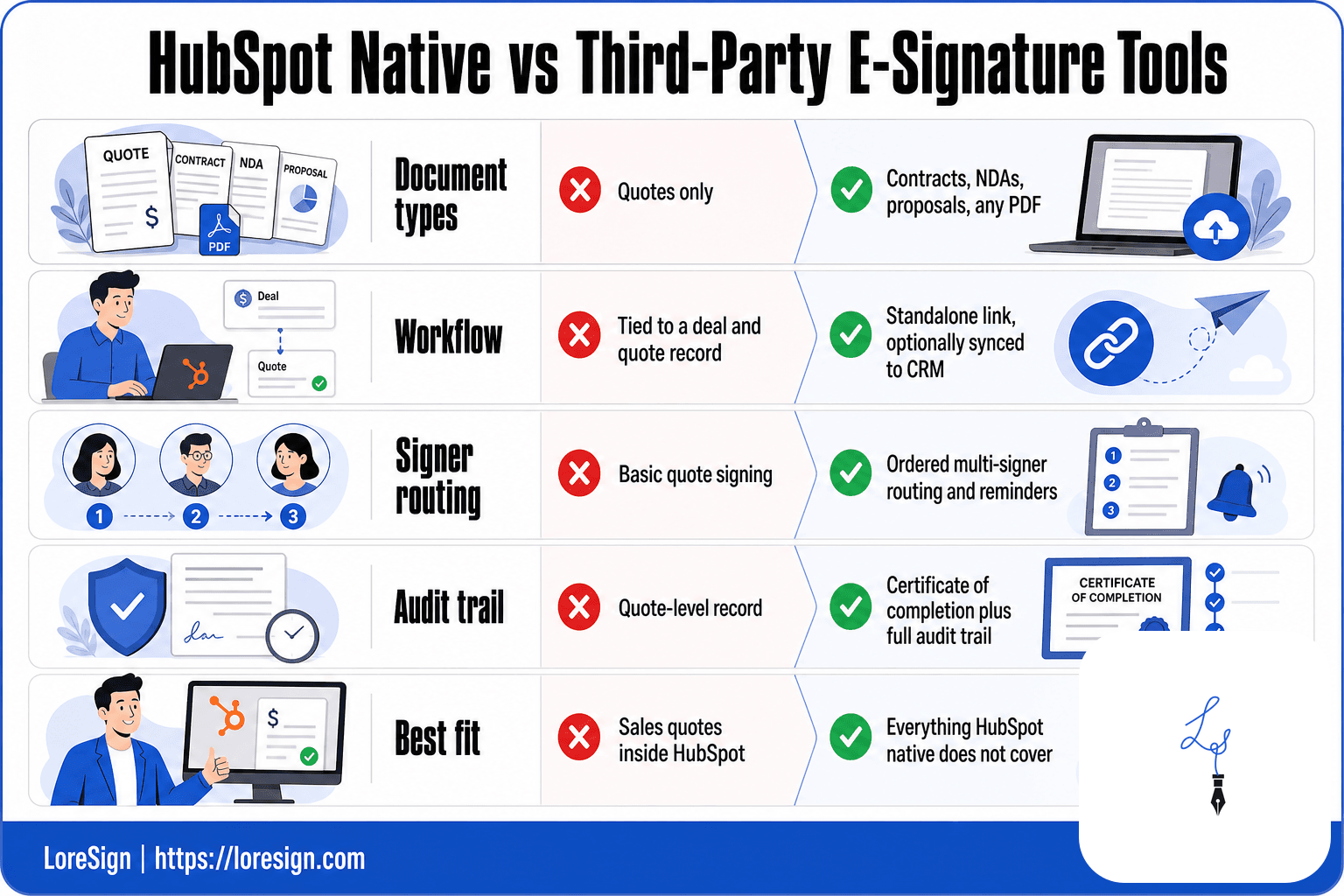
| Factor | HubSpot Native | Third-Party Integration |
|---|---|---|
| Document types | Quotes only | Contracts, NDAs, proposals, any PDF |
| Workflow | Tied to a deal and quote record | Standalone link, optionally synced to CRM |
| Signer routing | Basic quote signing | Ordered multi-signer routing and reminders |
| Audit trail | Quote-level record | Certificate of completion plus full audit trail |
| Best fit | Sales quotes inside HubSpot | Everything HubSpot native does not cover |
Step-by-Step: How to Use E-Signatures on HubSpot Quotes
The workflow is straightforward once you know where the toggle lives. You'll need Sales Hub Professional or Enterprise, a deal with a quote, and about two minutes.
Enabling e-signatures on a quote
Open the quote from the deal record. In the quote editor, find the e-signature toggle and switch it on. Add your own signature if you need to countersign. HubSpot stores your signature for reuse on future quotes.
Sending a quote for signature
Hit send. The buyer gets a link by email. They open it in a browser, review the line items, and sign. No app install needed. Once they sign, the quote locks and can't be edited.
Countersigning from the quotes index
If you didn't add your signature before sending, you can countersign after the buyer signs. Go to the quotes index page, find the quote, and sign from there. The signed copy saves to the quote record automatically.
Checking signature status
HubSpot tracks each quote's status: draft, sent, viewed, signed. You can see where a quote sits at any time from the deal timeline or the quotes index. If it's stuck on "sent," send a reminder. HubSpot doesn't automate that nudge for quotes.
If your team lives in HubSpot, keep the CRM as the system of record but do the signing in a dedicated tool, then attach the completed PDF back to the contact or deal. That way your pipeline stays accurate without forcing every document through the Quotes tool.
E Signatures Hubspot: A Step-by-Step Guide
- Confirm the document is not a quote, since HubSpot native e-signature only covers quotes.
- Pick a third-party e-signature tool that fits your document types and compliance needs.
- Upload the PDF and place the signing fields where each party needs to sign.
- Add signers in the order they should sign if routing matters for your process.
- Send one secure link and let automated reminders chase unsigned documents.
- Receive the completed, signed PDF automatically once everyone has signed.
- Log the signed document back to the HubSpot contact or deal record for a clean history.
The Big Limitation: You Can't Sign Contracts or Non-Quote Documents in HubSpot
HubSpot's native e-signature stops at quotes. That's the whole story. If you need a contract, NDA, proposal, or any standalone document signed, the built-in tool won't help you.
Why HubSpot limits e-signatures to quotes
The e-signature feature lives inside the quote object. It's designed to close a deal, not to manage documents. HubSpot built it to get a signed quote attached to a deal record so the sales team can move on. Contracts and NDAs don't fit that model. They aren't tied to a quote, and HubSpot has no native document object for them.
Common documents users try to sign (and can't)
Contracts. NDAs. Proposals. Vendor agreements. HR paperwork. Anything that isn't a quote generated inside HubSpot. You can upload a PDF to a deal or contact record, but there's no way to add signature fields to it. The file just sits there.
What happens when you try to sign a non-quote document
Nothing. There's no button for it. You can't attach a signature request to a file in the CRM. You can't send a document for signature from a contact or deal record unless it's a quote. The workaround is to download the file, upload it to a third-party e-signature tool, and send it from there. That works, but it breaks your workflow and leaves the signed copy outside HubSpot unless you manually re-upload it.
How E-Signatures Work: A Quick Legal and Technical Primer
You don't need to understand cryptography to use e-signatures. But knowing what makes one binding, and what makes one weak, changes how you evaluate every tool in this guide.
The basic mechanics of an e-signature
An e-signature is not a picture of your handwriting. It's a record that you agreed to a document at a specific time. When you click "sign" in a tool, the software captures the action, attaches it to the document, and locks both together. The signature block you see is just the visual representation. The legal weight comes from the data behind it: who signed, when they signed, and what they signed.
Why e-signatures are legally binding: ESIGN and UETA
Two US laws make e-signatures enforceable. The ESIGN Act of 2000 and the UETA, adopted by 47 states, both say a signature can't be denied legal effect just because it's electronic. The three states that didn't adopt UETA have their own equivalent laws. What matters is consent and intent. The signer has to agree to sign electronically, and the process has to show they meant to sign. A typed name, a clicked button, or a drawn signature all qualify, as long as the tool records the action.
What makes an e-signature secure: audit trails and authentication
The audit trail is the real security feature. It logs the signer's email, IP address, and timestamps for every action: document sent, opened, signed, completed. If someone disputes a signature later, the audit trail is your evidence. Authentication matters too. Most tools verify the signer through a unique email link. Stronger tools add SMS codes or ID checks. A signature without an audit trail is just a picture. A signature with one is a record you can defend.
Best E-Signature Apps for HubSpot: A Practical Comparison
You've seen what HubSpot's native tool can't do. The fix is a third-party app that plugs into your CRM and handles contracts, NDAs, and proposals. Here's how the main options stack up.
Comparison criteria: pricing, document types, compliance, HubSpot integration
Four things matter when you're picking a tool. Pricing: what you pay per month and per user, and whether the free tier is actually usable. Document types: some tools are built for contracts, others for proposals with embedded quotes. Compliance: audit trails, authentication options, and whether the tool meets ESIGN and UETA requirements. HubSpot integration depth: does it just sync contacts, or does it pull signing status back into the deal record?
LoreSign: built for HubSpot document workflows
LoreSign connects directly to HubSpot. You upload any PDF, place the signing fields, and send one secure link. The tool tracks every signer and delivers the completed document automatically once everyone signs. It also generates a certificate of completion and an audit trail, and every signed document gets a public verification page. AI drafting is included: generate a first draft of a contract from a description, then edit it. Templates start at 3 on the Starter plan and go unlimited on Pro and Business. Brand kits are available on paid tiers, and watermark-free PDFs come with Pro and above. The main catch: LoreSign is newer than DocuSign, so it has fewer third-party integrations beyond HubSpot.
DocuSign: the enterprise standard
DocuSign is the default choice for large sales teams and legal departments. It handles high-volume signing, complex routing rules, and compliance requirements across industries. The HubSpot integration is mature: you can send documents from deal records and sync signing status back. The honest answer is that DocuSign costs more than most alternatives, and the per-user pricing adds up fast for small teams. The interface also carries years of features, which makes simple sends feel heavier than they should.
PandaDoc: proposals and quotes
PandaDoc is built for sales documents, not just signatures. You create proposals with embedded pricing tables, send them for signature, and track opens and views. It integrates with HubSpot to pull deal data into documents. The tradeoff: PandaDoc's contract features are less flexible than DocuSign's, and the pricing is per seat, which gets expensive if you only need occasional signatures.
Other options: HelloSign, SignNow, Adobe Sign
HelloSign (now Dropbox Sign) is simple and low-cost for basic signing, but its HubSpot integration is thinner. SignNow offers per-document pricing that suits low-volume users. Adobe Sign ties into the Adobe ecosystem and handles compliance well, but the HubSpot integration requires extra setup and the pricing is opaque.
How to Choose the Right E-Signature Tool for Your HubSpot Workflow
The right tool depends on what you sign and how often. Here's the decision path.
Use case 1: You only sign quotes → stick with HubSpot native
If quotes are your only signing need, don't add a third-party app. HubSpot's native e-signature covers quotes on Sales Hub Professional or Enterprise, and it keeps everything inside the CRM. You'll save money and avoid managing another integration.
Use case 2: You sign contracts and NDAs → you need a third-party app
Contracts, NDAs, and standalone documents won't sign natively in HubSpot. You need an app that handles any PDF. LoreSign works well here: upload the document, place signing fields, send one link, and get the completed file back automatically. DocuSign is the safer pick if you need complex routing or industry-specific compliance.
Use case 3: You need advanced workflows or compliance → evaluate enterprise options
High-volume signing, countersignature chains, and regulated industries push you toward DocuSign or Adobe Sign. These tools handle authentication options and audit trails at scale. The tradeoff is cost and setup time. If you're signing a few contracts a week, you're overpaying.
A simple scoring matrix for your decision
Score each tool from 1 to 5 on four criteria: document types supported, HubSpot integration depth, compliance features, and monthly cost. Multiply by your priority weights. If quotes are 90% of your volume, HubSpot native wins. If contracts dominate, LoreSign or DocuSign score higher. The matrix forces you to name what actually matters before you pay for features you won't use.
Common Mistakes When Using E-Signatures in HubSpot
Most HubSpot e-signature problems aren't technical. They're assumptions. You assume the tool does something it doesn't, then you lose a day chasing a workflow that was never there.
Assuming HubSpot signs anything
The biggest mistake is treating HubSpot like a general e-signature tool. It isn't. Native e-signature works on quotes only. Contracts, NDAs, proposals, standalone PDFs: none of these sign natively. If you need a contract signed, you're not missing a setting. The feature doesn't exist. You need a third-party app.
Not checking plan requirements before enabling
E-signature on quotes requires Sales Hub Professional or Enterprise. Starter and free plans don't include it. Teams waste hours looking for the toggle before realizing their plan doesn't qualify. Check your plan first. If you're on Starter, you're paying for an app or upgrading your whole HubSpot tier just to sign quotes.
Ignoring legal compliance for regulated industries
E-signatures are legally binding under ESIGN and UETA, but regulated industries add requirements. Healthcare, finance, and government contracts often need specific authentication levels or audit trail standards. HubSpot's native quote e-signature gives you a basic signature. It doesn't give you advanced identity verification. If your industry requires it, you need a tool built for compliance, not a CRM feature.
Overpaying for features you don't need
The opposite mistake is buying an enterprise e-signature suite when you sign three documents a month. DocuSign's Business plan runs $40 per user monthly. If you're sending a handful of contracts, a simpler tool costs less and does the job. Match the tool to your volume, not to the biggest name in the category.
Can You Sign Contracts in HubSpot Without a Third-Party App?
No. HubSpot's native e-signature works on quotes only. Contracts, NDAs, proposals, and standalone documents all need a third-party app. There's no setting to enable, no workaround, and no hidden feature. If you need a contract signed, you're adding a tool like LoreSign or DocuSign to your stack.
Is HubSpot's Native E-Signature Free?
No. It requires Sales Hub Professional (from $90 per user per month) or Enterprise (from $150 per user per month). Free and Starter plans don't include it. If you're on a lower tier, you'll pay for an upgrade or a third-party app to sign anything.
What's the Difference Between an E-Signature and a Digital Signature?
An e-signature is a record that you agreed to a document. A digital signature is a cryptographic technique that secures that record. Most business signing tools use e-signatures backed by audit trails. Digital signatures add encryption and certificate-based verification, which matters for high-security or regulated use cases. For most HubSpot workflows, an e-signature with a solid audit trail is enough.
Are E-Signatures Legally Binding in the United States?
Yes. The ESIGN Act of 2000 and the UETA, adopted by 47 states, both say a signature can't be denied legal effect just because it's electronic. The three states that didn't adopt UETA have their own equivalent laws. What matters is consent and intent: the signer has to agree to sign electronically, and the process has to show they meant to sign.
The Bottom Line on E Signatures HubSpot
HubSpot's native e-signature does one thing: it signs quotes on Sales Hub Professional or Enterprise. That's it. If quotes are your only signing need, stick with the native tool and skip the extra app. If you sign contracts, NDAs, proposals, or any standalone document, you need a third-party tool. LoreSign handles any PDF, tracks every signer, and delivers the completed document automatically. DocuSign is the enterprise pick when compliance and complex routing matter. The decision comes down to what you sign and how often. Match the tool to the volume, and you won't overpay for features you'll never use.
Frequently Asked Questions
What is the best software for electronic signatures?
The best tool depends on your document types, signer volume, and whether you need CRM sync. If you mostly sign quotes inside HubSpot, native e-signature may be enough. For contracts, NDAs, and standalone PDFs, a dedicated e-signature tool with audit trails and automated reminders is usually the better fit.
How do I add a signature in HubSpot?
HubSpot's native e-signature lives inside the Quotes tool, so you add it to a quote rather than to an arbitrary document. You configure the quote, add the signer, and send it through HubSpot. For non-quote documents, you would use a third-party e-signature tool and optionally log the result back to HubSpot.
Can HubSpot sign contracts and NDAs natively?
No. HubSpot's native e-signature is scoped to quotes, so contracts, NDAs, and standalone documents fall outside it. You need a separate e-signature tool for those document types, even if you continue using HubSpot as your CRM.
How do e-signatures work?
You upload a document, place signing fields, and send a secure link to each signer. The signer opens the link, reviews the document, and applies their signature. The platform then records the completion, often with a certificate and audit trail, and delivers the signed PDF to the parties.
Are e-signatures legally binding?
In the US, the ESIGN Act and UETA give electronic signatures the same legal weight as handwritten ones for most business documents. Requirements typically include intent to sign, consent, and a record that can be retained and reproduced. Always confirm requirements for your specific document type and jurisdiction.
Do I need a third-party e-signature tool if I already use HubSpot?
Only if you sign documents beyond quotes. HubSpot native e-signature covers quotes, so contracts, NDAs, and proposals need a separate tool. Many teams keep HubSpot for CRM and use a dedicated e-signature platform for everything else, syncing the signed PDF back to the record.
What should I look for in a HubSpot e-signature integration?
Look for support for the document types you actually sign, ordered multi-signer routing, automated reminders, a certificate of completion with audit trail, and a way to attach the signed PDF back to the HubSpot contact or deal. Compliance with ESIGN and UETA is a baseline expectation for most business use.
About LoreSign
LoreSign helps individuals and businesses create, send, sign, and track documents in one place. You can upload a PDF or create an agreement, add the required signing fields, send it to recipients, and automatically receive the completed document once everyone has signed.